1. Introducción
This manual provides essential information for the proper use and maintenance of your HOTWAV R9 Pro Rugged Tablet. Please read it thoroughly before operating the device to ensure optimal performance and longevity.

Imagen: Anverso y reverso view of the HOTWAV R9 Pro Rugged Tablet, highlighting its robust design and 11-inch display.
2. ¿Qué hay en la caja?
Verifique que todos los artículos estén presentes en el embalaje:
- 1 tableta robusta HOTWAV R9 Pro
- 1x Manual (este documento)
- 1x caja de embalaje
- 1x Explosion-proof Film
- 1x cable USB tipo C
- 1 cable OTG
3. Producto terminadoview y características clave
3.1 Diseño robusto y durabilidad
The HOTWAV R9 Pro is engineered for extreme environments, featuring IP68/IP69K waterproof and dustproof ratings, and MIL-STD-810H certification for shock resistance. Its construction includes a double-shot TPU+PC+glass fiber back cover for enhanced protection.

Image: Visual representation of the tablet's ruggedness, showing it submerged in water, covered in dust, and surviving a drop, alongside its LED camping light in use.
3.2. Batería y carga
Equipped with a large 20080mAh battery, the R9 Pro offers extended usage times. It supports 20W fast charging to quickly replenish power.

Image: Diagram illustrating the 20080mAh battery capacity and 20W fast charging capability of the tablet.
3.3. Pantalla
The tablet features an 11-inch FHD+ display with a resolution of 1200x1920 pixels and 450cd/m² brightness. It is protected by Corning Glass 3 and supports glove touch functionality, making it suitable for outdoor use.

Image: The tablet's 11-inch display showing various applications, alongside icons indicating FHD+ resolution, 60Hz refresh rate, and dual SIM support.
3.4. Rendimiento y almacenamiento
Powered by an Octa-Core Unisoc T606 processor, the R9 Pro includes 20GB RAM (6GB physical + 14GB virtual) and 256GB internal storage. Storage can be expanded up to 2TB using a T-flash card.

Image: A visual representation of the Unisoc T606 octa-core chipset, detailing 20GB RAM and 256GB ROM with 2TB expandable memory.
3.5. Sistema de cámara
The tablet features a 64MP rear camera with PDAF and f/1.8 aperture, and a 16MP front camera for photography and video calls.

Imagen: Examples of photos taken with the 64MP rear camera and the 16MP front camera, demonstrating their capabilities.
3.6. Integrated Campluz brillante
A unique 6W camping light with 350 lumens and 246 LEDs is integrated into the tablet, providing illumination for various outdoor activities or emergencies.
4. Configuración
4.1. Carga de la tableta
Before first use, fully charge the tablet using the provided USB Type-C cable and a compatible 20W power adapter (not included). Connect the cable to the tablet's USB-C port and the adapter to a power outlet. The charging indicator will show the charging status.
4.2. Installing SIM and T-flash Cards
The tablet supports dual SIM cards and a T-flash (microSD) card for expandable storage.
- Localice la bandeja de la tarjeta SIM/SD en el costado de la tableta.
- Utilice la herramienta de expulsión de SIM proporcionada para abrir la bandeja.
- Carefully place your Nano-SIM cards and/or T-flash card into the designated slots. Ensure correct orientation.
- Empuje suavemente la bandeja hacia la tableta hasta que encaje en su lugar.
4.3. Encendido / apagado
- Para encender: Press and hold the Power button until the HOTWAV logo appears.
- Para apagar: Mantenga presionado el botón de Encendido hasta que aparezca el menú de opciones de energía, luego seleccione "Apagar".
- Para reiniciar: Mantenga presionado el botón de Encendido hasta que aparezca el menú de opciones de energía, luego seleccione "Reiniciar".
5. Instrucciones de funcionamiento
5.1. Sistema operativo Android 14
The HOTWAV R9 Pro runs on Android 14, offering a user-friendly interface and access to a wide range of applications via the Google Play Store.
5.2 Navegación
Navigate the tablet using touch gestures:
- Grifo: Seleccione un elemento.
- Golpe fuerte: Desplácese por las pantallas o listas.
- Pellizco: Acercar o alejar las imágenes y web páginas.
- Pulsación larga: Acceder a los menús contextuales o mover iconos.
5.3. Glove Touch Mode
The display supports glove touch, allowing you to operate the tablet while wearing gloves. This feature is automatically enabled.
5.4. Desbloqueo facial
Para un desbloqueo cómodo y seguro, configure el desbloqueo facial:
- Ir a Ajustes > Seguridad y privacidad > Desbloqueo facial.
- Siga las instrucciones en pantalla para registrar su rostro.
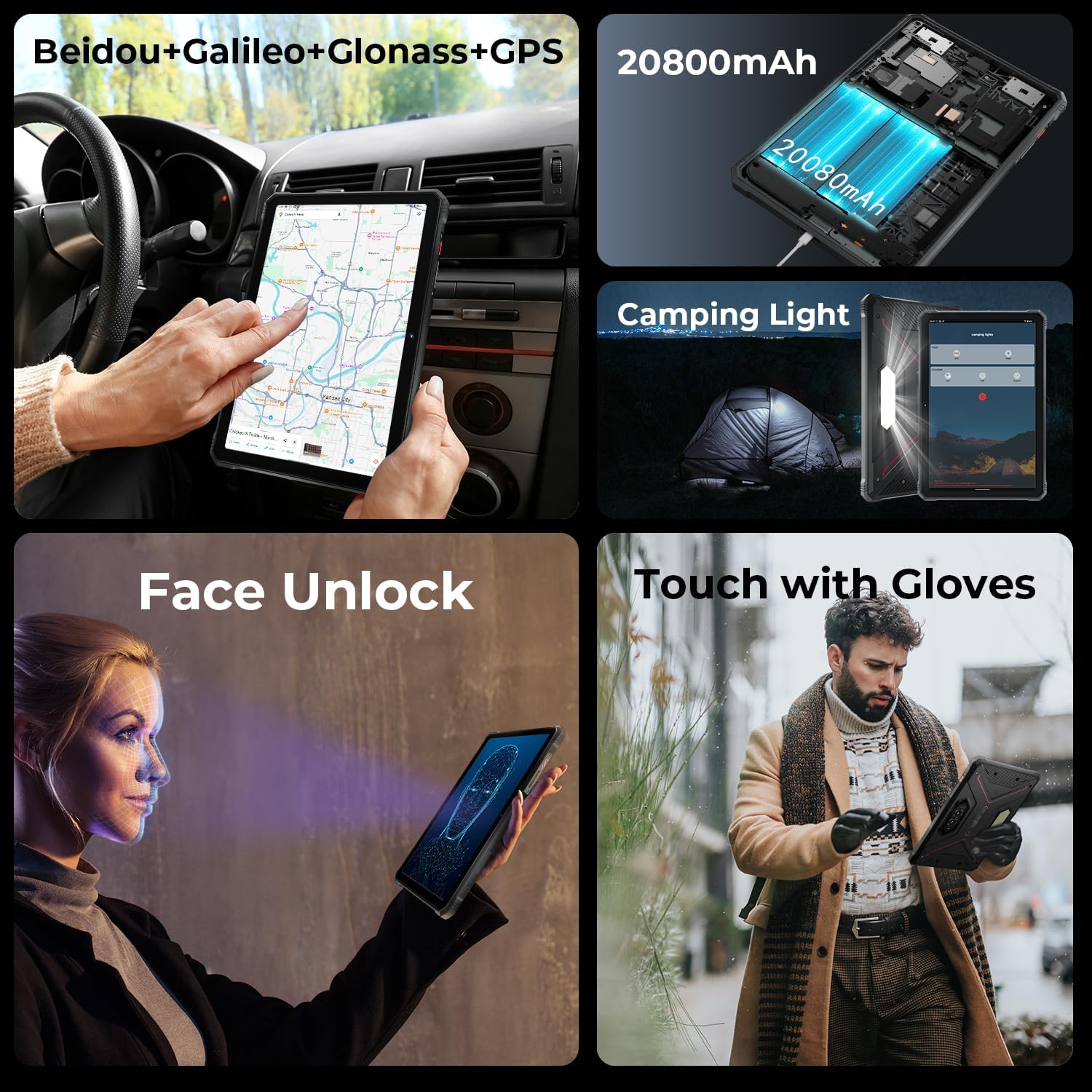
Image: A collage showing the tablet's GPS navigation, camping light in action, face unlock in progress, and a user operating the tablet with gloves.
5.5. Funcionalidad Dual SIM
The tablet supports two SIM cards, allowing you to manage two different phone numbers or network providers simultaneously. You can configure preferred SIM for calls, messages, and data in Ajustes > Red e internet > Tarjetas SIM.
6. Uso de la cámara
The HOTWAV R9 Pro is equipped with a 64MP rear camera and a 16MP front camera.
- Abriendo la cámara: Toque el ícono de la cámara en la pantalla de inicio o en el cajón de aplicaciones.
- Cambio de cámaras: Toque el ícono del interruptor de cámara para alternar entre la cámara frontal y trasera.
- Tomando fotos: Toque el botón del obturador para capturar una imagen.
- Grabación de videos: Cambie al modo de video y toque el botón de grabación para iniciar/detener la grabación.
- Configuración de la cámara: Access various settings like resolution, flash, and modes from within the camera app.
7. Camping Light Functionality
The integrated 6W camping light provides powerful illumination.
- Activando la Luz: La camping light can typically be activated via a dedicated button (if present) or through a quick settings toggle in the notification panel.
- Adjusting Brightness/Modes: Some models may offer adjustable brightness levels or different lighting modes. Refer to the on-screen controls once the light is activated.
8. Conectividad
- Wifi: Conectarse a redes inalámbricas a través de Ajustes > Red e internet > Internet.
- Bluetooth: Emparejar con dispositivos Bluetooth (auriculares, altavoces) a través de Ajustes > Dispositivos conectados > Preferencias de conexión > Bluetooth.
- GPS: The tablet supports Beidou, Galileo, Glonass, and GPS for accurate location services. Ensure location services are enabled in Ajustes > Ubicación.
9. Mantenimiento
- Limpieza: Utilice un paño suave y seco.amp Paño para limpiar la superficie de la tableta. Evite productos químicos agresivos o materiales abrasivos.
- Exposición al agua: While waterproof, ensure all ports are securely closed before exposing the tablet to water. After water exposure, dry the tablet thoroughly, especially the charging port, before charging.
- Temperatura: Avoid exposing the tablet to extreme temperatures (hot or cold) for prolonged periods.
- Almacenamiento: Cuando no vaya a utilizarla durante períodos prolongados, guarde la tableta en un lugar fresco y seco.
10. Solución de problemas
| Problema | Posible solución |
|---|---|
| La tableta no se enciende. | Asegúrese de que la batería esté cargada. Conecte el dispositivo a un cargador durante al menos 30 minutos. Si sigue sin responder, fuerce el reinicio manteniendo pulsado el botón de encendido durante 10-15 segundos. |
| Rendimiento lento. | Close unused applications. Clear cache regularly. Consider uninstalling unnecessary apps. Restart the tablet. |
| Problemas de conexión Wi-Fi. | Activa y desactiva el Wi-Fi. Reinicia el router. Olvida la red y vuelve a conectarte. |
| La batería se agota rápidamente. | Reduce screen brightness. Close background apps. Disable unused features like GPS, Bluetooth, or Wi-Fi when not needed. Check battery usage in settings to identify power-hungry apps. |
| La cámara no funciona. | Ensure the camera app has necessary permissions. Restart the tablet. Clear the camera app's cache and data in Ajustes > Aplicaciones. |
11. Especificaciones
| Característica | Detalle |
|---|---|
| Modelo | R9 Pro |
| Sistema operativo | Androide 14 |
| Tamaño de la pantalla | 11 pulgadas |
| Resolución de pantalla | 1200 x 1920 píxeles (FHD+) |
| Procesador | Unisoc T606 de ocho núcleos (1.6 GHz) |
| Coprocesador gráfico | Mali G57 MP1@650MHz |
| RAM | 20 GB (6 GB físicos + 14 GB virtuales) |
| Almacenamiento interno | 256 GB |
| Almacenamiento expandible | Up to 2TB (T-flash card) |
| Cámara trasera | 64MP (PDAF, f/1.8 aperture) |
| Cámara frontal | 16MP |
| Capacidad de la batería | 20080 mAh |
| Cargando | Carga rápida 20W |
| Robustez | IP68/IP69K Resistente al agua y al polvo, MIL-STD-810H |
| Conectividad | Dual SIM, Wi-Fi, Bluetooth, GPS (Beidou, Galileo, Glonass) |
| Campluz brillante | 6W (350 lumens, 246 LEDs) |
| Dimensiones (LxAnxAl) | 10.61 x 0.7 x 7.16 pulgadas |
| Peso | 2.35 libras |
12. Garantía y soporte
HOTWAV offers comprehensive after-sales service for the R9 Pro Rugged Tablet:
- Política de devoluciones: 30-day no-reason return.
- Garantía: Garantía gratuita de 2 año.
- Apoyo técnico: Soporte técnico de por vida.
- Servicio en línea: Servicio al cliente en línea 24 horas al día, 7 días a la semana.
For support, please contact HOTWAV customer service through their official channels or visit their websitio.


