Introducción
Gracias por elegir el Negroview W50PRO Smartwatch. This manual provides essential information for setting up, operating, and maintaining your device. Please read it carefully to ensure optimal performance and a safe user experience. Keep this manual for future reference.
Contenido del paquete
Verifique que todos los artículos estén presentes en su paquete:
- Negroview W50PRO Smartwatch
- Correa de silicona
- Replacement Nylon Braided Strap
- Cable de carga magnética
- Manual de usuario (este documento)

Imagen: Contenido del paquete y dimensiones del producto.
Producto terminadoview
El negroview W50PRO Smartwatch features a 1.45-inch HD touchscreen display, function buttons, a powerful flashlight, and a comfortable silicone strap. Its robust design is suitable for various activities.

Imagen: Negroview W50PRO Smartwatch with its key features labeled.
Configuración
1. Carga del dispositivo
Antes del primer uso, cargue completamente su reloj inteligente. Conecte el cable de carga magnético a los puntos de carga de la parte trasera del reloj y conecte el extremo USB a un adaptador de corriente (no incluido) o al puerto USB de una computadora. El reloj mostrará un indicador de carga.
- Una carga completa suele tardar aproximadamente 3 horas.
- The 960mAh battery provides up to 30 days of typical use and 100 days of standby time.

Image: Battery capacity and charging information.
2. Instalación de la aplicación
Descargue e instale el "El ajuste" application on your smartphone. You can find it in the App Store (iOS) or Google Play Store (Android).
3. Device Pairing and Bluetooth Calls
To connect your smartwatch and enable Bluetooth calling:
- Download the Da Fit app from your phone's app store.
- Habilite Bluetooth en su teléfono inteligente.
- Open the Da Fit app and add your device.
- Confirm the pairing request on your phone and watch.
- Grant necessary notification permissions within the Da Fit app for calls and messages.
- Una vez emparejado, podrás realizar y recibir llamadas directamente desde tu reloj.

Image: Connection and calling setup guide.
Instrucciones de funcionamiento
1. Navegación básica
- Pantalla táctil: Desliza el dedo hacia la izquierda/derecha, arriba/abajo para navegar por los menús y acceder a las funciones. Toca para seleccionar.
- Botones de función: Use the physical buttons on the side of the watch for quick access to specific functions or to return to the home screen.
2. Flashlight and Compass
The W50PRO includes a built-in flashlight and compass for outdoor activities.
- Flash: Activate the flashlight feature from the watch's menu. It offers fixed and intermittent modes for various situations.
- Brújula: Access the compass feature from the watch's menu for accurate directional guidance.
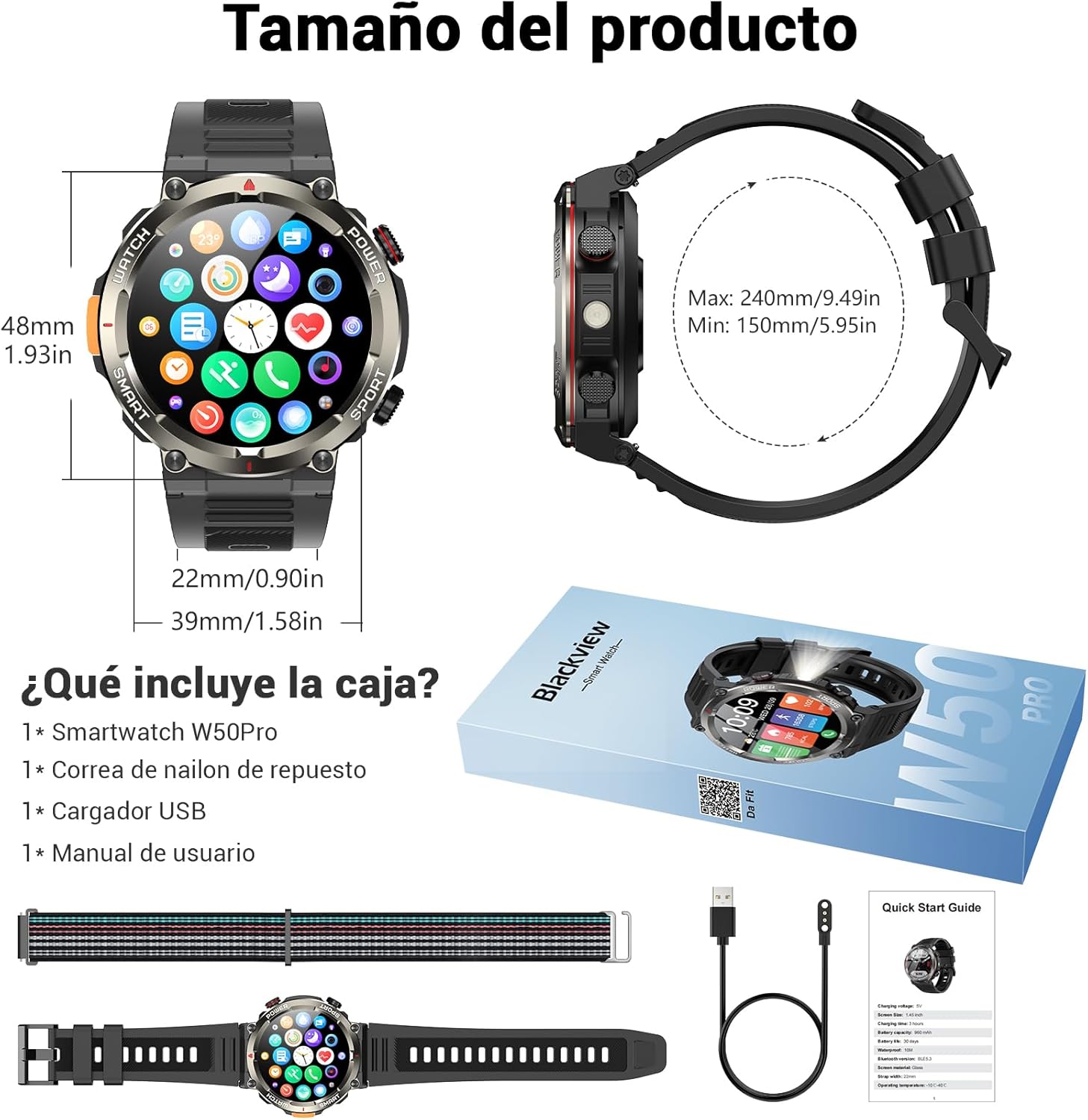
Image: Compass feature for outdoor navigation.

Image: Powerful LED flashlight in action.
3. Llamadas y notificaciones por Bluetooth
Once paired with your smartphone, the W50PRO allows you to manage calls and notifications directly from your wrist.
- Realizar/Recibir llamadas: Use the integrated speaker and microphone to make or answer calls.
- Notificaciones: Receive real-time alerts for text messages, emails, and social media apps.
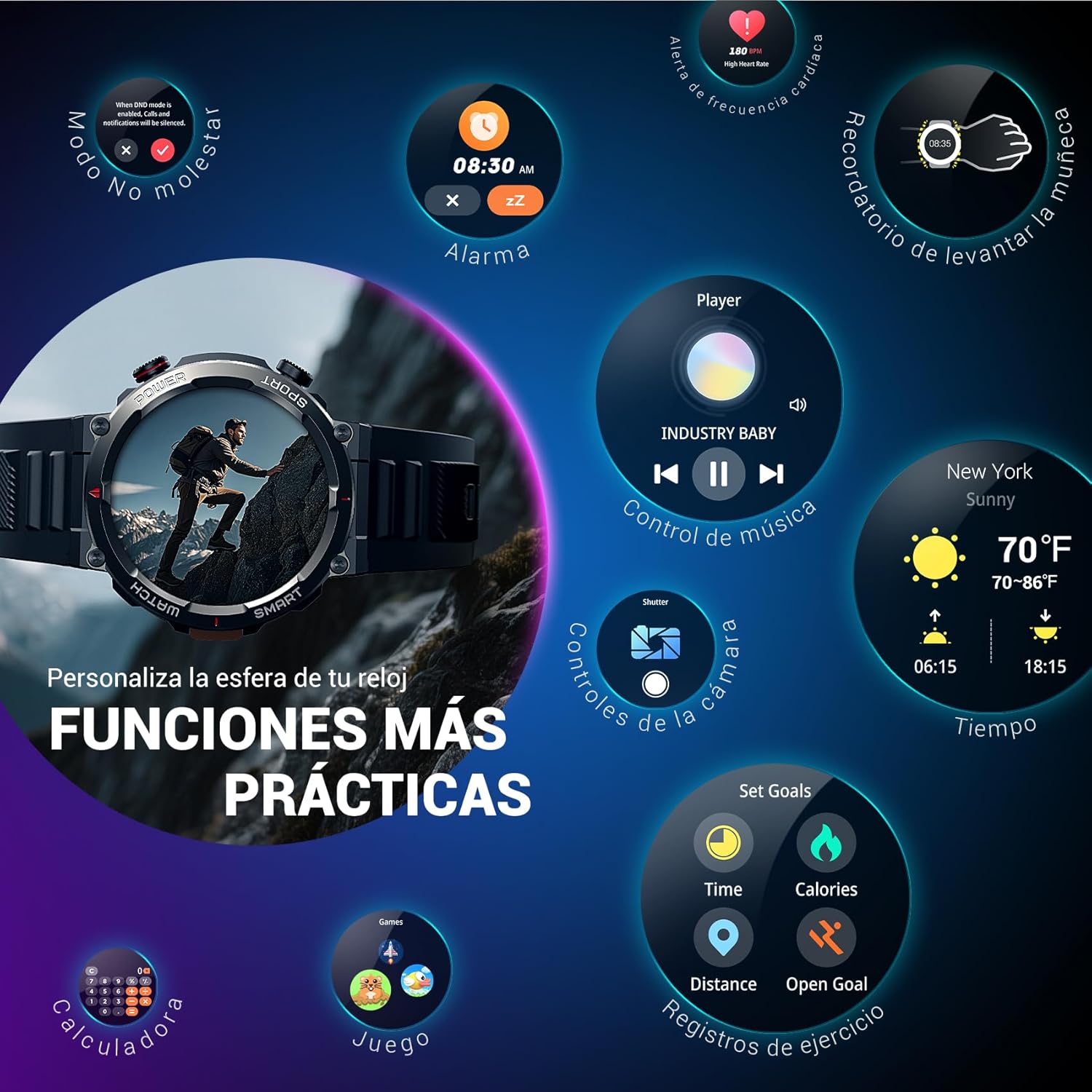
Image: Bluetooth calling and notification features.
4. Monitoreo de la salud
The smartwatch is equipped with high-precision sensors to monitor various health indicators:
- Frecuencia cardíaca: Monitorización de frecuencia cardíaca en tiempo real.
- Oxígeno en sangre (SpO2): Controle sus niveles de oxígeno en sangre.
- Monitor de sueño: Realiza un seguimiento de la calidad y los patrones del sueño.
- Niveles de estrés: Proporciona información sobre sus niveles de estrés.
All health data synchronizes with the Da Fit app for detailed analysis and trend tracking.

Image: Real-time health monitoring features.
5. Modos deportivos
The W50PRO offers over 100 integrated sports modes, including running, cycling, climbing, rope skipping, football, and basketball. It accurately records exercise time, distance, steps, calorie consumption, and heart rate changes, providing clear and intuitive performance data. Detailed data can be vieweditado en la aplicación Da Fit.

Imagen: Más alláview de más de 100 modos deportivos.
6. Personalización de las esferas del reloj
The Da Fit app provides a wide selection of watch faces to suit various styles. You can also upload personal photos as wallpaper and adjust text color and widget layout to create a unique watch interface.

Image: Customizable watch faces.
7. Otras funciones prácticas
El negroview W50PRO includes additional features for daily convenience:
- Pronóstico del tiempo
- Control de música
- Control remoto de la cámara
- Alarmas
- Recordatorio de sedentarismo
- Recordatorio de beber agua
- Cronógrafo
- Temporizador de cuenta regresiva
- Encuentra Teléfono
- Calculadora
- Juegos
- Ajuste de brillo

Image: Multiple smart functions available on the smartwatch.
Mantenimiento
1. Limpieza
Limpie regularmente su reloj inteligente y su correa para evitar la irritación de la piel y mantener la funcionalidad del dispositivo. Use un paño suave.amp Paño para limpiar la pantalla y casing. For the strap, follow the manufacturer's cleaning recommendations based on the material (silicone or nylon).
2. Resistencia al agua
El negroview W50PRO Smartwatch features an IP68 water resistance rating. This means it is protected against dust ingress and can withstand immersion in water up to 1.5 meters for up to 30 minutes. It is suitable for daily use, such as hand washing or light rain. Avoid using it in hot water, saunas, or during diving, as steam and high pressure can compromise the seals.

Image: Durability features including IP68 water resistance.
3. Cuidado de la batería
Para prolongar la vida útil de la batería:
- Evite temperaturas extremas.
- No deje que la batería se descargue por completo con frecuencia.
- Cargue el dispositivo utilizando el cable de carga magnético proporcionado.
Solución de problemas
Si tiene problemas con su Blackview W50PRO Smartwatch, try the following:
- El dispositivo no enciende: Asegúrese de que el reloj esté completamente cargado.
- No se puede emparejar con el teléfono: Check if Bluetooth is enabled on both devices. Restart both the watch and phone. Ensure the Da Fit app has necessary permissions.
- Datos de salud inexactos: Asegúrese de que el reloj esté bien ajustado a su muñeca. Limpie los sensores con regularidad.
- Notificaciones no recibidas: Verify that notification permissions are granted in the Da Fit app and your phone's settings. Ensure the app is running in the background.
- Duración de la batería corta: Reduce el brillo de la pantalla, desactiva las funciones innecesarias y limita el monitoreo frecuente de la frecuencia cardíaca.
For persistent issues, refer to the Da Fit app's help section or contact customer support.
Presupuesto
| Característica | Especificación |
|---|---|
| Marca | Negroview |
| Modelo | W50PRO |
| Tamaño de la pantalla | 1.45 pulgadas |
| Tipo de pantalla | Pantalla LCD |
| Resolución | 360 x 360 píxeles |
| Capacidad de la batería | 960 mAh |
| Duración típica de la batería | Hasta 30 días |
| Tiempo de espera | Hasta 100 días |
| Tiempo de carga | Aproximadamente 3 horas |
| Conectividad | Bluetooth |
| Entrada de interfaz humana | Buttons, Microphone |
| Resistencia al agua | IP68 |
| Modelos de teléfonos compatibles | iOS y Android |
| Dimensiones del producto | 8.8 x 2.2 x 18.1 cm |
| Peso del producto | 136 gramos |
Garantía y soporte
For warranty information and technical support, please refer to the documentation included with your purchase or visit the official Blackview webSitio. Conserve su comprobante de compra para reclamaciones de garantía.


