Introducción
Gracias por la compraasing the Supersonic SC-1425WSW 2.1 Channel Bluetooth Soundbar with Wireless Subwoofer. This manual provides important information regarding the setup, operation, and maintenance of your new audio system. Please read it thoroughly before use and retain it for future reference.
Contenido del paquete
Please ensure all items listed below are included in your package. If any items are missing or damaged, contact your retailer for assistance.
- Supersonic SC-1425WSW Soundbar
- Subwoofer inalámbrico
- Mando a distancia
- Adaptador de corriente
- Cable micro USB
- Manual de usuario
Producto terminadoview
The Supersonic SC-1425WSW is a 2.1 channel soundbar system designed to enhance your audio experience. It features a sleek, low-profile soundbar and a powerful wireless subwoofer for deep, rich bass.
Barra de sonido y subwoofer inalámbrico
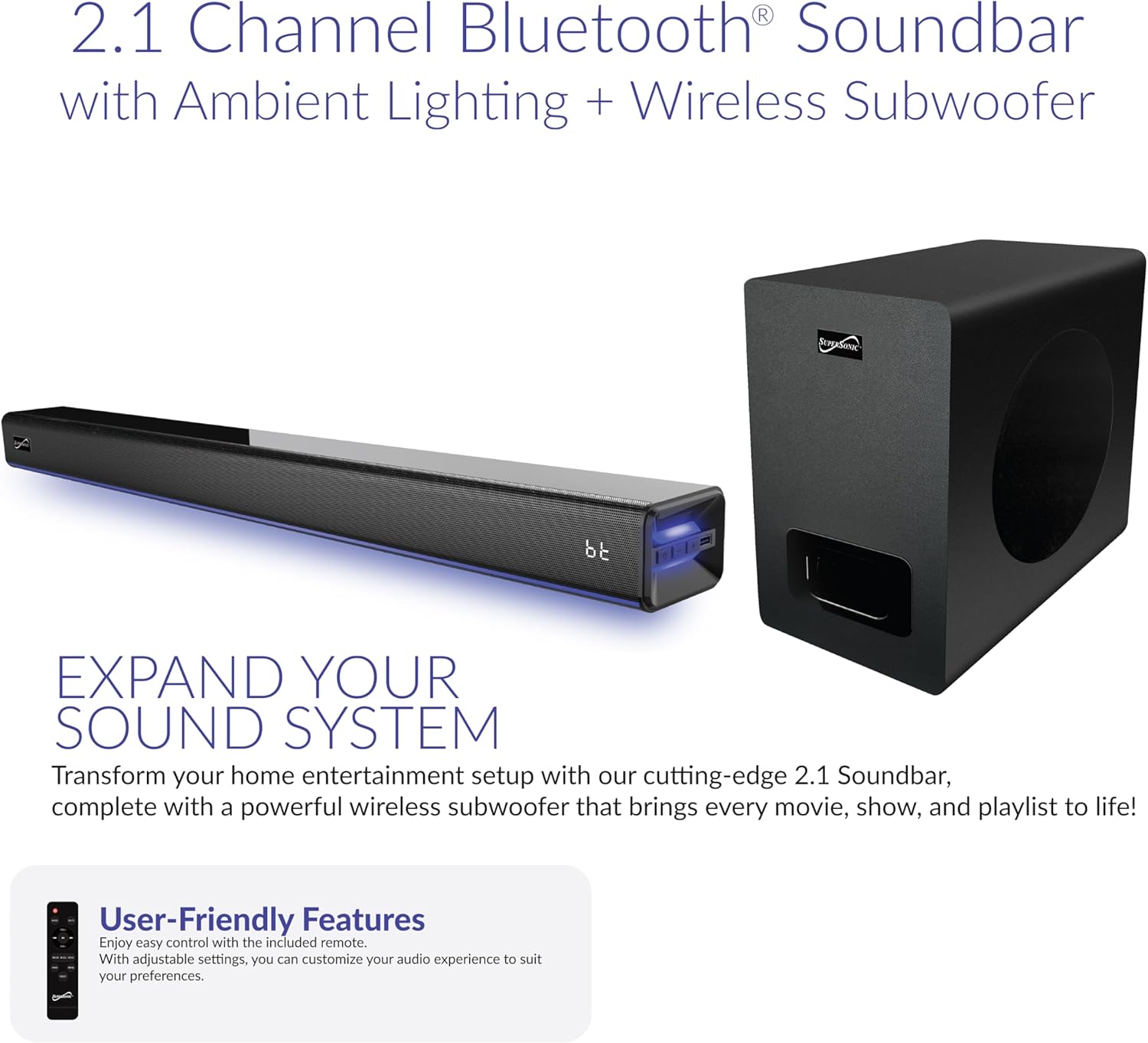
Image: The soundbar and wireless subwoofer, showcasing su diseño compacto.
The soundbar houses dual 2"x2.95" drivers, delivering clear highs and mids. The dedicated 5.25" wireless subwoofer provides powerful bass, creating an immersive soundstage. The soundbar's slim design (31.49" x 3.62" x 2.67") allows it to fit seamlessly in front of most TVs without obstructing the screen.
Controles y pantalla

Image: A close-up of the soundbar's front panel, highlighting the LED display and control buttons.
The soundbar features a large LED display that shows current settings, source selection, and volume levels. Integrated control buttons on the unit allow for basic operations such as power, volume, and input selection. The soundbar also includes ambient lighting with 7 dynamic color modes, which can be turned off if desired.
Puertos de entrada
The rear of the soundbar provides various input options for versatile connectivity:
- ARCO HDMI: For high-quality audio connection with compatible TVs.
- Óptico: Digital audio input for clear sound.
- USB: Para reproducir audio desde dispositivos de almacenamiento USB.
- Entrada auxiliar: 3.5mm analog audio input for general devices.
- DC en: Entrada de alimentación.
Configuración
Opciones de ubicación

Imagen: Examples of soundbar placement, including on an entertainment center and wall-mounted below a television.
The soundbar can be placed on a flat surface, such as an entertainment center, or wall-mounted. Ensure the soundbar is positioned centrally below your TV for optimal sound distribution. The wireless subwoofer can be placed anywhere in the room, ideally within 10 meters of the soundbar, for best performance.
Conexión de energía
- Conecte el adaptador de corriente al puerto DC IN de la barra de sonido.
- Conecte el adaptador de corriente a una toma de pared.
- The wireless subwoofer will automatically pair with the soundbar once both units are powered on.
Conexión a su televisor
Elija uno de los siguientes métodos de conexión según los puertos disponibles de su televisor:
- HDMI ARC (recomendado): Connect an HDMI cable from the soundbar's HDMI ARC port to your TV's HDMI ARC port. This allows for audio return channel functionality, simplifying control.
- Óptico: Connect an optical cable from the soundbar's OPTICAL port to your TV's optical output port.
- Auxiliar: Connect a 3.5mm audio cable from the soundbar's AUX IN port to your TV's audio output (headphone jack or dedicated AUX out).
Nota: After connecting, you may need to adjust your TV's audio settings to output sound through the external speaker (soundbar) and disable Dolby/DTS if experiencing silent or noisy output. Refer to your TV's manual for specific audio output settings.
Instrucciones de funcionamiento
Encendido/apagado
Presione el FUERZA Botón en el control remoto o en la barra de sonido para encender o apagar la unidad.
Selección de entrada

Image: The soundbar displaying 'bt' for Bluetooth, with icons for HDMI, Optical, USB, and AUX inputs.
Presione el APORTE button on the remote control or the soundbar to cycle through available input sources: Bluetooth (BT), Optical (OPT), USB, AUX, HDMI ARC (HD), and FM Radio (FM).
Control de volumen
Utilice el VOL+ y vol- buttons on the remote control or the soundbar to adjust the volume. The soundbar features 32-point precision volume control.
Emparejamiento Bluetooth
- Select Bluetooth (BT) input on the soundbar. The LED display will show "BT" and flash, indicating it's in pairing mode.
- En su dispositivo móvil, habilite Bluetooth y busque dispositivos disponibles.
- Select "SC-1425WSW" from the list of devices. Once connected, the soundbar will emit a confirmation tone, and "BT" on the display will stop flashing.
- You can now stream audio wirelessly from your device within a 10-meter range.
Modos de ecualización
The soundbar offers 3 preset EQ modes to optimize your listening experience:
- Música: Optimizado para reproducción de música.
- Película: Mejorado para audio cinematográfico.
- Diálogo: Improves vocal clarity for TV shows and news.
Press the corresponding button on the remote control to select your desired EQ mode.
Iluminación ambiental
The soundbar features 7 dynamic ambient color modes. Use the dedicated button on the remote control to cycle through the colors or turn the lighting off.
Radio FM
Select FM input. Use the ANTERIOR / SIGUIENTE buttons on the remote to tune to different stations. The soundbar will automatically scan and save available stations.
Mantenimiento
Para garantizar la longevidad y el rendimiento óptimo de su sistema de barra de sonido, siga estas pautas de mantenimiento:
- Limpieza: Use a soft, dry cloth to clean the surfaces of the soundbar and subwoofer. Do not use liquid cleaners, aerosols, or abrasive materials, as they may damage the finish.
- Ventilación: Asegúrese de que haya una ventilación adecuada alrededor de las unidades. No obstruya ninguna abertura de ventilación.
- Ambiente: Avoid exposing the soundbar and subwoofer to extreme temperatures, humidity, direct sunlight, or dusty environments.
- Fuerza: Desconecte el adaptador de corriente del tomacorriente de pared si la unidad no se utilizará durante un período prolongado.
Solución de problemas
If you encounter any issues with your soundbar system, refer to the following common problems and solutions:
| Problema | Posible solución |
|---|---|
| Sin poder | Ensure the power adapter is securely connected to both the soundbar and a working wall outlet. |
| Sin sonido | Check the input source selected on the soundbar matches the connection to your TV. Verify TV audio output settings are configured for external speakers. Ensure volume is not muted or too low. |
| El Bluetooth no se conecta | Ensure the soundbar is in Bluetooth pairing mode (BT flashing). Make sure your device's Bluetooth is enabled and within range (10 meters). Try unpairing and re-pairing the device. |
| El control remoto no funciona | Revise la batería del control remoto y reemplácela si es necesario. Asegúrese de que no haya obstrucciones entre el control remoto y el sensor de la barra de sonido. |
| El subwoofer no produce graves | Ensure the subwoofer is powered on and within range of the soundbar. The subwoofer should automatically pair; if not, refer to the full manual for manual pairing instructions. |
Presupuesto
| Característica | Detalle |
|---|---|
| Nombre del modelo | SC-1425WSW |
| Marca | Supersónico |
| Tipo de altavoz | Barra de sonido de 2.1 canales con subwoofer inalámbrico |
| Tecnología de conectividad | Bluetooth 5.3, HDMI ARC, Optical, USB, AUX |
| Potencia máxima de salida del altavoz | 80W RMS (Combined) |
| Respuesta de frecuencia | 45 Hz - 20 kHz |
| Relación señal-ruido (S/N) | 86 dB |
| Alcance de Bluetooth | Hasta 10 metros |
| Dimensiones de la barra de sonido (largo x ancho x alto) | 31.49" x 3.62" x 2.67" |
| Dimensiones del subwoofer (largo x ancho x alto) | 7.08" x 11.61" x 11.02" |
| Modos de ecualización | 3 (Music, Movie, Dialogue) |
| Iluminación ambiental | 7 dynamic color modes |
| Fuente de poder | Adaptador de corriente alterna |
| Código Postal | 639131214255 |
Garantía y soporte
Supersonic products are designed and manufactured to the highest quality standards. For detailed warranty information, please refer to the warranty card included in your package or visit the official Supersonic website. If you require technical assistance or have questions about your product, please contact Supersonic customer support through their official channels.
Para obtener más ayuda, visite el sitio web Tienda Supersonic en Amazon.


