1. Introducción
The Comfytemp Cordless Heating Pad with Back Brace is designed to provide targeted heat therapy and lumbar support for pain relief. This portable and rechargeable device offers convenience and comfort, allowing for use during various activities. It features multiple heat levels and timer settings to customize your experience.
This manual provides essential information on the safe and effective use, setup, operation, and maintenance of your Comfytemp Cordless Heating Pad with Back Brace.
2. Componentes del producto

Figure 2.1: Comfytemp Cordless Heating Pad with Back Brace. This image displays the main components including the heating element, control panel, and adjustable straps.

Figure 2.2: Premium Materials for Comfort. Illustrates the breathable Lycra lining and durable hook-and-loop external fabric used in the heating pad's construction.
Contenido del paquete:
- 1 x Comfytemp Cordless Heating Pad with Back Brace
- 1 x 5000mAh Rechargeable Power Bank
- 1 x USB Charging Cable (Type C)
- 1 x Extension Strap (for waist sizes 26 to 52 inches)
- Manual de usuario (este documento)
3. Configuración
3.1 Carga del banco de energía
Before first use, fully charge the included 5000mAh power bank. Use a 5V/2A charger (not included) and the provided USB Type C charging cable. The four small white lights on the power bank will pulse while charging and indicate the charge level.
- Connect the USB charging cable to the power bank's input port (Micro USB or Type C).
- Connect the other end of the cable to a compatible 5V/2A USB wall charger.
- Charge for approximately 3 hours until all four indicator lights are solid.
3.2 Attaching the Power Bank
The heating pad features a dedicated storage pocket for the power bank.
- Locate the storage pocket on the right side of the back brace.
- Connect the power bank to the USB cable inside the pocket.
- Insert the power bank into the pocket and secure it.
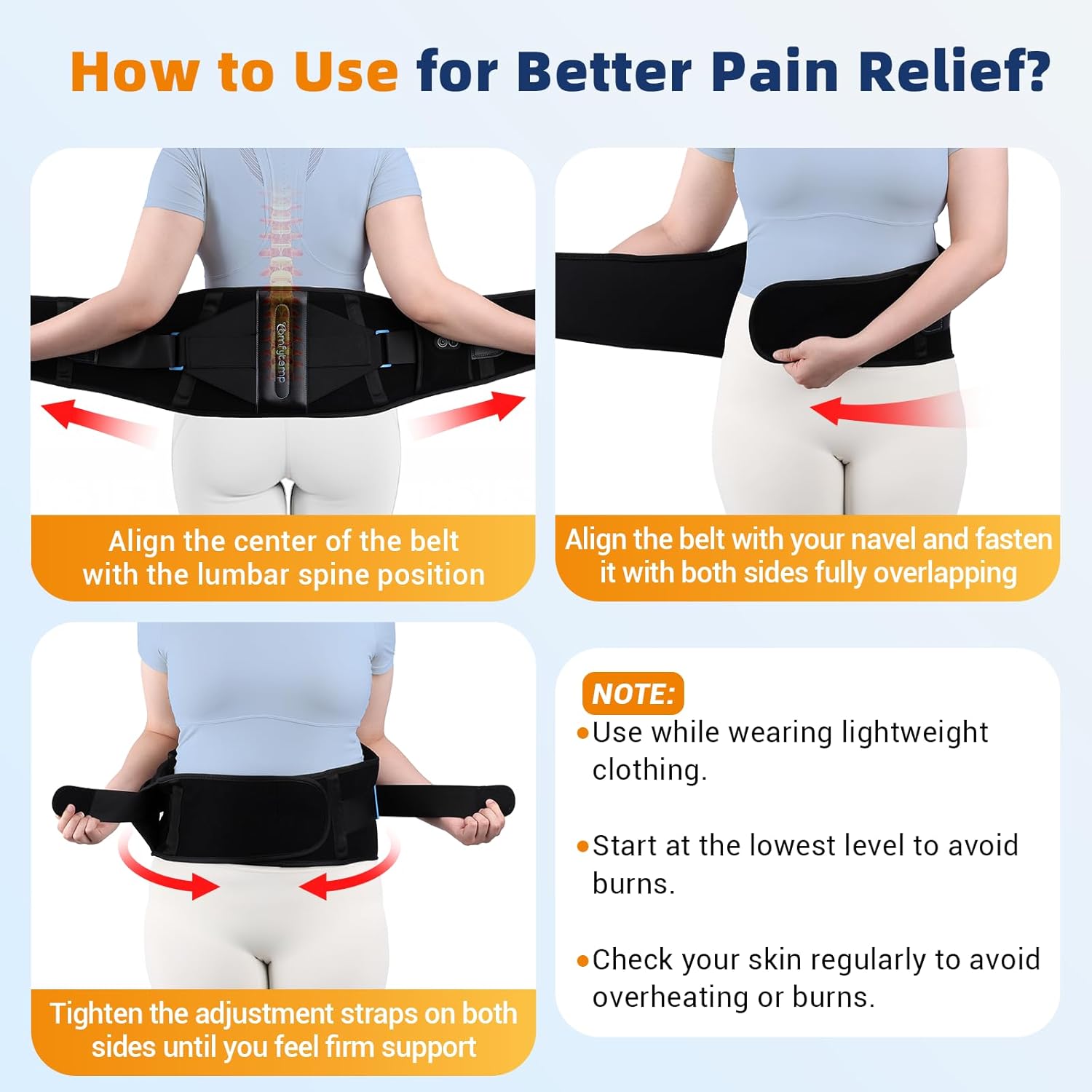
Figure 3.1: Steps for connecting the power bank and wearing the heating pad.
4. Instrucciones de funcionamiento
4.1 Uso de la almohadilla térmica
- Align the center of the belt with your lumbar spine position (lower back).
- Wrap the main belt around your waist, aligning it with your navel, and fasten it with both sides fully overlapping.
- Tighten the dual adjustable straps on both sides until you feel firm, comfortable support. An extension strap is included for waist sizes up to 52 inches.
- Nota importante: It is recommended to wear lightweight clothing when using the heat function to prevent direct skin contact and potential burns.

Figure 4.1: Dual-Strap Fit for Better Support and Warmth. Demonstrates how the adjustable straps provide a secure and comfortable fit.
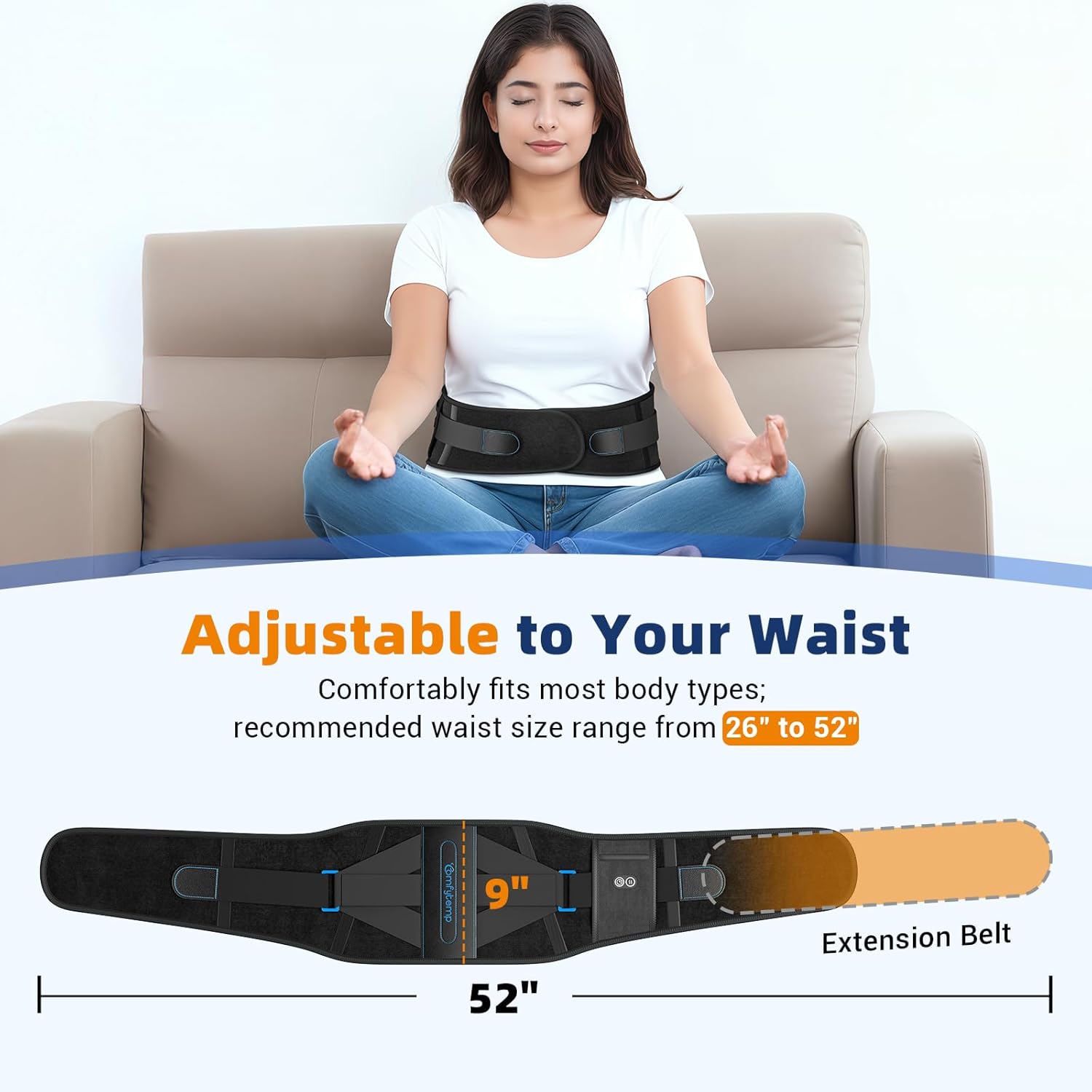
Figure 4.2: Adjustable to Your Waist. Illustrates the standard belt and the included extension belt for a wider range of waist sizes.
4.2 Encendido y ajuste de la configuración
The control panel features two buttons: one for timer settings and one for heat levels.
- To power on, press and hold either the Timer button (clock icon) or the Heat button (waves icon) for a few seconds. The LED indicators will light up.
- Ajuste de los niveles de calor: Press the Heat button (waves icon) to cycle through the three temperature levels:
- Verde: Calor bajo
- Azul: Calor medio
- Rojo: Calor alto
- Adjusting Timer Settings: Press the Timer button (clock icon) to cycle through the three timer settings:
- 15 minutos
- 30 minutos
- 45 minutos
- To power off, press and hold either button again for a few seconds.

Figure 4.3: Control Panel for Temperature and Timer Settings. Displays the intuitive buttons and their corresponding LED colors for different settings.
4.3 Recomendaciones de uso
- For best results, start at the lowest heat level and gradually increase if needed. Regularly check your skin to avoid overheating or burns.
- The heating pad can provide up to 4 hours of cordless warmth on low setting, or up to 2 hours on high setting, with a fully charged power bank.
- It is recommended to use the support function for up to 2 hours per day and heat therapy for about 15 minutes per session.
- This product is not suitable for strenuous physical activity or heavy lifting.
Video 4.1: Demonstrates the features and proper usage of the Comfytemp Cordless Heating Pad with Back Brace, including how to wear it and adjust settings.
5. Mantenimiento
5.1 Instrucciones de limpieza
- Always unplug the power bank from the heating pad before cleaning.
- Limpie la superficie de la almohadilla térmica con adamp Paño y detergente suave.
- Do not submerge the heating pad or power bank in water.
- Allow the heating pad to air dry completely before storing or re-using.
5.2 Almacenamiento
- Store the heating pad in a cool, dry place away from direct sunlight.
- Ensure the power bank is fully charged before long-term storage to maintain battery health.
6. Solución de problemas
| Problema | Posible causa | Solución |
|---|---|---|
| La almohadilla térmica no se enciende. | El banco de energía no está cargado o no está conectado correctamente. | Ensure the power bank is fully charged and securely connected to the heating pad. Press and hold a control button to power on. |
| Heat is not strong enough. | Low heat setting selected; battery level is low. | Increase the heat level using the Heat button. Ensure the power bank is fully charged. |
| La almohadilla térmica se apaga inesperadamente. | Timer setting expired; power bank battery depleted. | Check the timer setting and reset if necessary. Recharge the power bank. |
| Control buttons are hard to reach/see. | Placement of the power bank pocket on the side. | While wearing, you may need to adjust the belt slightly or use a mirror to view the buttons. Familiarize yourself with button positions for tactile use. |
7. Especificaciones
- Dimensiones del producto: 47.24 x 8.66 x 1.18 pulgadas; 1.79 libras
- Fuente de energía: Batería recargable de 5000 mAh
- Niveles de calor: 3 (Bajo, Medio, Alto)
- Configuración del temporizador: 3 (15, 30, 45 minutos)
- Adjustable Waist Size: 26 to 52 inches (with extension strap)
- Material: Breathable Lycra Lining, Hook-and-Loop External
- Sistema de soporte: 6 built-in support strips (4 lumbar + 2 abdomen)
- Color: Negro
- Fabricante: Shenzhen Yicai Health Technology Co. , Ltd.

Figure 7.1: Upgraded Support Strips. Illustrates the internal structure providing 6x lumbar support and 360° compression.
8. Garantía y soporte
Comfytemp se compromete a proporcionar productos de alta calidad y satisfacción del cliente.
- Garantía: Este producto viene con una garantía de 365 días a partir de la fecha de compra.
- Devoluciones: Disfrute de 30 días de devoluciones gratuitas.
- Atención al cliente: For any inquiries, technical assistance, or warranty claims, please contact Comfytemp customer support. We aim to provide 24-hour quick customer support.
- Aviso legal: Las declaraciones sobre los suplementos dietéticos no han sido evaluadas por la FDA y no pretenden diagnosticar, tratar, curar o prevenir ninguna enfermedad o condición de salud.


