1. Introducción
Thank you for choosing the TELESTAR TOP 250 DAB+/Internet Radio. This manual provides essential information for setting up, operating, and maintaining your device. Please read it thoroughly before use to ensure proper functionality and safety.
2. Información de seguridad
Siga siempre las precauciones básicas de seguridad al utilizar este producto para reducir el riesgo de incendio, descarga eléctrica y lesiones.
- No exponga el dispositivo a la lluvia ni a la humedad.
- No abra la casing; delegue cualquier servicio a personal calificado.
- Asegure una ventilación adecuada alrededor de la unidad.
- Utilice únicamente el adaptador de corriente proporcionado.
- Mantenga el dispositivo alejado de fuentes de calor y de la luz solar directa.
3. Contenido del paquete
Desempaque la caja con cuidado y asegúrese de que todos los elementos estén presentes:
- TELESTAR TOP 250 Unit
- External Power Adapter DC 15 Volt / 1.5 A
- Antena telescópica atornillable
- Remote Control with Battery (CR2025)
- Manual de usuario (este documento)

Image: Contents of the TELESTAR TOP 250 package, including the radio unit, remote control, power adapter, and antenna.
4. Producto terminadoview
4.1 Panel frontal
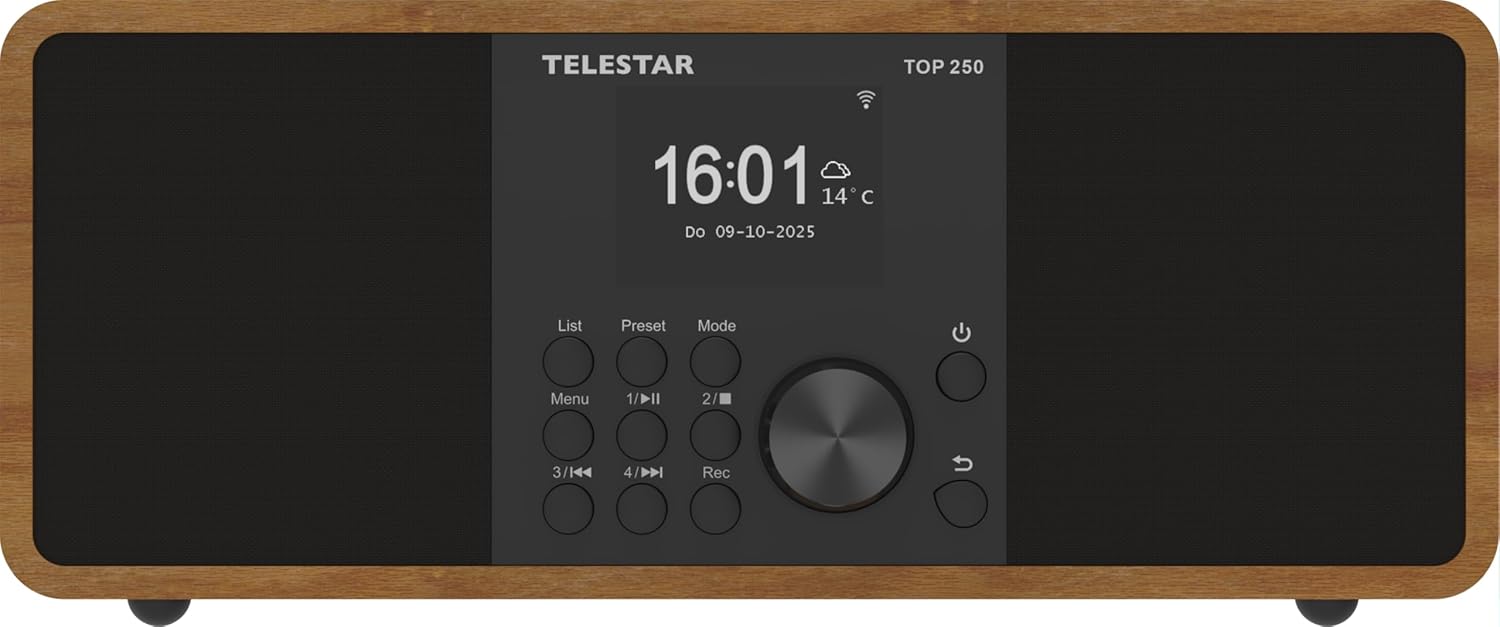
Imagen: Frente view of the TELESTAR TOP 250, highlighting the central display, navigation knob, and various control buttons.
- Mostrar: Large 6.1 cm illuminated color display for information and menu navigation.
- Perilla de control: Used for volume adjustment and menu navigation.
- Direct Selection Buttons (1-4): For quick access to favorite stations or functions.
- Botón de menú: Accede al menú principal.
- Botón de modo: Switches between different operating modes (DAB+, FM, Internet Radio, Bluetooth, USB).
- Botón de encendido: Enciende/apaga la unidad o la pone en modo de espera.
4.2 Panel trasero
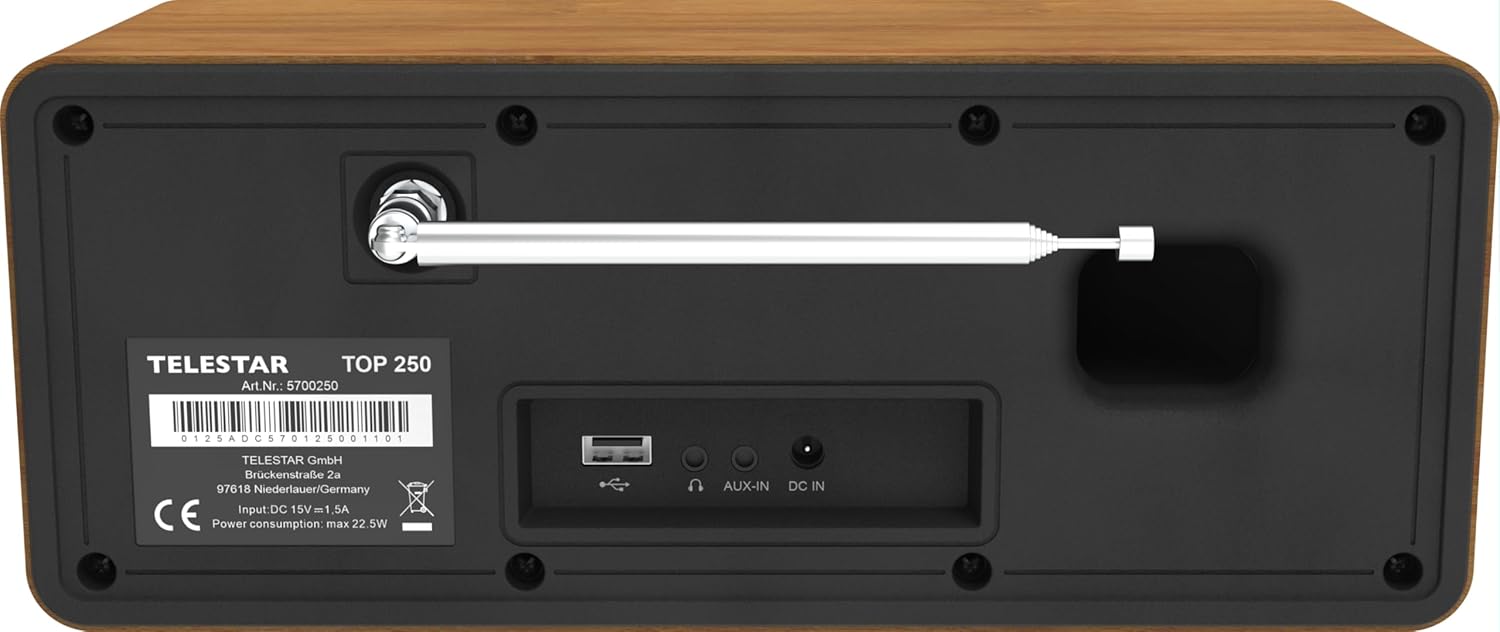
Image: Rear panel of the TELESTAR TOP 250, detailing the screw-on antenna connector, USB 2.0 port, 3.5mm AUX-in, headphone jack, and DC power input.
- Conector de antena: For the screw-on telescopic antenna.
- Puerto USB 2.0: For USB media playback and recording.
- AUX-in (3.5 mm): Conecte dispositivos de audio externos.
- Toma de auriculares: Para escucha privada.
- DC EN: Entrada de alimentación para el adaptador de corriente externo.
4.3 control remoto

Image: The remote control for the TELESTAR TOP 250, showing buttons for power, mode selection, equalizer, volume control, navigation, direct presets, and recording.
The remote control allows convenient operation of all functions from a distance. Ensure the CR2025 battery is correctly inserted.
5. Configuración
5.1 Conexión de la alimentación
- Connect the external power adapter to the DC IN port on the rear of the unit.
- Conecte el adaptador de corriente a una toma de pared adecuada.
5.2 Conexión de la antena
Screw the telescopic antenna firmly into the antenna connector on the rear panel. Extend the antenna for optimal reception of DAB+ and FM signals.
5.3 Configuración inicial
- Presione el botón de encendido para encender la unidad.
- The display will guide you through the initial setup process, including language selection and network configuration.
- For Internet Radio, select your Wi-Fi network and enter the password.
- The radio will automatically scan for available DAB+ and FM stations.
6. Instrucciones de funcionamiento
Radio DAB+ 6.1
Select DAB+ mode using the Mode button. The radio will automatically scan for and list available DAB+ stations. Use the control knob or navigation buttons to browse and select stations.
6.2 Radio FM
Select FM mode using the Mode button. Use the control knob to tune to stations or perform an auto-scan for available FM frequencies.
6.3 Radio por Internet
Select Internet Radio mode. Ensure the device is connected to a Wi-Fi network. You can browse stations by genre, location, or search for specific stations. The device supports thousands of internet radio stations worldwide.
6.4 Transmisión de audio por Bluetooth
The TELESTAR TOP 250 supports both Bluetooth reception and transmission.
- Receive Function: Pair your smartphone or other Bluetooth device with the TOP 250 to stream audio wirelessly to the radio's speakers.
- Send Function: Transmit the currently playing radio station (DAB+, FM, Internet Radio) via Bluetooth to your wireless headphones or external Bluetooth speakers.
6.5 Reproducción y grabación USB
Insert a USB memory stick into the USB 2.0 port on the rear panel.
- Reproducción USB: The radio can play audio files stored on the USB stick. Navigate through your files using the control knob and display.
- Grabación USB: Record radio broadcasts directly to the USB stick. You can initiate direct recording or program recordings for specific times and durations.
6.6 Despertador y temporizador de apagado
- Despertador: Set up to 5 programmable alarms. Choose to wake up to various sounds, DAB+, FM, or Internet Radio. Alarms can be set for once, daily, weekdays, or weekends.
- Tiempo de dormir: Configure un temporizador para que la radio se apague automáticamente después de un período específico.
6.7 Modo nocturno
The night mode function allows you to dim or turn off the display illumination for a set period, preventing disturbance during sleep. This function can be individually adjusted for standby and operation modes.
6.8 Control de aplicaciones
Control your TELESTAR TOP 250 using the dedicated Soundmate app, available for iOS and Android devices. The app provides full control over the radio's functions without additional cost.
6.9 Emergency Alarm System (ASA)
The integrated ASA emergency alarm system allows the radio to automatically transmit official alert messages in case of catastrophes. The device will activate from standby mode, and alerts may also be sent via SMS (multilingual).
7. Mantenimiento
- Limpieza: Utilice un paño suave y seco para limpiar la unidad. No utilice limpiadores abrasivos ni disolventes.
- Antena: Manipule la antena telescópica con cuidado para evitar dañarla.
- Actualizaciones de software: Periodically check for software updates through the system settings to ensure optimal performance and new features.
8. Solución de problemas
| Problema | Posible causa | Solución |
|---|---|---|
| Sin poder | Adaptador de corriente no conectado; toma de corriente no funciona. | Verifique las conexiones eléctricas; pruebe con una toma de corriente diferente. |
| Mala recepción de DAB+/FM | Antena no extendida o posicionada correctamente; señal débil. | Extend and adjust the telescopic antenna; try repositioning the radio. |
| La radio por Internet no se conecta | Incorrect Wi-Fi password; weak Wi-Fi signal; router issue. | Verify Wi-Fi password; move radio closer to router; restart router. |
| Problemas de emparejamiento de Bluetooth | Device not in pairing mode; too far from radio. | Ensure both devices are in pairing mode; bring devices closer. |
| Sin sonido | Volumen demasiado bajo; silencio activado; fuente incorrecta seleccionada. | Aumente el volumen; verifique el estado de silencio; seleccione la fuente de entrada correcta. |
9. Especificaciones

Image: Product dimensions of the TELESTAR TOP 250.
| Característica | Detalle |
|---|---|
| Fabricante | TELESTAR |
| Número de modelo | 5701250 |
| Dimensiones del producto (L x An x Al) | 27.6 x 13 x 11.8 cm |
| Peso | 1.44 kilogramos |
| Color | Madera |
| Tecnología de conectividad | Aux, Bluetooth, Wi-Fi |
| Tecnología de sintonizador | DAB+, Internet Radio, FM |
| Fuente de poder | Corded Electric (DC 15V / 1.5A) |
| Salida de audio | 2 x 10 Watt (20 W total) Stereo |
| Características especiales | Integrated Clock, USB Recording, USB Media Player, Emergency Alarm System (ASA), Alarm Clock, Sleep Timer, Night Mode, App Control |
| Mostrar | 6.1 cm illuminated color display with dimmer |
10. Garantía y soporte
For warranty information and technical support, please refer to the official TELESTAR webSitio web o contacte a su distribuidor local. Conserve el recibo de compra como comprobante.
Manufacturer: TELESTAR GmbH
Websitio: www.telestar.de


