Introducción
This manual provides detailed instructions for the setup, operation, and maintenance of your Edifier S300 Hi-Fi Tabletop Speaker. Please read this manual thoroughly before using the product to ensure proper functionality and to maximize your listening experience. Keep this manual for future reference.

The Edifier S300 Hi-Fi Tabletop Speaker, showcasing its elegant black walnut finish and front grille.
Instrucciones de seguridad importantes
- Lea atentamente estas instrucciones.
- Conserve estas instrucciones para futuras consultas.
- Preste atención a todas las advertencias.
- Siga todas las instrucciones.
- No utilice este aparato cerca del agua.
- Limpiar únicamente con un paño seco.
- No obstruya las aberturas de ventilación. Instale el producto según las instrucciones del fabricante.
- No lo instale cerca de fuentes de calor como radiadores, rejillas de calefacción, estufas u otros aparatos (incluidos ampificadores) que producen calor.
- Proteja el cable de alimentación para que no sea pisado ni aplastado, especialmente en los enchufes, receptáculos y en el punto donde sale del aparato.
- Utilice únicamente accesorios especificados por el fabricante.
- Desenchufe este aparato durante tormentas eléctricas o cuando no lo utilice durante períodos prolongados.
- Encargue todas las tareas de mantenimiento a personal técnico cualificado. Se requiere realizar el mantenimiento cuando el aparato haya sufrido algún daño, como por ejemplo si el cable de alimentación o el enchufe están dañados, si se ha derramado líquido o han caído objetos en el interior del aparato, si el aparato ha estado expuesto a la lluvia o la humedad, si no funciona con normalidad o si se ha caído.
¿Qué hay en la caja?
Al desembalar, verifique que todos los elementos enumerados a continuación estén presentes y en buenas condiciones:
- S300 Speaker × 1
- Cable de alimentación × 1
- Cable USB × 1
- 3.5mm-to-3.5mm Audio Cable × 1
- Mando a distancia × 1
- Pila AAA × 2
- Guía de inicio rápido × 1
- Instrucciones de seguridad importantes × 1
Un sobreview of all items included in the Edifier S300 package.
Producto terminadoview
Controles e indicadores del panel frontal
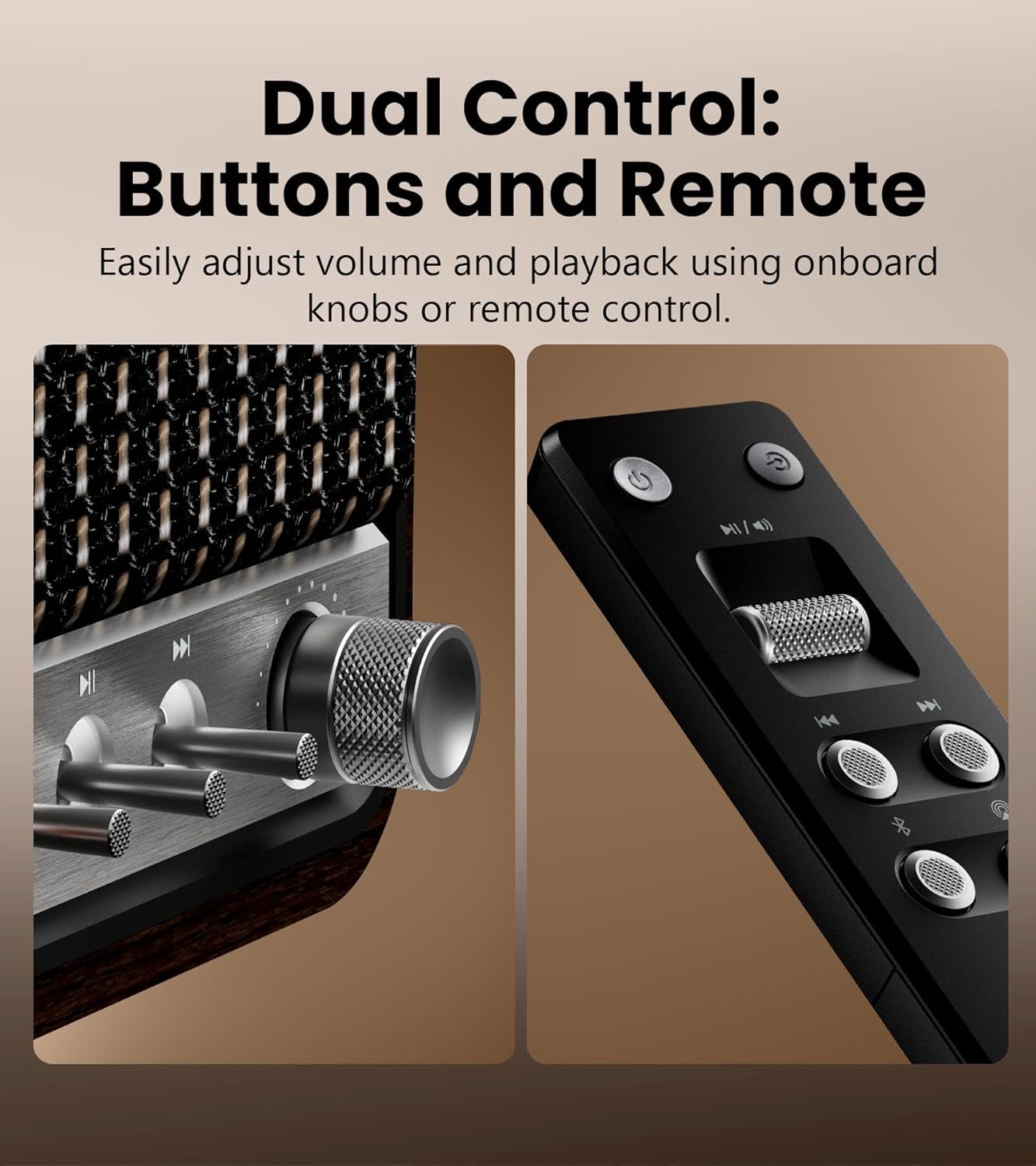
Detallado view of the speaker's control knobs and the included remote control.
- Perilla selectora de volumen/entrada: Rotate to adjust volume. Press to cycle through input sources (Bluetooth, AirPlay, USB-C, AUX).
- Controles de reproducción: Buttons for Play/Pause, Previous Track, Next Track (functionality varies by input source).
- Luz indicadora de estado: Displays current input mode and connection status.
Conexiones del panel trasero

The rear panel of the Edifier S300, highlighting its various connectivity options.
- Entrada USB-C: For connecting to computers or other USB-C audio sources.
- Entrada auxiliar: Standard 3.5mm audio jack for connecting to analog audio devices.
- Entrada de energía: Conecte aquí el cable de alimentación proporcionado.
Configuración
Colocación de los altavoces
For optimal sound performance, place the Edifier S300 on a stable, flat surface. Ensure there is adequate space around the speaker for proper ventilation. Placing the speaker near a wall can enhance bass response, but avoid placing it directly in a corner, which might lead to boomy or unclear bass.

The dimensions of the Edifier S300 speaker, useful for placement planning.
Conexión de energía
- Connect the power cable to the power input port on the rear of the speaker.
- Conecte el otro extremo del cable de alimentación a una toma de pared.
- The speaker will power on automatically or can be turned on using the power button on the remote control.
Instrucciones de funcionamiento
Selección de fuente de entrada
The S300 supports multiple audio input sources. You can switch between them using the volume/input selector knob on the front panel or the dedicated input buttons on the remote control.
- Bluetooth: Para transmisión de audio inalámbrica desde dispositivos compatibles.
- Juego de aire 2: For seamless multi-room audio and lossless streaming from Apple devices.
- USB-C: For direct digital audio connection to computers or other USB-C sources.
- Auxiliar: For connecting traditional analog audio devices using a 3.5mm cable.
Emparejamiento Bluetooth

The Edifier S300 supports dual Bluetooth device pairing for convenient switching.
- Select Bluetooth input on the speaker. The status indicator will flash, indicating pairing mode.
- On your device (smartphone, tablet, computer), enable Bluetooth and search for "EDIFIER S300".
- Select "EDIFIER S300" to pair. Once connected, the indicator light will become solid.
- The S300 supports LDAC for high-resolution wireless audio on compatible Android 8.0+ devices.
- It also supports multi-device pairing, allowing two devices to be connected simultaneously.
AirPlay 2 Setup (for Apple Devices)

AirPlay 2 enables seamless multi-room audio and lossless streaming across your home.
- Ensure your S300 speaker is connected to the same Wi-Fi network as your Apple device.
- On your iOS device, open Control Center, tap the AirPlay icon, and select "EDIFIER S300".
- For multi-room audio, select multiple AirPlay 2 compatible speakers from the AirPlay menu.
- For stereo pairing, use the EDIFIER Home App to configure two S300 speakers as left and right channels.
Uso de la aplicación EDIFIER Home
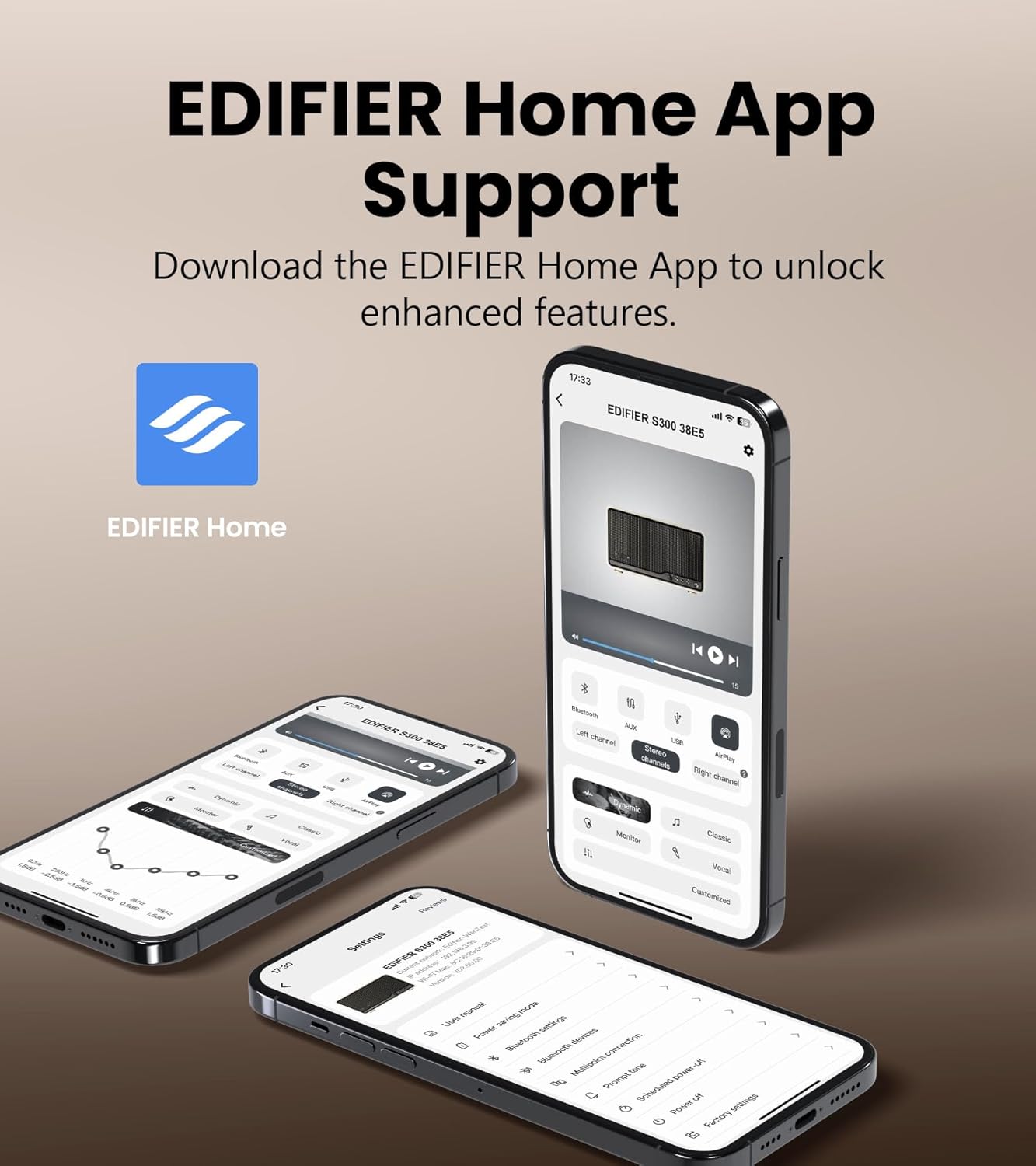
The EDIFIER Home App provides enhanced control and features for your S300 speaker.
Download the EDIFIER Home App from your device's app store to unlock enhanced features and control options for your S300 speaker. The app allows you to:
- Connect your speaker to a Wi-Fi network.
- Switch between input sources effortlessly.
- Control playback with ease.
- Customize sound effects to suit your preferences.
- Access the digital user manual anytime.
Mantenimiento
- Limpieza: Use a soft, dry cloth to clean the speaker's surface. Do not use liquid cleaners or aerosol sprays.
- Ventilación: Asegúrese de que las aberturas de ventilación no estén bloqueadas para evitar el sobrecalentamiento.
- Almacenamiento: If storing the speaker for an extended period, unplug it from the power outlet and store it in a cool, dry place.
Solución de problemas
| Problema | Posible causa | Solución |
|---|---|---|
| Sin sonido | Power not connected; incorrect input source selected; volume too low. | Ensure power cable is securely plugged in. Select the correct input source. Increase volume. |
| La conexión Bluetooth falla | El altavoz no está en modo de emparejamiento; el dispositivo está demasiado lejos; hay interferencias. | Ensure speaker is in Bluetooth pairing mode. Move device closer to speaker. Avoid obstacles. Try re-pairing. |
| AirPlay 2 connection issues | Speaker and device on different Wi-Fi networks; network instability. | Verify both speaker and Apple device are on the same Wi-Fi network. Restart router and speaker. |
| Sonido distorsionado | El volumen es demasiado alto; la calidad de la fuente de audio es mala. | Reduce volume. Check audio source quality. |
Presupuesto

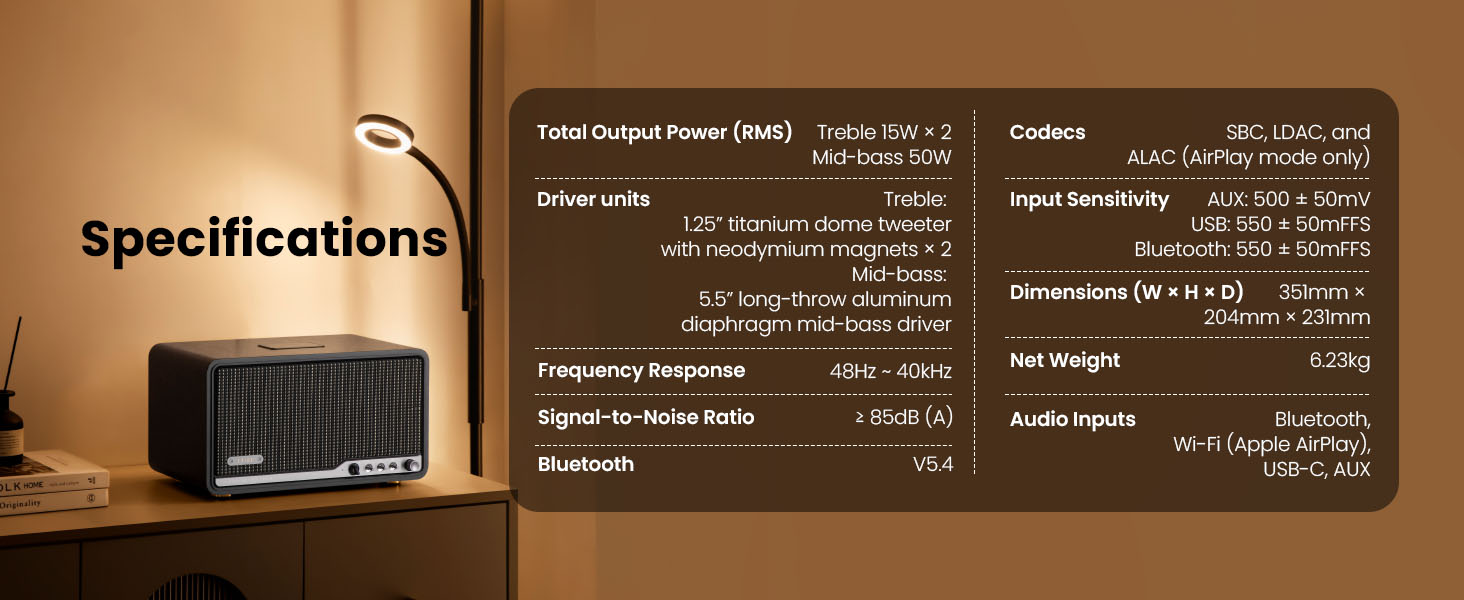
Detailed technical specifications of the Edifier S300 speaker.
| Característica | Detalle |
|---|---|
| Potencia de salida total (RMS) | Treble 15W × 2, Mid-bass 50W |
| Unidades de controlador | 1.25" titanium dome tweeter with neodymium magnets × 2, 5.5" long-throw aluminum diaphragm mid-bass driver |
| Respuesta de frecuencia | 48Hz ~ 40kHz |
| Relación señal a ruido | ≥ 85 dB (A) |
| Versión de Bluetooth | V5.4 |
| Códecs | SBC, LDAC, and ALAC (AirPlay mode only) |
| Sensibilidad de entrada | AUX: 500 ± 50 mV, USB: 550 ± 50 mFFS, Bluetooth: 550 ± 50 mFFS |
| Dimensiones (An × Al × Pr) | 351 mm × 204 mm × 231 mm (13.82" × 8.03" × 9.09") |
| Peso neto | 6.23 kg (13.73 libras) |
| Entradas de audio | Bluetooth, Wi-Fi (Apple AirPlay), USB-C, AUX |
Garantía y soporte
Edifier products are designed and manufactured to the highest quality standards. For information regarding warranty coverage, please refer to the warranty card included in your product packaging or visit the official Edifier websitio.
Para obtener asistencia técnica, asistencia para la resolución de problemas o consultas de servicio, comuníquese con el servicio de atención al cliente de Edifier a través de su sitio web oficial. websitio o la información de contacto proporcionada en la documentación de su producto.
Edificador oficial Websitio: www.edificador.com


