1. Introducción
The PGYTECH LinkGo Phone Strap Crossbody is designed to provide a secure, convenient, and hands-free method for carrying your smartphone or lightweight camera. This manual provides detailed instructions for proper setup, operation, and maintenance to ensure optimal performance and longevity of your product.
2. Producto terminadoview
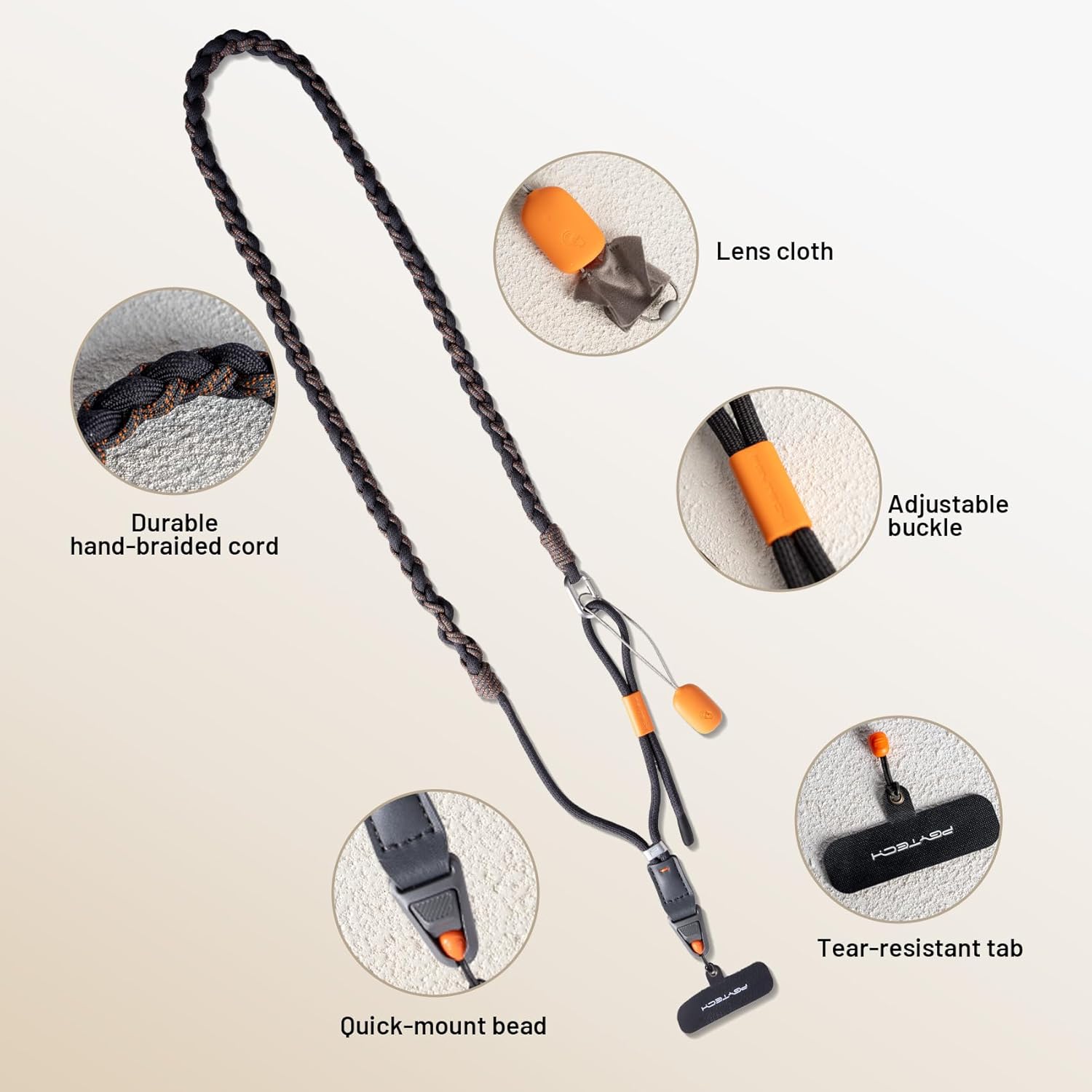
The LinkGo Phone Strap Crossbody features a durable, hand-braided cord with an adjustable length, a quick-release mechanism, and an integrated lens cloth for convenience.
2.1 Componentes
- Hand-Braided Cord: Meticulously crafted for durability and comfort.
- Hebilla ajustable: Allows for flexible length adjustment to suit various body types.
- Quick-Mount Bead: A 7mm quick-release mechanism for easy attachment and detachment of your device.
- Tear-Resistant Tab: A slim, durable tab that fits inside your phone case to connect to the strap.
- Built-in Lens Cloth: A polyester lens cloth integrated for quick cleaning of camera lenses or phone screens.
2.2 Contenido del paquete
- Phone Camera Strap x 1
- Quick-Release Bead (MINI) x 2
- Lens Cleaning Charm x 1
- Mounting Tab x 1

3. Instrucciones de configuración
Follow these steps to properly install the LinkGo Phone Strap Crossbody with your phone case.
- Prepare Phone Case: Ensure your phone case has a charging port cutout. The slim 0.5mm tab is designed to fit discreetly under full-coverage cases.
- Thread the Tab: Thread the tear-resistant mounting tab through the charging port cutout of your phone case.
- Asegure la bisagra: Click the hinge of the quick-mount bead onto the tab until it snaps securely into place.
- Insertar teléfono: Place your phone into the case as normal, ensuring the tab lies flat against the inside of the case.
- Fijar la correa: Attach the quick-mount bead of the phone strap to the secured tab.


4. Instrucciones de funcionamiento
4.1 Ajuste de la longitud de la correa
The strap length can be adjusted to fit various body types and carrying preferences. The adjustable range is from 43.7 inches (111mm) to 53.5 inches (136mm).
- To shorten the strap, pull the cord through the adjustable buckle.
- To lengthen the strap, push the cord through the adjustable buckle.
- Consejo: After adjusting, slide the buckle to the top to ensure a secure hold and prevent accidental changes in length.

4.2 Quick Release Function
The quick-mount bead allows for rapid attachment and detachment of your device from the strap. This feature includes a dead-point locking mechanism to prevent accidental drops.
- To detach, press the release button on the quick-mount bead and pull the device away from the strap.
- To reattach, align the quick-mount bead with the tab and push until it clicks securely into place.

4.3 Using the Built-in Lens Cloth
The integrated polyester lens cloth is conveniently located for quick cleaning of your phone camera lens or screen.
- Gently pull the lens cloth from its housing.
- Use the cloth to wipe away smudges or dust from your device's lens or screen.
- After use, carefully tuck the cloth back into its housing.

4.4 Compatibilidad de dispositivos
The PGYTECH LinkGo Phone Strap Crossbody is compatible with all smartphones and lightweight cameras that can be housed in a full-coverage case with a charging port cutout.

5. Mantenimiento
Proper care will extend the life of your PGYTECH LinkGo Phone Strap Crossbody.
- Limpieza de la correa: The fabric strap can be hand washed. Use mild soap and cold water, then air dry completely. Do not machine wash or tumble dry.
- Cleaning the Lens Cloth: The polyester lens cloth can be gently hand washed with mild soap and water. Allow it to air dry before reinserting into its housing.
- Inspección de componentes: Regularly inspect the quick-mount bead, tab, and strap for any signs of wear or damage. Discontinue use if any component appears compromised.
6. Solución de problemas
- Strap feels loose after adjustment: Ensure the adjustable buckle is slid fully to the top position after setting your desired length.
- Difficulty charging phone with tab installed: Verify that your phone case is a full-coverage type. Half-coverage cases may not provide sufficient space for the tab, potentially obstructing the charging port or interfering with MagSafe charging. If issues persist, consider removing the tab for charging or using a different case.
- Quick-mount bead not securing: Check for any debris in the locking mechanism. Ensure the tab is correctly installed and not damaged. Apply firm, even pressure until a distinct click is heard, indicating it is securely locked.
7. Especificaciones
| Modelo | LinkGo Phone Strap Crossbody |
| Longitud ajustable | 43.7 - 53.5 pulgadas (111 mm - 136 mm) |
| Capacidad de peso | Hasta 10 kg (22 lbs) |
| Mounting Tab Thickness | 0.5 milímetros |
| Tipo de tela | Microfabric (Strap), Polyester (Lens Cloth) |
| Instrucciones de cuidado | Lavado a mano |
| Origen | Importado |
| Primero disponible | 23 de mayo de 2025 |
8. Información de garantía
For specific warranty details, please refer to the warranty card included with your product or visit the official PGYTECH website. General warranty terms typically cover manufacturing defects under normal use conditions.
9. Soporte
If you encounter any issues or have questions regarding your PGYTECH LinkGo Phone Strap Crossbody, please contact PGYTECH customer support through their official webSitio web o la información de contacto proporcionada en el empaque de su producto. Tenga a mano el modelo de su producto y los detalles de compra al contactar con el servicio de asistencia.


