1. Introducción
Thank you for choosing the Klarus E5 Plus Ultra-Slim Dual Switch Triple-Light EDC Flashlight. This manual provides detailed instructions for the safe and efficient operation, maintenance, and troubleshooting of your new device. Please read this manual thoroughly before use and retain it for future reference.
2. Producto terminadoview
The Klarus E5 Plus is a compact and versatile everyday carry (EDC) flashlight featuring three distinct light sources and a dual-switch design for intuitive control. Its ultra-slim profile, magnetic base, and pocket clip offer multiple hands-free lighting options.

Figure 1: Klarus E5 Plus Flashlight with key features highlighted.
3. Contenido del paquete
- Klarus E5 Plus Flashlight
- Cable de carga USB-C
- Manual de usuario (este documento)

Figure 2: Contents included in the Klarus E5 Plus package.
4. Especificaciones
| Característica | Detalle |
|---|---|
| Modelo | E5 MÁS |
| Salida máxima | 650 Lumens (Side COB) |
| Fuentes de luz | Front (White), Side (Warm White, Red) |
| Dimensiones | 4.45" de largo x 0.98" de ancho x 0.31" de alto (113 mm x 25 mm x 8 mm) |
| Peso | 1.26 oz (39g) |
| Batería | Batería de iones de litio de 500 mAh incorporada |
| Puerto de carga | USB-C |
| Tiempo de carga | Aproximadamente 1.5 horas |
| Tiempo de ejecución máximo | Hasta 12.5 horas (Modo bajo) |
| Resistencia al agua | IPX4 (a prueba de salpicaduras) |
| Material | Aleación de aluminio (6061) |
| Características especiales | Dual Switch, Magnetic Base, Pocket Clip, Flicker-Free Dimming |

Figure 3: Physical dimensions and weight comparison.
5. Configuración: Carga de la batería
The Klarus E5 Plus features a built-in rechargeable lithium-ion battery. Before first use, fully charge the device.
- Locate the USB-C charging port on the side of the flashlight, protected by a silicone cover.
- Gently lift the silicone cover to expose the USB-C port.
- Connect the provided USB-C cable to the flashlight and plug the other end into a compatible USB power source (e.g., computer, wall adapter).
- During charging, the indicator light on the flashlight will illuminate red.
- Once fully charged (approximately 1.5 hours), the indicator light will turn blue.
- Disconnect the charging cable and securely close the silicone cover to maintain IPX4 water resistance.

Figure 4: Charging the Klarus E5 Plus via USB-C.
6. Instrucciones de funcionamiento
The E5 Plus features two distinct switches for controlling its multiple light sources.
6.1. Head Light (Front White Light) Operation
- Encender/Apagar: Mantenga pulsado el Interruptor de los faros (upper button) for 0.5 seconds.
- Cambiar brillo: With the head light on, single-click the Interruptor de los faros to cycle through brightness modes (Low, High).
- Modo Memoria: The head light will remember the last used brightness mode when turned off and on again.
6.2. Side Light (Warm White & Red Light) Operation
- Encender/Apagar: Mantenga pulsado el Interruptor de luz lateral (lower button) for 0.5 seconds.
- Change Brightness (Warm White): With the warm white side light on, single-click the Interruptor de luz lateral to cycle through brightness modes (Low, Medium, High, Turbo).
- Toggle Red Light: With the warm white side light on, double-click the Interruptor de luz lateral to switch to Red Constant-On mode. Double-click again to return to warm white.
- Luz estroboscópica roja: From Red Constant-On mode, single-click the Interruptor de luz lateral to activate Red Strobe mode. Single-click again to return to Red Constant-On.
- Modo Memoria: The warm white side light will remember the last used brightness mode. Red light modes do not have memory and will default to Red Constant-On when reactivated.

Figure 5: Dual switch operation for the Klarus E5 Plus.
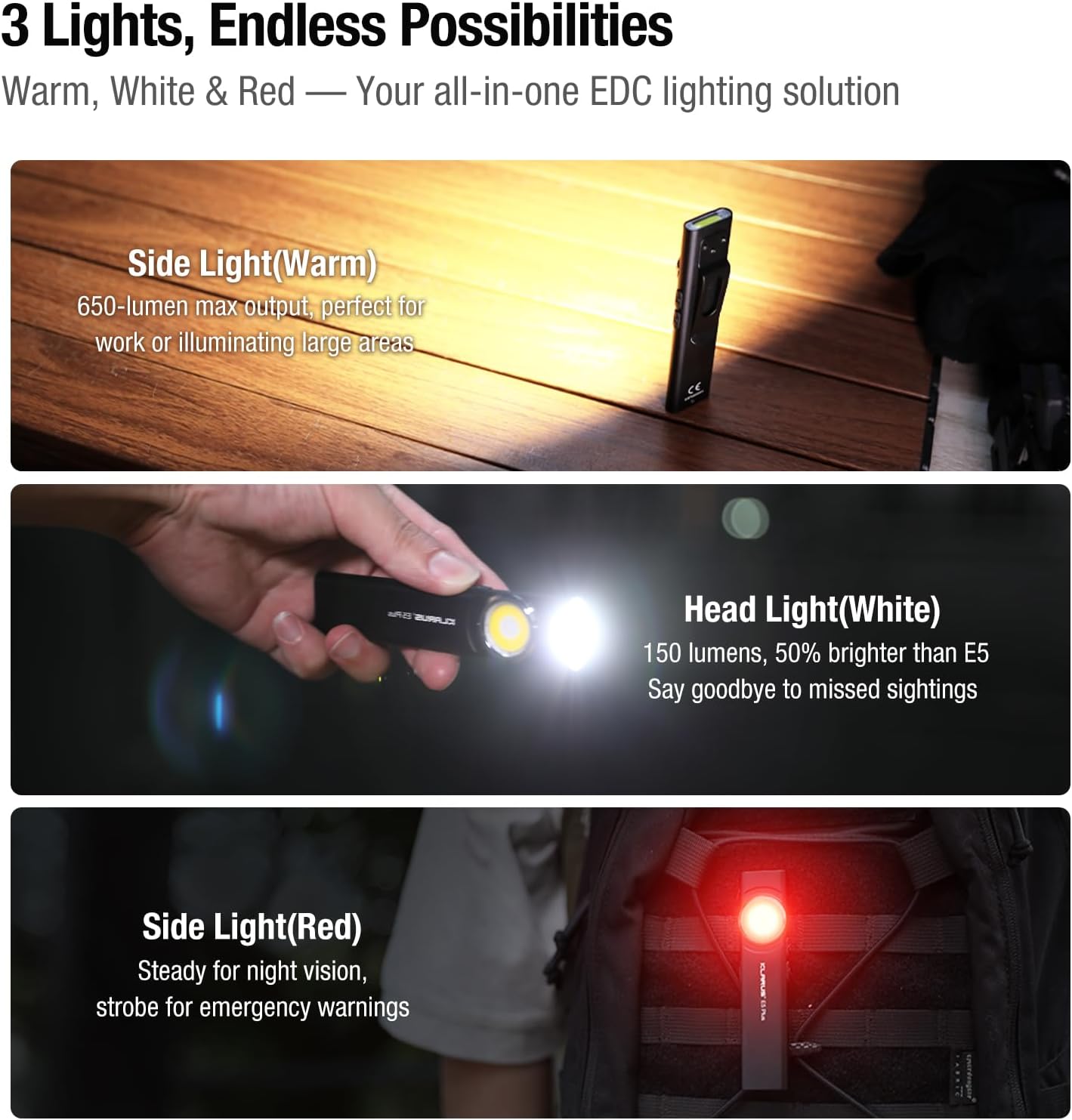
Figure 6: Three light sources and their applications.

Figure 7: Hands-free usage with magnetic base and clip.
7. Mantenimiento
- Limpieza: Limpie el cuerpo de la linterna con un paño suave.amp Paño. Evite limpiadores abrasivos o disolventes.
- Cargando: Recharge the battery regularly to maintain optimal performance, especially if stored for extended periods.
- Almacenamiento: Guarde la linterna en un lugar fresco y seco, lejos de la luz solar directa y de temperaturas extremas.
- Resistencia al agua: Ensure the USB-C port's silicone cover is securely closed to maintain IPX4 water resistance.
8. Solución de problemas
| Problema | Posible causa | Solución |
|---|---|---|
| La linterna no se enciende. | Low battery or lockout mode activated. | Charge the battery. Ensure no buttons are accidentally pressed during storage. |
| La salida de luz es tenue. | Low battery or incorrect mode selected. | Charge the battery. Cycle through brightness modes to select a higher setting. |
| El indicador de carga no funciona. | Loose connection or faulty cable/charger. | Ensure USB-C cable is securely connected. Try a different USB-C cable or power source. |
9. Vídeos oficiales del producto
The following videos provide additional visual guidance and demonstrations of the Klarus E5 Plus flashlight's features and operation.
Klarus E5 Plus - Ultra-Slim Dual Switch Triple-Light EDC Flashlight
Vídeo 1: Un finalview of the Klarus E5 Plus, highlighting its ultra-slim design, dual switch, and triple-light functionality. This video demonstrates the product's key features and versatility.
10. Garantía y soporte
Klarus products are manufactured to high-quality standards. For warranty information, technical support, or service inquiries, please refer to the official Klarus webSitio web o contacte a su distribuidor autorizado. Conserve su comprobante de compra para reclamaciones de garantía.
Fabricante: KLARUS


