1. Producto terminadoview
The GEPRC Cinelog30 V3 O4 Air Unit Pro is a high-performance FPV drone designed for professional-grade aerial videography and dynamic flight. It features an O4 Pro Air Unit for ultra-sharp 4K/120fps footage, an aluminum-reinforced frame for durability, and a TAKER F722 45A AIO flight system for responsive handling.
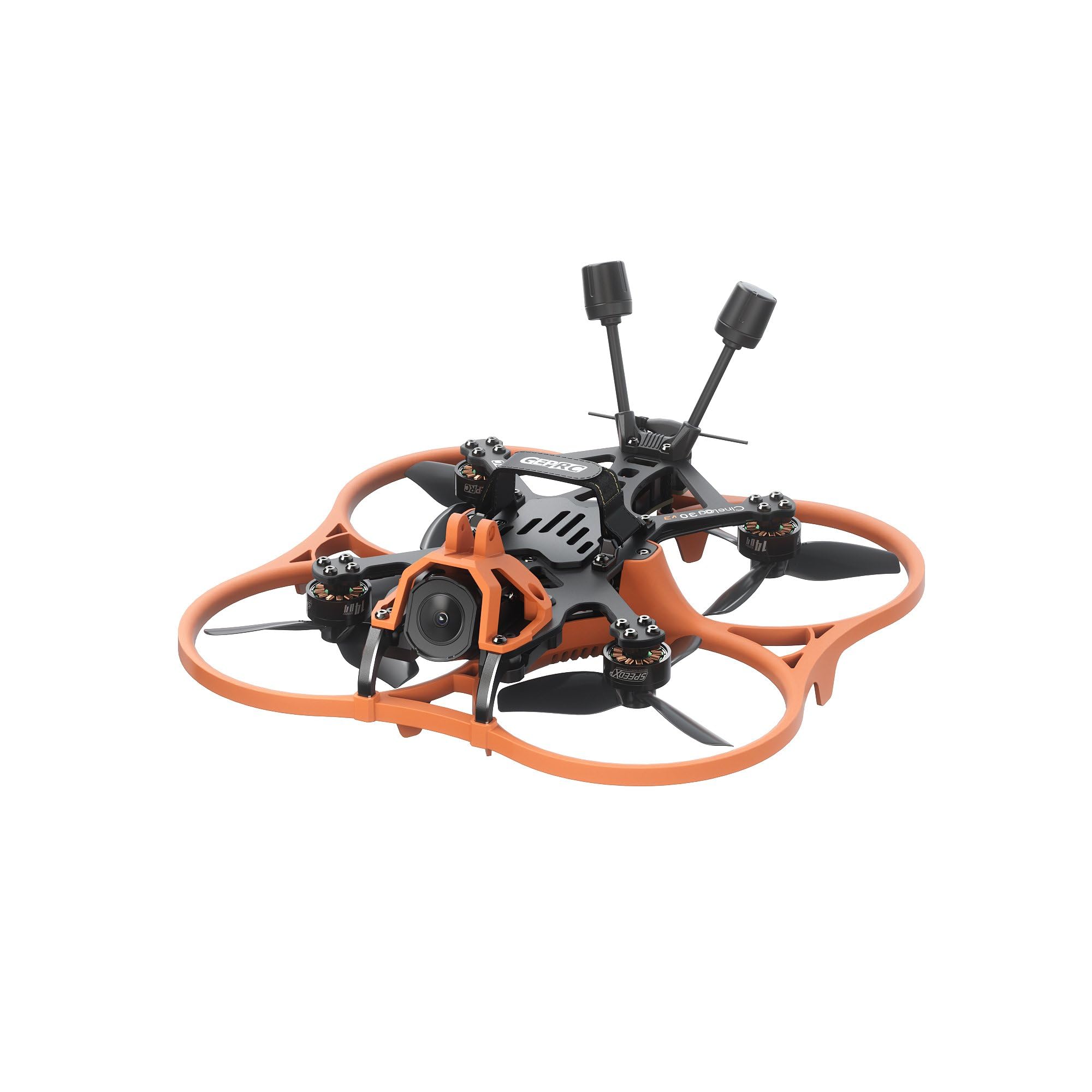
Imagen 1: De arriba hacia abajo view of the GEPRC Cinelog30 V3 O4 Air Unit Pro FPV Drone, showcasing its orange protective frame and black carbon fiber components.
2. Componentes incluidos
Verifique que todos los siguientes componentes estén incluidos en su paquete:
- 1 x Cinelog30 V3 FPV Drone
- 1 x Protective Frame (transparent black)
- 2 x HQprop DT76mmx3 V2 (pair) - Hélices de repuesto
- 1 correa de batería de 15 x 150 mm
- 1 x L-shaped Screwdriver 1.5mm
- 1 x Grey Canopy
- 1 x Black Canopy
- 1 x Spare Screw Pack (includes M2 rivet nut, M2*4.5, M2*6, M2*4 button-head hex socket screws, M2*12 button-head screw, 2 x Damping Ball)
- 1 x Battery Anti-slip Pad
- 1xDamping Ball Puncher
- 1 x Frequency Pairing Ejector pin
3. Configuración inicial
3.1 Despliegue del dron
Carefully unfold the drone arms. Always unfold the front arms first, then the rear arms. Ensure they click securely into place.

Imagen 2: En ángulo view of the GEPRC Cinelog30 V3 FPV Drone with its arms unfolded, ready for flight.
3.2 Propeller Installation (If Required)
The drone comes with propellers pre-installed. If replacement is needed, ensure correct orientation. Match the propeller rotation direction to the motor direction. Use the provided L-shaped screwdriver for secure attachment.
3.3 Conexión de la batería
Connect a fully charged LiHV 4S 660mAh-720mAh battery (not included) to the XT30 connector on the drone. Secure the battery using the provided battery strap and anti-slip pad.
3.4 Canopy Installation
Choose between the grey or black canopy and securely attach it to the drone frame. Ensure it does not obstruct any sensors or the camera.
4. FPV System Setup (O4 Air Unit Pro & Goggles)
The Cinelog30 V3 is equipped with the O4 Air Unit Pro for high-quality digital FPV transmission. For optimal experience, it is recommended to use compatible FPV goggles, such as the DJI Goggles 3.
4.1 en vivoview Sharing with DJI Goggles 3
The DJI Goggles 3 allow for live view sharing to a mobile device or other goggles. This feature is useful for co-pilots or spectators to view the drone's feed.
Video 1: This video demonstrates how to set up live view sharing from DJI Goggles 3 to a mobile device or other compatible goggles, allowing multiple users to see the drone's real-time camera feed.
For detailed instructions on connecting and sharing live view with DJI Goggles 3, please refer to the video above. Ensure your mobile device has the DJI Fly app installed and that Wi-Fi and Bluetooth are enabled for wireless connections.
5. Directrices de funcionamiento
5.1 Comprobaciones previas al vuelo
- Asegúrese de que todos los brazos estén completamente extendidos y bloqueados.
- Check propellers for any damage and ensure they are securely fastened.
- Verify battery is fully charged and securely attached.
- Confirm FPV goggles and remote controller are powered on and connected.
- Perform a visual inspection of the drone for any loose parts or damage.
5.2 Despegue y aterrizaje
Place the drone on a flat, open surface, clear of obstacles. Follow your remote controller's specific instructions for arming motors and initiating take-off. For landing, gently descend the drone to a clear area.
5.3 Controles de vuelo
Familiarize yourself with your remote controller's stick configurations for throttle, yaw, pitch, and roll. Practice in a safe, open environment before attempting complex maneuvers.
5.4 Operación de la cámara
The O4 camera captures ultra-sharp 4K/120fps footage. Use your FPV goggles or connected mobile device to view the live feed and control camera settings. The advanced structural design isolates camera vibration for smooth footage.
5.5 Active Tracking
The drone supports active tracking features, allowing it to follow moving subjects. Refer to your remote controller and FPV system manual for specific active tracking mode activation and usage.
6. Mantenimiento y cuidado
6.1 Limpieza
Regularly clean the drone, especially after flights in dusty or dirty environments. Use a soft, dry cloth to wipe down the frame and propellers. Ensure the camera lens is clean for clear footage.
6.2 Reemplazo de la hélice
Inspect propellers before each flight for cracks, bends, or chips. Replace damaged propellers immediately using the spare HQprop DT76mmx3 V2 pairs and the provided screwdriver. Incorrectly installed or damaged propellers can affect flight stability and safety.
6.3 actualizaciones de firmware
Consulte periódicamente el informe oficial del GEPRC website for firmware updates for the TAKER F722 45A 32Bit AIO flight system (FC Firmware: GEPRC_F722_AIO). Follow the provided instructions carefully to ensure proper update installation.
6.4 Cuidado de la batería
Store LiHV batteries in a cool, dry place away from direct sunlight. Do not overcharge or over-discharge batteries. Always use a compatible charger. Discontinue use of any damaged or swollen batteries.
7. Solución de problemas
- El dron no se enciende: Ensure the battery is fully charged and correctly connected to the XT30 connector.
- Sin transmisión FPV: Check the connection between the O4 Air Unit Pro and your FPV goggles. Ensure both devices are powered on and correctly paired.
- Vuelo inestable: Inspect propellers for damage or incorrect installation. Calibrate the gyroscope and accelerometer if necessary (refer to the flight controller manual).
- El control remoto no se conecta: Ensure the remote controller is powered on and correctly bound to the drone's receiver (PNP digital built-in VTS receiver). Use the frequency pairing ejector pin if re-binding is required.
For further assistance, please contact GEPRC customer support.
8. Especificaciones
| Característica | Especificación |
|---|---|
| Modelo | Cinelog30 V3 O4 Pro Quadcopter |
| Tipo de cuadro | GEP-CL30 V3 |
| Carbon Fiber Plate Thickness | 2.5 mm |
| Distancia entre ejes | 128 mm |
| Sistema de vuelo | TAKER F722 45A 32Bit AIO |
| MCU | STM32F722RET6 |
| Giroscopio | ICM 42688-P |
| Firmware FC | GEPRC_F722_AIO |
| Destello | 16 MB |
| ESC | 32 bits 45A |
| Motor | VELOCIDAD X2 1404 3850KV |
| Hélices | HQprop DT76mmx3 V2 |
| Conector de batería | XT30 |
| VTX | O4 AIR Unit Pro |
| Cámara | O4 |
| Antena | O4 original |
| Receptor | PNP (digital built-in VTS receiver) |
| Batería recomendada | LiHV 4S 660mAh-720mAh |
| Approximate Flight Time | 8’10″ (Tested at slow cruising speeds; actual times may vary with flying method) |
| Resolución de captura de video | 4K |
| Peso del artículo | 190 gramos (aprox. 6.7 onzas) |
| Dimensiones del producto | 7.99" de largo x 7.99" de ancho x 3.54" de alto |
9. Garantía y soporte
For warranty information, technical support, or to purchase replacement parts, please visit the official GEPRC webSitio web o contacte directamente con el servicio de atención al cliente. Conserve el recibo de compra para reclamaciones de garantía.
También puedes visitar el GEPRC Store on Amazon para obtener información adicional sobre el producto y recursos de soporte.


