
1. Introducción
Thank you for choosing the roborock Q10 S5 Robot Vacuum and Mop Cleaner. This manual provides essential information for setting up, operating, and maintaining your device to ensure optimal performance and longevity. Please read this manual thoroughly before using the product and keep it for future reference.
2. Información de seguridad
To reduce the risk of injury, electric shock, fire, or damage, please observe the following safety precautions:
- Este aparato puede ser utilizado por niños mayores de 8 años y personas con capacidades físicas, sensoriales o mentales reducidas o con falta de experiencia y conocimientos, si están bajo supervisión o reciben instrucciones sobre el uso del aparato de forma segura y comprenden los peligros que implica.
- Se debe supervisar a los niños para garantizar que no jueguen con el aparato.
- La limpieza y el mantenimiento por parte del usuario no deberán ser realizados por niños sin supervisión.
- Do not use the robot in areas with open flames or fragile objects.
- Asegúrese de que la base de carga esté colocada sobre una superficie nivelada contra una pared.
- Utilice únicamente el adaptador de corriente original proporcionado con el dispositivo.
- Do not expose the robot to direct sunlight or moisture.
- Antes de limpiar, retire los cables de alimentación, los objetos pequeños y los elementos frágiles del piso.
3. Producto terminadoview
Familiarize yourself with the components of your roborock Q10 S5 robot vacuum.
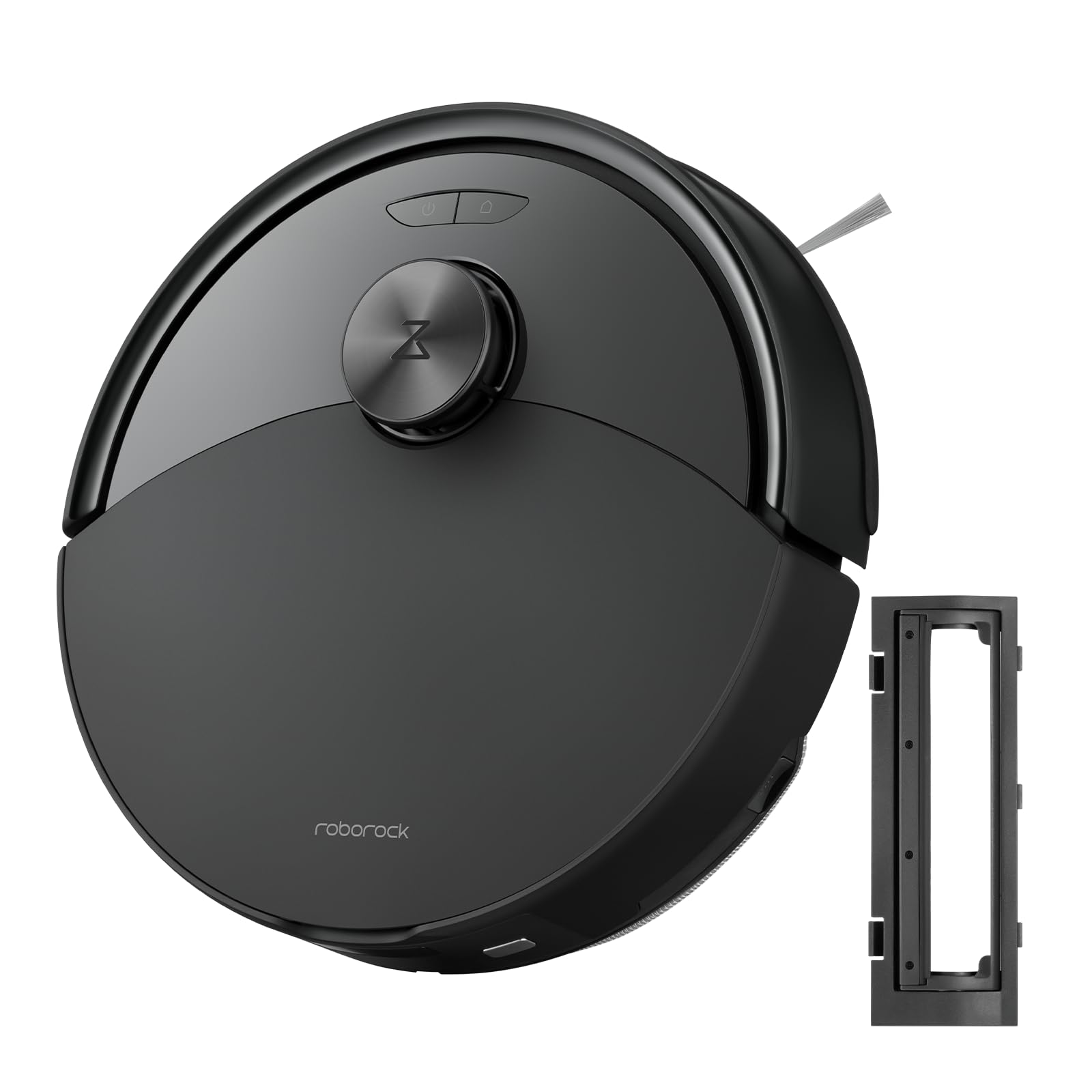
Figura 1: The roborock Q10 S5 Robot Vacuum and Mop Cleaner. This image shows the top view of the robot, highlighting its sleek black design and main control buttons.
Componentes del robot:
- La cubierta superior: Lifts to reveal the dustbin and Wi-Fi indicator.
- Botón de encendido/limpieza: Press to start/pause cleaning, hold to turn on/off.
- Dock/Spot Clean Button: Press to send the robot back to the dock, hold for spot cleaning.
- LDS Sensor: For navigation and mapping.
- Parachoques: Detecta obstáculos.
- Cepillo lateral: Barre los residuos de los bordes y las esquinas.
- Cepillo principal: Collects dirt and debris from floors. Features a floating design for better contact.
- Rueda omnidireccional: Para el movimiento.
- Contactos de carga: Se conecta con la base de carga.
- Sensores de acantilado: Evita que el robot se caiga por las escaleras.
- Tanque de agua y mopa: Para funcionalidad de trapeador.
Base de carga:
- Dock Location Beacon: Helps the robot locate the dock.
- Contactos de carga: Transfers power to the robot.
- Puerto del cable de alimentación: Conecta el adaptador de corriente.
4. Configuración
- Desembalaje del robot: Carefully remove the robot and all accessories from the packaging. Remove any protective films or shipping materials.
- Instalar el cepillo lateral: Press the side brush onto its post until it clicks into place.
- Coloque la base de carga:
- Coloque la base de carga sobre una superficie dura y nivelada contra una pared.
- Ensure there is at least 0.5 meters (1.6 feet) of clear space on both sides and 1.5 meters (4.9 feet) in front of the dock.
- Connect the power cable to the charging dock and plug it into a wall outlet.
- Carga inicial: Place the robot on the charging dock. The robot will automatically turn on and begin charging. For first-time use, fully charge the robot before operation (approximately 4-6 hours). The power indicator light will breathe white during charging and turn solid white when fully charged.
- Descargar la aplicación: Buscar "Roborock" in the App Store or Google Play Store, or scan the QR code on the packaging to download and install the app.
- Conectarse a Wi-Fi:
- Open the Roborock app and follow the on-screen instructions to add your device.
- Asegúrese de que su teléfono esté conectado a una red Wi-Fi de 2.4 GHz.
- Mantenga pulsado el Muelle y Fuerza buttons simultaneously for 3 seconds until you hear the "Resetting Wi-Fi" voice alert.
- Siga las instrucciones de la aplicación para completar la conexión.
5. Instrucciones de funcionamiento
Iniciando una limpieza:
- De Robot: Presione el Fuerza button once. The robot will start cleaning.
- Desde la aplicación: Open the Roborock app and tap the "Clean" button.
Pausing/Resuming/Stopping:
- Pausa: Presione cualquier botón del robot o toque "Pausa" en la aplicación.
- Reanudar: Presione el Fuerza button or tap "Resume" in the app.
- Stop: To stop a cleaning cycle, press the Muelle button to send the robot back to the charging dock, or tap "Stop" in the app.
Función de trapeado:
- Llena el tanque de agua: Open the water tank cover, fill with clean water, and close securely.
- Colocar la almohadilla de fregado: Wet the mop pad and wring it out. Slide it into the mop pad slot until it is securely attached.
- Comience a trapear: The robot will automatically detect the mop module and switch to mopping mode. You can adjust water flow levels in the app.
Características de la aplicación:
- Gestión de mapas: Create and save maps, set no-go zones, virtual walls, and invisible barriers.
- Limpieza selectiva de habitaciones: Elija habitaciones específicas para limpiar.
- Limpieza programada: Establezca horarios de limpieza para diferentes horas y días.
- Custom Cleaning Modes: Ajuste la potencia de succión y los niveles de flujo de agua.
- Mando a distancia: Controlar manualmente el movimiento del robot.
6. Mantenimiento
Regular maintenance ensures your roborock Q10 S5 operates efficiently. Always turn off the robot and unplug the charging dock before performing any maintenance.
Dustbin and Filter (Weekly):
- Lift the top cover of the robot.
- Retire el cubo de basura.
- Abra la tapa del depósito de basura y vacíe su contenido en un cubo de basura.
- Remove the filter. Tap it gently to remove dust. The filter can be rinsed with water; ensure it is completely dry before reinstallation (allow 24 hours).
- Rinse the dustbin with water if necessary and allow it to dry completely.
- Reinstall the dry filter and dustbin.
Main Brush (Weekly):
- Dé la vuelta al robot.
- Press the tabs to remove the main brush cover.
- Levante el cepillo principal.
- Utilice la herramienta de limpieza (si está incluida) o tijeras para cortar y quitar cualquier pelo o residuo enredado alrededor del cepillo.
- Reinstall the main brush and cover, ensuring it clicks into place.
Side Brush (Monthly):
- Desatornille el cepillo lateral.
- Retire cualquier pelo o residuo.
- Reattach and tighten the screw.
Sensors and Charging Contacts (Monthly):
- Wipe all sensors (cliff sensors, wall sensor, LDS sensor window) and the charging contacts on both the robot and the dock with a soft, dry cloth.
Mop Pad (After Each Use):
- Retire la almohadilla de la fregona del tanque de agua.
- Rinse thoroughly with water and allow it to air dry completely before next use.
7. Solución de problemas
If you encounter issues with your robot, please refer to the following table before contacting support.
| Problema | Posible causa | Solución |
|---|---|---|
| El robot no enciende. | Batería baja o no cargada. | Coloque el robot en la base de carga y asegúrese de que se esté cargando. |
| El robot no puede conectarse a Wi-Fi. | Contraseña de Wi-Fi incorrecta, red de 5 GHz o señal deficiente. | Ensure correct 2.4GHz Wi-Fi, reset Wi-Fi on robot, move closer to router. |
| El robot se atasca con frecuencia. | Obstacles, tangled cables, or dirty sensors. | Clear floor, clean sensors, use no-go zones in app. |
| Bajo rendimiento de limpieza. | Full dustbin, dirty filter, tangled brushes. | Empty dustbin, clean/replace filter, clean main/side brushes. |
| El robot hace un ruido inusual. | Debris in main brush, side brush, or wheels. | Inspect and clean all brushes and wheels for obstructions. |
If the problem persists, please refer to the Roborock app for more detailed error messages or contact customer support.
8. Especificaciones
| Característica | Detalle |
|---|---|
| Modelo | Q10 S5 |
| Dimensiones | Aprox. 353 x 350 x 96.5 mm (13.9 x 13.8 x 3.8 pulgadas) |
| Peso | Aprox. 3.7 kg (8.16 libras) |
| Batería | Lithium-Ion (Capacity not specified, typical for robot vacuums) |
| Potencia nominal | Approx. 60W (Typical for robot vacuums) |
| Capacidad del cubo de basura | Approx. 470 ml (Typical for robot vacuums) |
| Capacidad del tanque de agua | Approx. 300 ml (Typical for robot vacuums) |
| Poder de succión | Up to 10,000 Pa (HyperForce Suction Power from feature bullets) |
| Conectividad Wi-Fi | 2.4 GHz |
Nota: las especificaciones están sujetas a cambios sin previo aviso.
9. Garantía y soporte
roborock products are manufactured to the highest quality standards. For detailed warranty information, please refer to the warranty card included in your product packaging or visit the official roborock website. For technical support, troubleshooting assistance, or to purchase replacement parts, please contact roborock customer service through the app or their official websitio.
Oficial Websitio: www.roborock.com