Introducción
The ELECFOX INKY75 is a high-quality 75% layout mechanical keyboard designed for enhanced typing and gaming experiences. It features a full aluminum chassis with a glitter finish, providing both durability and a modern aesthetic. This keyboard is engineered with five layers of acoustic dampening for a satisfying, creamy sound profile with every keystroke. It offers versatile connectivity options, including Bluetooth, 2.4GHz wireless, and USB-C wired modes, and boasts a long-lasting 4000mAh battery. The INKY75 is hot-swappable, allowing for easy customization of switches, and is VIA-compatible for comprehensive key remapping and macro creation. It comes pre-installed with smooth, factory-lubed Matcha Buttermilk linear switches and durable OEM profile Teclas PBT.
¿Qué hay en la caja?
- Cable USB
- Extractor de teclas
- ELECFOX INKY75 Mechanical Keyboard
Configuración
Opciones de conectividad
The INKY75 keyboard supports three connection modes:
- Bluetooth: Para conexión inalámbrica a dispositivos compatibles como teléfonos inteligentes, tabletas y computadoras portátiles.
- 2.4 GHz inalámbrico: Utilizes a dedicated USB dongle (not explicitly listed in box contents but implied by 2.4GHz wireless) for a stable, low-latency connection, ideal for gaming.
- Cable USB-C: Connect directly to your computer using the provided USB-C cable for a reliable, zero-latency connection and simultaneous charging.
Configuración inicial
- Cargar el teclado: Before first use, connect the keyboard to a USB power source using the USB-C cable. The built-in 4000mAh battery provides up to a week of wireless use with the backlight off.
- Seleccionar modo de conexión: Use the switch on the back or side of the keyboard to select your desired connection mode (Bluetooth, 2.4GHz, or Wired).
- Emparejamiento (Bluetooth/2.4 GHz): Follow your device's instructions to pair via Bluetooth or plug in the 2.4GHz dongle to establish a wireless connection.
- Connect (Wired): Simply plug the USB-C cable into the keyboard and your computer.
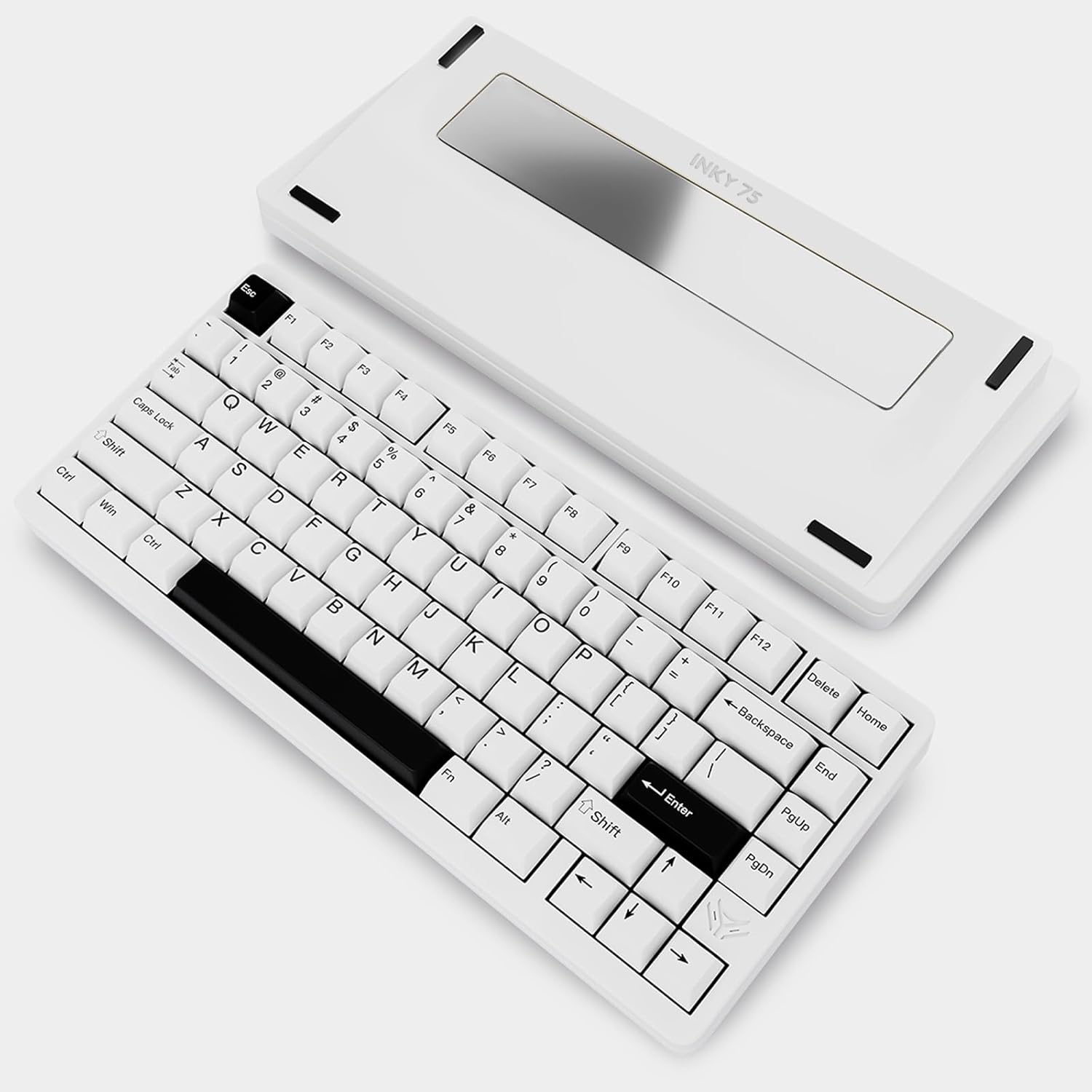
This image displays the ELECFOX INKY75 Mechanical Keyboard in its 'Almost White' color variant. The keyboard features a compact 75% layout, showcasing the alphanumeric keys, function row, and dedicated navigation cluster. The full aluminum chassis is visible, with the 'INKY 75' branding subtly placed on the bottom plate. The design highlights the clean aesthetic and robust build quality of the keyboard.
Instrucciones de funcionamiento
Disposición y funciones de las teclas
The INKY75 features a 75% layout, which includes the alphanumeric keys, a function row (F1-F12), and a compact navigation cluster (Delete, Home, PgUp, PgDn, End, and arrow keys). Standard modifier keys like Ctrl, Shift, Alt, and Fn are present.
VIA Compatibility
The INKY75 is compatible with the VIA web driver, allowing for extensive customization:
- Reasignación de teclas: Change the function of any key to suit your workflow or gaming preferences.
- Creación de macros: Program complex sequences of keystrokes into a single key for increased efficiency.
- Efectos de iluminación: Adjust and customize the RGB backlighting.
To use VIA, connect your keyboard via USB-C and access the VIA web application. No special software installation is required.
Iluminación RGB
The keyboard features south-facing RGB LEDs, ensuring optimal backlight visibility, especially with custom keycaps. You can customize lighting effects, colors, and modes through the VIA software to personalize your setup.
Mantenimiento
Limpieza
- Desconecte el teclado de todas las fuentes de alimentación antes de limpiarlo.
- Utilice un paño suave y sin pelusa ligeramente seco.ampLimpie con agua o una solución de limpieza suave las teclas y el chasis.
- Para una limpieza más profunda, utilice el extractor de teclas provisto para quitar las teclas y limpiar el polvo y los residuos de debajo con aire comprimido o un cepillo pequeño.
- Evite utilizar productos químicos agresivos o materiales abrasivos.
Conmutadores intercambiables en caliente
The INKY75 features a hot-swappable PCB, supporting both 3-pin and 5-pin mechanical switches. This allows you to easily change switches without soldering. To swap switches:
- Retire con cuidado la tecla utilizando el extractor de teclas.
- Use a switch puller (not included, but commonly available) to carefully extract the switch from the PCB.
- Alinee las clavijas del nuevo interruptor con los orificios de la placa de circuito impreso y presione firmemente hasta que encaje en su lugar. Asegúrese de que las clavijas no estén dobladas.
- Reemplace la tecla.
Solución de problemas
- El teclado no responde: Ensure the keyboard is charged and the correct connection mode (Bluetooth, 2.4GHz, or Wired) is selected. Try reconnecting the USB-C cable or re-pairing Bluetooth/2.4GHz.
- Claves que no se registran: Check if the switch is properly seated. If it's a hot-swappable switch, try removing and reinserting it.
- Problemas de conexión Bluetooth: Ensure the keyboard is in pairing mode and your device's Bluetooth is enabled. Try forgetting the device on your computer/phone and re-pairing.
- La iluminación RGB no funciona: Check VIA software settings for lighting control. Ensure the keyboard is powered on.
- Comportamiento inesperado: Try resetting the keyboard (refer to manufacturer's website or support for specific reset procedures if available).
Presupuesto
| Característica | Detalle |
|---|---|
| Dimensiones del producto | 12.6 x 5.51 x 1.57 pulgadas (12.6" de largo x 5.51" de ancho x 1.57" de alto) |
| Peso del artículo | 5.29 libras |
| Número de modelo del artículo | Tinta75 |
| Baterías | 1 batería no estándar (incluida) |
| Marca | ELECFOX |
| Dispositivos compatibles | Portátil, PC, teléfono inteligente, tableta |
| Tecnología de conectividad | 2.4GHz, Bluetooth 5.0, USB-C |
| Descripción del teclado | Juego de azar |
| Usos recomendados | Juego de azar |
| Características especiales | Full Aluminum CNC, Hot-Swappable, Rechargeable, VIA Programmable Macro |
| Color | Almost White |
| Retroiluminación del teclado | RGB |
| Estilo | Clásico |
Garantía y soporte
For warranty information and customer support, please refer to the ELECFOX official webSitio web o contacte directamente con el servicio de atención al cliente. Las condiciones específicas de la garantía pueden variar según la región y el vendedor.