Introducción
Thank you for choosing the Geevon Mini Digital Refrigerator Thermometer. This device is designed to provide accurate temperature readings for your refrigerator or freezer, ensuring safe storage of perishable goods. Its IP65 waterproof rating and user-friendly design make it suitable for various environments, from home kitchens to commercial settings.
Lea este manual detenidamente antes de utilizar el producto para garantizar un funcionamiento correcto y maximizar su vida útil.
Información de seguridad
- No exponga el dispositivo a temperaturas extremas fuera de su rango de funcionamiento (-30 °C a 50 °C / -22 °F a 122 °F).
- Mantenga el dispositivo alejado de campos magnéticos fuertes, que pueden afectar su precisión.
- No intente desmontar ni modificar el dispositivo. Esto anulará la garantía y podría causar daños.
- Deseche las baterías según la normativa local. No las incinere.
- Mantener fuera del alcance de los niños para evitar la ingestión accidental de piezas pequeñas o pilas.
Producto terminadoview
The Geevon Mini Digital Refrigerator Thermometer features a clear LCD display, simple controls, and versatile mounting options. It is designed for reliable temperature monitoring in various cold storage environments.
Características principales:
- Medición precisa de temperatura: Provides precise readings within -30°C to 50°C (-22°F to 122°F) with an accuracy of ±1°C (±2°F).
- Gran pantalla LCD: Easy-to-read screen shows current, maximum, and minimum temperatures.
- Diseño impermeable IP65: Ensures reliable performance in humid or wet conditions.
- Max/Min Temperature Record: Tracks the highest and lowest temperatures recorded since the last reset.
- Unidades conmutables: Cambie fácilmente entre Celsius (°C) y Fahrenheit (°F).
- Montaje versátil: Features a magnetic back, a stable kickstand, and a hanging hook for flexible placement.
- Operación sencilla: Three-button interface for power, unit change, and Max/Min reset.
Componentes:
- Digital Thermometer Unit
- Pila de botón CR2032 (preinstalada o incluida)
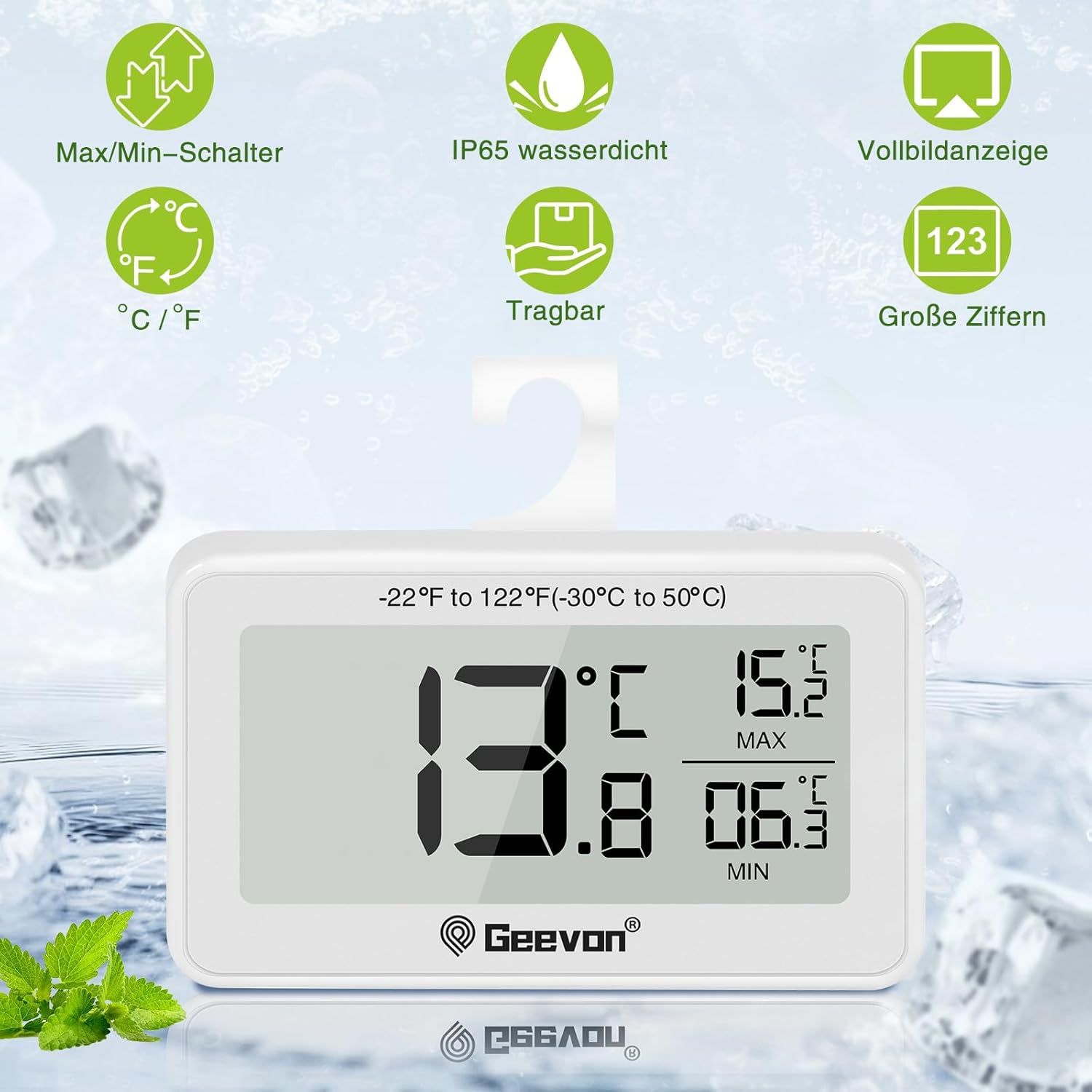
Figura 1: Frente view of the thermometer displaying current, maximum, and minimum temperatures. The display shows 13.8°C as current, 15.2°C as MAX, and 06.3°C as MIN. Icons for Max/Min switch, IP65 waterproof, full screen display, °C/°F switch, portable, and large digits are visible above the device.
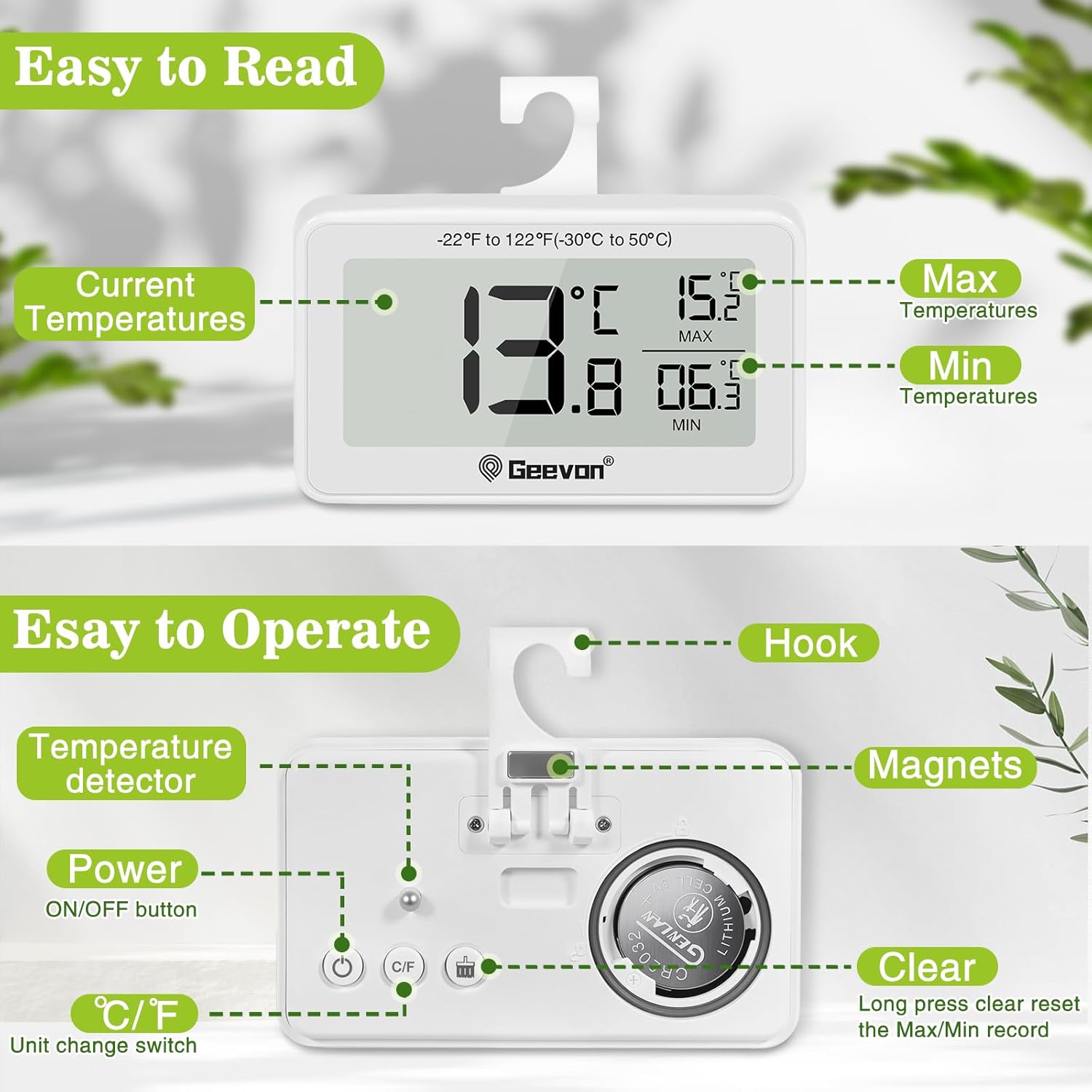
Figura 2: Atrás view of the thermometer highlighting the hook, magnets, temperature detector, ON/OFF button, °C/°F unit change switch, and the clear (Max/Min reset) button. The battery compartment for the CR2032 battery is also visible.
Configuración
1. Battery Installation/Activation:
The thermometer typically comes with a CR2032 button cell battery pre-installed. If the display is not active, you may need to remove a plastic insulation tab from the battery compartment or install a new battery.
- Localice el compartimento de la batería en la parte posterior del dispositivo.
- Use a coin or a small screwdriver to twist the battery cover counter-clockwise to open.
- Remove any plastic insulation tab if present.
- Inserte una nueva batería CR2032 con el lado positivo (+) hacia arriba.
- Vuelva a colocar la tapa de la batería y gírela en el sentido de las agujas del reloj para asegurarla.

Figure 3: Battery replacement guide. The image illustrates how to open and close the battery compartment by twisting the cover. It also notes that unscrewing is not required.
2. Initial Placement:
Once the battery is installed, the thermometer will power on automatically and display the current temperature. Place the thermometer in your desired location within the refrigerator or freezer.
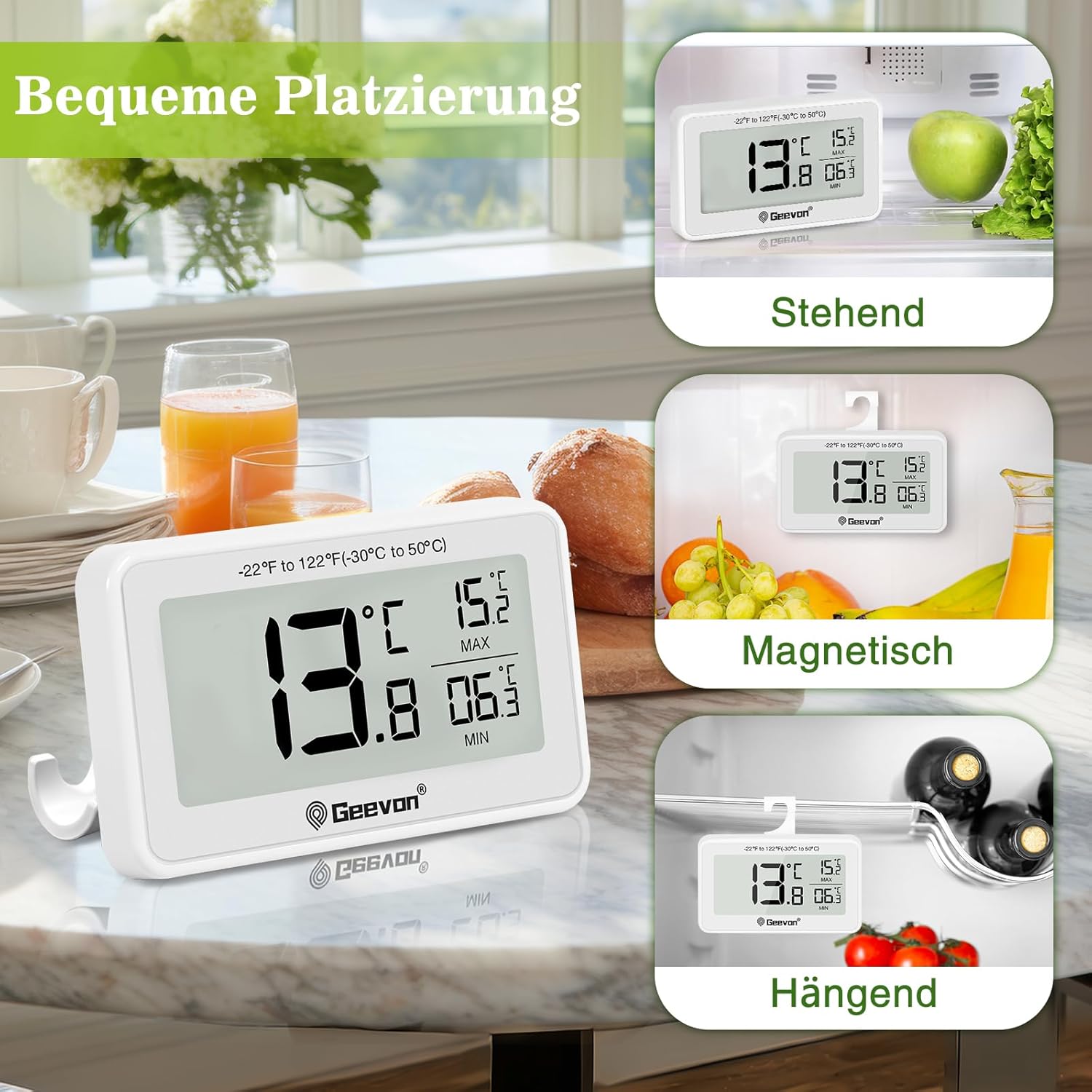
Figure 4: Versatile placement options for the thermometer, including standing on its kickstand, magnetic attachment to a metal surface, and hanging from a shelf or rack using its integrated hook.
Instrucciones de funcionamiento
Encendido/apagado:
- Presione el ENCENDIDO/APAGADO button (power symbol) on the back to turn the device on or off.
Unidades de temperatura de conmutación (°C/°F):
- Presione el ° C / ° F button on the back to toggle between Celsius and Fahrenheit display.
Viewing and Resetting Max/Min Temperatures:
The thermometer automatically records the maximum (MAX) and minimum (MIN) temperatures reached since the last reset. These values are displayed on the right side of the screen.
- Para restablecer los registros MAX/MIN, mantenga presionado el botón CLARO button (labeled "Clear" or with a reset icon) on the back for approximately 3 seconds. The MAX/MIN values will reset to the current temperature.
Mantenimiento
Limpieza:
- Limpie el termómetro con un paño suave yamp Paño. No utilice limpiadores abrasivos ni disolventes.
- The device is IP65 waterproof, meaning it is protected against low-pressure water jets from any direction. However, avoid submerging it completely in water for extended periods.

Figure 5: The thermometer demonstrating its IP65 waterproof capability, shown partially in water.
Reemplazo de batería:
When the display becomes dim or the device stops functioning, it's time to replace the battery. Refer to the "Battery Installation/Activation" section under Setup for detailed instructions.
Solución de problemas
| Problema | Posible causa | Solución |
|---|---|---|
| Sin pantalla o pantalla tenue | La batería está muerta o no está instalada correctamente. | Replace the CR2032 battery or ensure it is correctly inserted with the positive (+) side up. Remove any plastic insulation tab. |
| Lectura de temperatura incorrecta | Device placed too close to a heat source or air vent; battery low. | Relocate the thermometer to a central area of the refrigerator/freezer. Replace battery if low. Allow time for the temperature to stabilize. |
| Los botones no responden | Battery low; temporary software glitch. | Replace the battery. Try turning the device off and on again. |
| Los valores MÁX/MÍN no se restablecen | El botón CLEAR no se mantuvo presionado el tiempo suficiente. | Press and hold the CLEAR button for approximately 3 seconds until the values reset. |
Presupuesto
| Característica | Detalle |
|---|---|
| Número de modelo | 8707B-WH-4 |
| Rango de temperatura | -30 °C a 50 °C (-22 °F a 122 °F) |
| Precisión de temperatura | ±1 °C (±2 °F) |
| Resolución de pantalla | ± 0.1 ° C / ° F |
| Clasificación de impermeabilidad | IP65 |
| Fuente de poder | 1 x CR2032 Button Cell Battery (included) |
| Dimensiones del producto (L x An x Al) | 6.2 x 2.2 x 8.4 cm (2.44 x 0.87 x 3.31 pulgadas) |
| Peso del producto | 100 gramos (3.53 onzas) |
| Tipo de pantalla | LCD digital |
| Material | Acrilonitrilo butadieno estireno (ABS) |
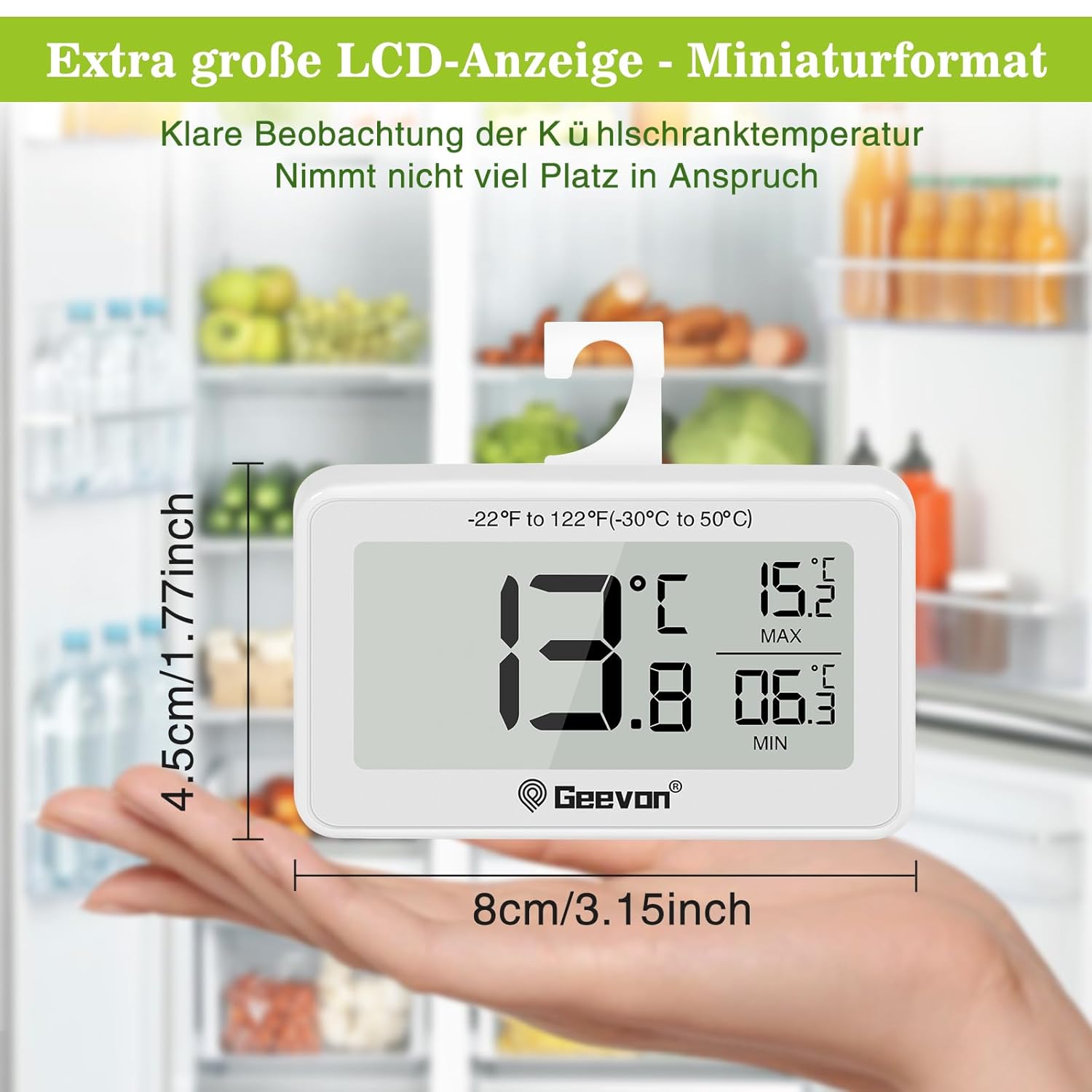
Figure 6: Dimensions of the thermometer, illustrating its compact size in hand.

Figure 7: The thermometer in a refrigerator setting, emphasizing its measurement accuracy of ±1°C (±2°F), resolution of ±0.2°F, and temperature range of -30°C to 50°C (-22°F to 122°F).
Garantía y soporte
Geevon is committed to providing high-quality products and customer satisfaction. While specific warranty details are not provided in this manual, Geevon offers a lifetime consulting service for its products.
If you encounter any questions or issues with your Geevon Mini Digital Refrigerator Thermometer, please contact Geevon customer support for assistance. Your feedback and experience are important to us.
For support, please refer to the contact information provided with your purchase or visit the official Geevon websitio.


