Introducción
This manual provides detailed instructions for the setup, operation, and maintenance of your Phenyx Pro PWB-4200 UHF Wireless Bodypack Transmitter. Please read this manual thoroughly before using the device to ensure proper function and longevity.
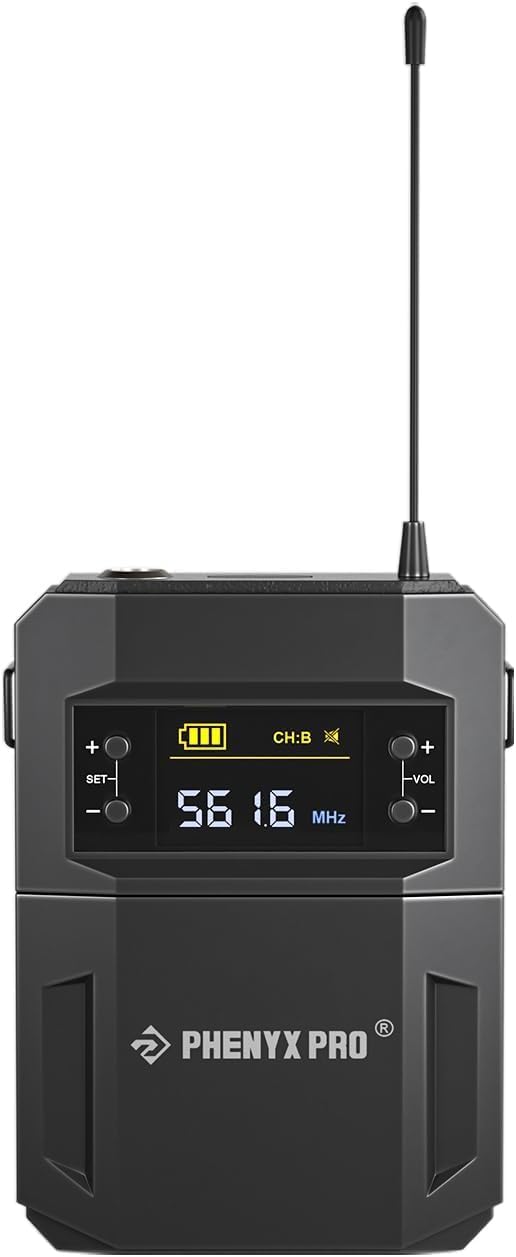
Figura 1: Frente view of the Phenyx Pro PWB-4200 UHF Wireless Bodypack Transmitter, showing the display screen and control buttons.
The PWB-4200 is a durable UHF wireless bodypack transmitter designed for reliable performance. It features a 3-pin mini XLR jack for compatibility with various lapel and headset microphones, offers 30 selectable frequencies within the 500MHz band, and provides an operating range of up to 200ft line of sight in open spaces. It is compatible with Phenyx Pro PTU-52, PTU-5200, and PTU-4200 wireless microphone systems.
Instrucciones de instalación
1. Instalación de la batería
The PWB-4200 requires batteries for operation (batteries are not included). To install:
- Locate the battery compartment on the bodypack transmitter.
- Abra la tapa del compartimento.
- Inserte las pilas necesarias, asegurándose de la polaridad correcta (+/-).
- Cierre bien la tapa del compartimento de la batería.
2. Conexión de un micrófono
The bodypack transmitter is equipped with a 3-pin mini XLR jack for connecting compatible microphones.
- Identify the 3-pin mini XLR connector on your lapel or headset microphone.
- Align the connector with the mini XLR jack on the top of the bodypack transmitter.
- Gently push the connector into the jack until it clicks into place, ensuring a secure connection.
3. Initial Power On and Control Overview

Figura 2: Diagram illustrating the controls of the PWB-4200 bodypack transmitter, including the ON/MUTE/OFF button, volume adjustment, and frequency selection buttons.
To power on the device, press and hold the power button (often labeled ON/MUTE/OFF) for 2 seconds. The display will illuminate, showing battery status, channel, and frequency. Familiarize yourself with the volume adjustment and frequency selection buttons as indicated in Figure 2.
Instrucciones de funcionamiento
1. Función de encendido/apagado y silencio
- Encendido: Mantenga pulsado el FUERZA Botón durante aproximadamente 2 segundos.
- Apagado: Mantenga pulsado el FUERZA Botón durante aproximadamente 2 segundos hasta que la pantalla se apague.
- Silenciar: Presione brevemente el FUERZA button during operation to mute or unmute the microphone. The display will indicate the mute status.
2. Ajuste del volumen
Utilice el VOL+ y vol- buttons to adjust the output volume of the bodypack transmitter. Adjust the volume to an appropriate level to avoid distortion and ensure clear audio transmission.
3. Frequency Selection and Channel Switching
The PWB-4200 offers 30 selectable frequencies. To switch channels and synchronize with your receiver:

Figura 3: Visual guide detailing the five steps to switch and lock the operating channel on the bodypack transmitter.
- Paso 1: Presione el FUERZA button for 2 seconds to turn on the transmitter.
- Paso 2: Presione el COLOCAR button for 3 seconds to enter channel switching mode. Continue pressing COLOCAR to cycle through available channels (e.g., from Channel A to Channel B).
- Paso 3: Observe the display to confirm the desired channel (e.g., Channel B) is selected.
- Paso 4: To lock your setting, turn off the transmitter by holding the FUERZA button. Then, simultaneously long press the COLOCAR y FUERZA botones juntos durante 3 segundos.
- Paso 5: Toque el COLOCAR button briefly to confirm the synchronization with your receiver.
Ensure your Phenyx Pro receiver is also set to the same frequency/channel for proper wireless communication.
Mantenimiento
- Limpieza: Use a soft, dry cloth to clean the exterior of the bodypack transmitter. Avoid using harsh chemicals or abrasive materials.
- Cuidado de la batería: Remove batteries if the device will not be used for an extended period to prevent leakage. Replace batteries promptly when the low battery indicator appears on the display.
- Almacenamiento: Store the bodypack in a cool, dry place away from direct sunlight and extreme temperatures.
- Manejo: Evite dejar caer el dispositivo o someterlo a impactos fuertes, ya que esto puede dañar los componentes internos.
Solución de problemas
| Problema | Posible causa | Solución |
|---|---|---|
| No hay sonido del micrófono |
|
|
| Interferencia o mala calidad de sonido |
|
|
| El transmisor no se enciende |
|
|
Presupuesto
| Modelo | PWB-4200 |
| Marca | Phenyx Pro |
| Compatibilidad | Phenyx Pro PTU-52, PTU-5200, PTU-4200 Wireless Microphone Systems |
| Tipo de conector | 3-Pin Mini XLR Jack |
| Banda de frecuencia | UHF (500MHz band) |
| Frecuencias seleccionables | 30 |
| Rango de operación | Up to 200ft line of sight (open space) |
| Peso del artículo | 4.4 libras |
| Dimensiones del paquete | 7.4 x 2.95 x 1.46 pulgadas |
| Fabricante | Phenyx Technology,LLC |
| Código Postal | 810164760548 |
Garantía y soporte
For detailed warranty information and technical support, please refer to the official Phenyx Pro website or contact Phenyx Technology,LLC directly. Contact information is typically available on the product packaging or the manufacturer's official support pages.
Fabricante: Phenyx Technology,LLC
Marca: Phenyx Pro
Websitio: Visit the Phenyx Pro Store on Amazon (para información general del producto)


