1. Introducción
Thank you for choosing the ProtoArc XKM01 Foldable Wireless Keyboard and Mouse Combo. This manual provides detailed instructions for setting up, operating, and maintaining your device. Please read this manual thoroughly before use to ensure optimal performance and longevity of your product.
2. Contenido del paquete
The ProtoArc XKM01 combo includes the following items:
- ProtoArc XKM01 Foldable Wireless Keyboard
- Ratón inalámbrico ProtoArc
- Carrying Hard Case
- Foldable Stand (for 4-11” devices)
- Cable de carga USB-C
- USB Receiver (stored in mouse)
- Manual de usuario

Figure 1: ProtoArc XKM01 Package Contents

Figure 2: Quality Portable Hard Case for ProtoArc XKM01
3. Producto terminadoview
3.1 Características del teclado
- Diseño de tamaño completo: 105-key design with dedicated function and number pads for comprehensive input.
- Diseño plegable: Profesional ultradelgadofile with a simple fold-and-go mechanism, featuring internal aluminum hinges tested for over 10,000 folds.
- Escritura silenciosa: Equipped with whisper-quiet scissor switches and low-profile llaves.
- Teclas de función multimedia: Dedicated keys for various multimedia controls.

Figure 3: Keyboard Durable Hinges
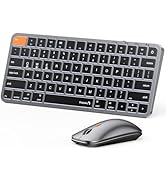
Figure 4: Keyboard Multimedia Function Keys
3.2 Características del ratón
- Diseño ultradelgado: Portable and compact for easy transport.
- DPI ajustable: 3 modes (1000/1600/2400) for precision control.
- Clic silencioso: 25dB micro-switches for silent operation.
- Conectividad multidispositivo: Supports 2.4G wireless, Bluetooth 1, and Bluetooth 2 connections.

Figure 5: Slim and Portable Mouse

Figure 6: Mouse Component Diagram
4. Configuración y conectividad
4.1 Configuración del teclado
- Despliegue el teclado: Gently unfold the keyboard until it lies flat.
- Encendido: Locate the power switch (usually on the side or back) and slide it to the 'ON' position.
- Seleccionar modo de conexión: The keyboard supports 2.4G wireless and two Bluetooth channels (BT1, BT2).
- 2.4G inalámbrico: Insert the USB receiver (found in the mouse's battery compartment) into your device's USB port. The keyboard should connect automatically.
- Conexión Bluetooth: Press and hold the 'Fn' key along with 'BT1' or 'BT2' key for 3 seconds until the indicator light flashes, indicating pairing mode. On your device, search for 'ProtoArc XKM01' in Bluetooth settings and connect.
- Dispositivos de conmutación: To switch between connected devices, simply press 'Fn' + 'BT1', 'Fn' + 'BT2', or 'Fn' + '2.4G' (if applicable).
4.2 Configuración del ratón
- Encendido: Deslice el interruptor de encendido en la parte inferior del mouse a la posición 'ENCENDIDO'.
- Seleccionar modo de conexión: The mouse supports 2.4G wireless and two Bluetooth channels (BT1, BT2).
- 2.4G inalámbrico: Ensure the USB receiver is plugged into your device. The mouse will connect automatically.
- Conexión Bluetooth: Press the mode switch button on the bottom of the mouse to cycle between BT1 and BT2. Hold the desired BT button for 3 seconds until the indicator light flashes. On your device, search for 'ProtoArc Mouse' in Bluetooth settings and connect.
- Dispositivos de conmutación: Press the mode switch button on the bottom of the mouse to switch between connected devices.

Figure 7: Multi-Device Connectivity Overview
5. Instrucciones de funcionamiento
5.1 Uso del teclado
- Teclas de función: The top row of keys (F1-F12) can be used as standard function keys or multimedia keys. Press Fn + Esc to toggle between these modes.
- Compatibilidad del sistema operativo: The keyboard is compatible with Windows, macOS, Chrome OS, iPadOS, and Android. Specific key functions may vary slightly depending on the operating system.
5.2 Uso del ratón
- Ajuste de PPP: Press the DPI switch button (usually near the scroll wheel) to cycle through 1000, 1600, and 2400 DPI settings.
- Funcionamiento silencioso: The mouse is designed for quiet clicking, suitable for various work environments.

Figure 8: Quiet Operation of Keyboard and Mouse
6. Carga
Both the keyboard and mouse are rechargeable via USB-C.
- Puerto de carga: Conecte el cable USB-C provisto al puerto de carga del dispositivo y a una fuente de alimentación USB.
- Indicador de carga: The indicator light will show charging status. It typically takes 2-3 hours for a full charge.
- Duración de la batería: A full charge provides approximately 150-200 days of standby time.

Figure 9: Type-C Charging for Keyboard and Mouse
7. Mantenimiento
- Limpieza: Utilice un paño suave y seco para limpiar las superficies del teclado y el ratón. Para la suciedad difícil, utilice un paño ligeramente seco.amp Se puede utilizar un paño, asegurándose de que no entre humedad en el dispositivo.
- Almacenamiento: When not in use, fold the keyboard and store it along with the mouse in the provided hard case to protect it from dust and damage.
- Evite condiciones extremas: No exponga los dispositivos a temperaturas extremas, luz solar directa o humedad alta.
8. Solución de problemas
8.1 Problemas de conectividad
- Dispositivo no conectado: Ensure both the keyboard and mouse are powered on and in the correct pairing mode (2.4G or Bluetooth). Check your device's Bluetooth settings to confirm it's discoverable and try re-pairing.
- Conexión intermitente: Ensure there are no obstructions between the devices and your computer. Move closer to your computer. Check battery levels.
8.2 Problemas al escribir y hacer clic
- Las teclas no responden: Check battery level. Ensure the keyboard is properly connected. Try restarting the keyboard and your device.
- Mouse Cursor Erratic: Clean the mouse sensor. Ensure the mouse is on a suitable surface. Adjust DPI settings if the cursor is too fast or slow.
9. Especificaciones
| Número de modelo | XKM01 |
| Tecnología de conectividad | Bluetooth, 2.4G USB |
| Dispositivos compatibles | Portátil, computadora personal, teléfono inteligente, tableta |
| Características especiales | Lightweight, Portable, Rechargeable, Tri-Fold |
| Peso del artículo | 1.96 libras (aprox. 0.89 kg) |
| Dimensiones del paquete | 12.99 x 6.42 x 2.13 pulgadas (aprox. 33 x 16.3 x 5.4 cm) |

Figura 10: Dimensiones del producto
10. Garantía y soporte
ProtoArc products come with a standard manufacturer's warranty. For detailed warranty information, product support, or technical assistance, please visit the official ProtoArc website or contact customer service using the information provided in the product packaging.
Política de devoluciones: This product is eligible for a refund/replacement within 30 days of purchase, as per Amazon's return policy.
11. Producto terminadoview Video
Video 1: ProtoArc XKM01 Foldable Keyboard and Mouse Combo Overview. This video demonstrates the product's features, including its foldable design, multi-device connectivity, and portability.