1. Instrucciones de seguridad importantes
Please read all safety instructions carefully before using this appliance. Failure to follow these instructions may result in electric shock, fire, or serious personal injury.
- Desenchufe siempre el ventilador antes de limpiarlo o realizar cualquier mantenimiento.
- No introduzca los dedos ni ningún objeto a través de la rejilla cuando el ventilador esté en funcionamiento.
- Asegúrese de que el ventilador esté colocado sobre una superficie estable y nivelada para evitar que se vuelque.
- Mantenga el cable de alimentación alejado de superficies calientes.
- No opere el ventilador con un cable o enchufe dañado.
- Este aparato es solo para uso en interiores.
2. Contenido del paquete
Verifique que todos los artículos estén incluidos en su paquete:
- 1 × Dreo Poly Fan (DR-HPF007S)
- 1 × Adaptador de corriente
- 1 × Remote Control (Battery included)
- 1 × Screw for Base
- 1 × Screwdriver for Base
3. Configuración y montaje
Follow these steps to assemble your DREO Smart Fan:
- Retire con cuidado todos los componentes del embalaje.
- Attach the fan body to the pedestal column.
- Secure the base to the bottom of the pedestal column using the provided screw and screwdriver.
- Attach the remote control holder to the pedestal column at a convenient height.
- Plug the power adapter into the fan and then into a power outlet.
Video: PolyFan Assembly and Clean
This video demonstrates the step-by-step assembly process and how to clean the PolyFan. It shows how to attach the base, secure the column, and connect the power adapter. It also covers disassembling parts for cleaning.
Video: Dreo HPF004S Installation Video
This video provides a visual guide for the installation of the Dreo HPF004S fan, which shares similar assembly steps with the DR-HPF007S model.
4. Instrucciones de funcionamiento
Your DREO Smart Fan offers multiple control methods and customizable settings for optimal comfort.
Métodos de control 4.1
- Controles táctiles: Use the intuitive touch panel on the fan's pedestal.
- Mando a distancia: Operate the fan from a distance with the included remote.
- DREO App: Connect via Wi-Fi for advanced features, scheduling, and voice control.
- Control de voz: Integrate with Alexa or Google Assistant for hands-free operation.
4.2 Fan Speeds and Airflow Modes
- 9 velocidades de ventilador: Adjust airflow intensity from a gentle breeze to powerful circulation.
- 6 Airflow Modes: Choose from Normal, Natural, Sleep, Auto, Custom, and Turbo modes to suit your preference.

Image: Fan Modes and Speeds
The fan's display shows the current speed and selected mode, offering 9 speed levels and 6 distinct airflow modes for personalized comfort.
4.3 Oscilación
- Oscilación 3D: Enjoy wide-area coverage with 150° horizontal and 120° vertical oscillation.
- Position-based Oscillation: (DREO app exclusive) The fan adjusts its airflow direction based on your movement within the room.

Image: 3D Oscillation
This image illustrates the fan's ability to oscillate both horizontally (150°) and vertically (120°), providing comprehensive air circulation.
Video: Dreo Smart Position-based Oscillation Fan TurboPoly Fan 707S
This video highlights the smart position-based oscillation feature of the fan, demonstrating how it tracks movement to maintain airflow.
4.4 Función de temporizador
Configure el ventilador para que se apague automáticamente después de un período específico:
- En el dispositivo: Hasta 8 horas.
- DREO App: Up to 12 hours for extended control.
4.5 Smart Features via DREO App
- Programación: Program the fan to turn on/off at specific times.
- Temperature Triggers: Set the fan to adjust speed based on ambient temperature.
- Widgets de escritorio: Quick access to fan controls from your smartphone home screen.
- Funcionamiento silencioso: Operates as low as 25dB for undisturbed sleep.
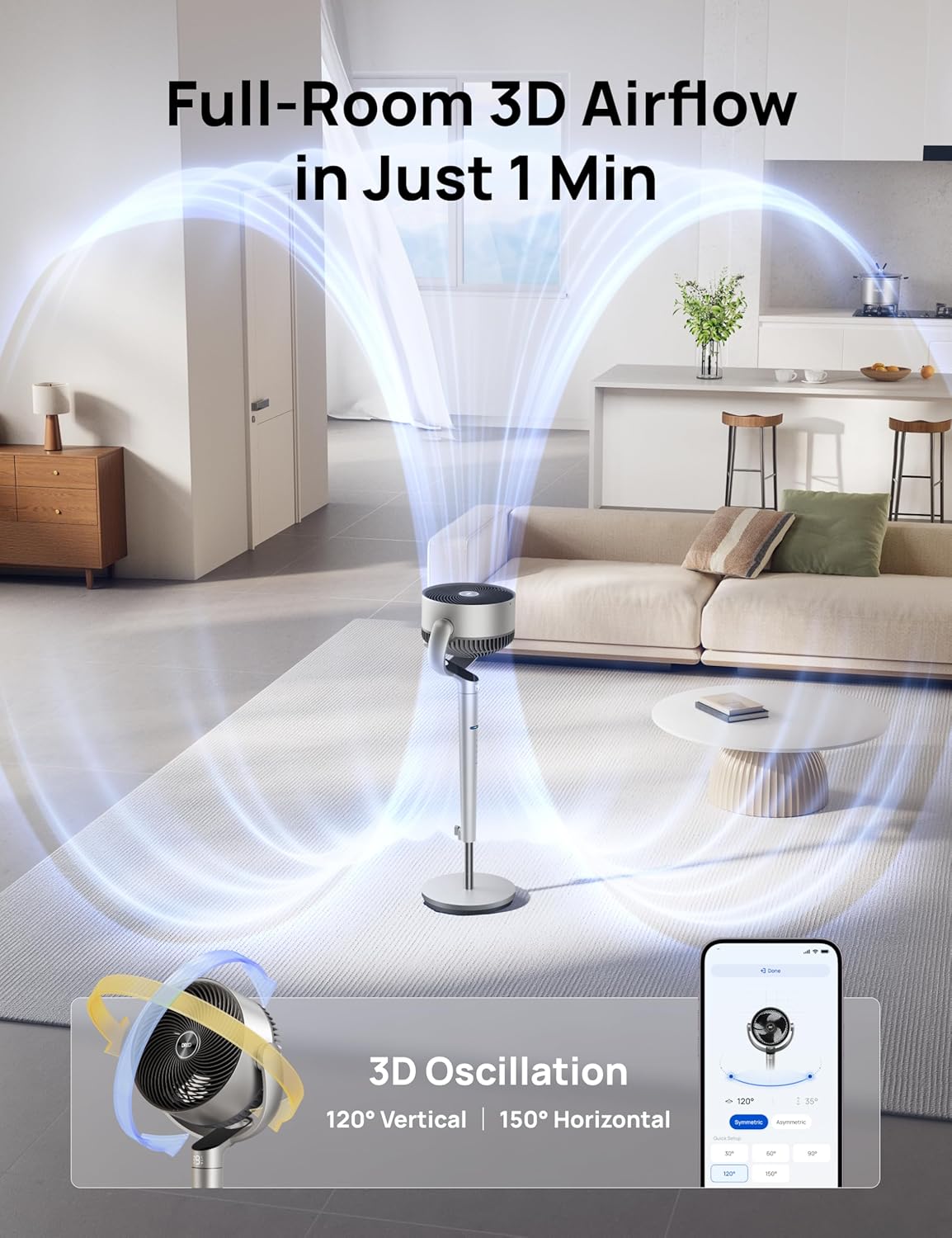
Image: App Control Interface
The DREO app provides comprehensive control over fan settings, including modes, speeds, oscillation, and smart features.
5. Limpieza y mantenimiento
La limpieza regular garantiza un rendimiento óptimo y la longevidad de su ventilador.
- Desenchufe siempre el ventilador antes de limpiarlo.
- Limpie las superficies exteriores con un paño suave, damp paño.
- To clean the fan blades, remove the front grille by rotating it counter-clockwise.
- Rotate the blade cap counter-clockwise to remove it, then carefully take out the blade from the shaft.
- Enjuague la tapa, la cuchilla y la rejilla con agua corriente. Seque bien todas las piezas antes de volver a montarlas.
- Reassemble the fan by reversing the disassembly steps.
Video: PolyFan Assembly and Clean
This video demonstrates how to disassemble the fan for cleaning and reassemble it, ensuring proper maintenance.
6. Solución de problemas
If you encounter any issues with your DREO Smart Fan, refer to the following common solutions:
- El ventilador no enciende: Ensure the power cord is securely plugged into a working outlet. Check if the power adapter is correctly connected to the fan.
- Flujo de aire débil: Verify that the fan speed is set to an appropriate level. Clean the fan blades and grilles to remove any dust buildup.
- Ruido inusual: Ensure all parts are assembled correctly and securely. Clean the fan to remove any foreign objects that might be causing noise.
- El control remoto no funciona: Check the battery in the remote control. Ensure there are no obstructions between the remote and the fan.
- Problemas de conexión Wi-Fi: Ensure your Wi-Fi network is 2.4GHz. Restart your router and the fan, then try connecting again via the DREO app.
7. Especificaciones
| Característica | Detalle |
|---|---|
| Marca | Dreo |
| Nombre del modelo | DR-HPF007S |
| Dimensiones del producto | 13.7" de profundidad x 8.7" de ancho x 42.52" de alto |
| Fuente de poder | DC |
| Quétage | 50 vatios |
| Volumentage | 120 voltios |
| Nivel de ruido | 25 decibelios |
| Capacidad de flujo de aire | 1404 pies cúbicos por minuto |
| Velocidad | 8 Meters per Second |
| Número de niveles de potencia | 9 |
| Características especiales | Adjustable Height, Adjustable Tilt, Oscillating, Remote Controlled, Timer, Wi-Fi, Voice Control |
| Método de control | Aplicación, Remoto, Toque |
| Uso en interiores y exteriores | Interior |
| Peso del artículo | 17.96 libras |
| Código Postal | 810142858212 |
8. Garantía y soporte
For product support, warranty information, or any inquiries, please contact Dreo customer service:
- Websitio: www.dreo.com
- Correo electrónico: soporte@dreo.com
- Teléfono: (888) 290-1688 (Mon-Fri, 9:00 AM-5:00 PM PST/PDT)


