1. Introducción
This manual provides essential instructions for the assembly, operation, and maintenance of your Arcade1Up Ms. Pac-Man Classic SE Arcade Machine. Please read this manual thoroughly before use to ensure proper function and safety.

Image 1: The Arcade1Up Ms. Pac-Man Classic SE Arcade Machine, featuring vibrant blue and pink artwork with Ms. Pac-Man characters.
2. Información de seguridad
Tenga en cuenta las siguientes precauciones de seguridad:
- Keep the arcade machine away from water or excessive moisture.
- Asegúrese de que el cable de alimentación no esté dañado ni desgastado.
- Do not attempt to open or modify the machine. Refer all servicing to qualified personnel.
- Coloque la máquina sobre una superficie estable y nivelada para evitar que se vuelque.
- Supervise a los niños durante su uso.
3. Contenido del paquete
Your Arcade1Up Ms. Pac-Man Classic SE Arcade Machine package includes:
- Arcade Machine Cabinet
- Adaptador de corriente
- Manual de instrucciones (este documento)
Note: An optional riser may be sold separately.
4. Configuración
4.1 Asamblea
The Arcade1Up Ms. Pac-Man Classic SE Arcade Machine requires some assembly. Follow the detailed instructions provided in the separate assembly guide included with your product. Ensure all screws and fasteners are securely tightened before use.

Image 2: Dimensions of the Arcade1Up Ms. Pac-Man Classic SE Arcade Machine, showing its height of 45.4 inches without a riser and indicating an optional riser is sold separately.
4.2 Conexión de alimentación
- Locate the power input port on the back of the arcade machine.
- Connect the provided power adapter to the machine.
- Conecte el adaptador de corriente a una toma de corriente estándar.
- Asegúrese de que el interruptor de encendido (si está presente) esté en la posición "APAGADO" antes de enchufarlo.
Vídeo 1: Un finalview of the Arcade1Up Ms. Pac-Man Classic SE Arcade Machine, demonstrating its features and setup in a home environment. This video is provided by the seller.
5. Instrucciones de funcionamiento
5.1 Encendido / Apagado
Locate the power switch on the control panel. Flip the switch to 'ON' to power on the machine. Flip to 'OFF' to power off.
5.2 Selección de juegos
Upon powering on, you will see a game selection menu. Use the joystick to navigate through the available games. Press the 'Start Game' button to select and launch your desired game.
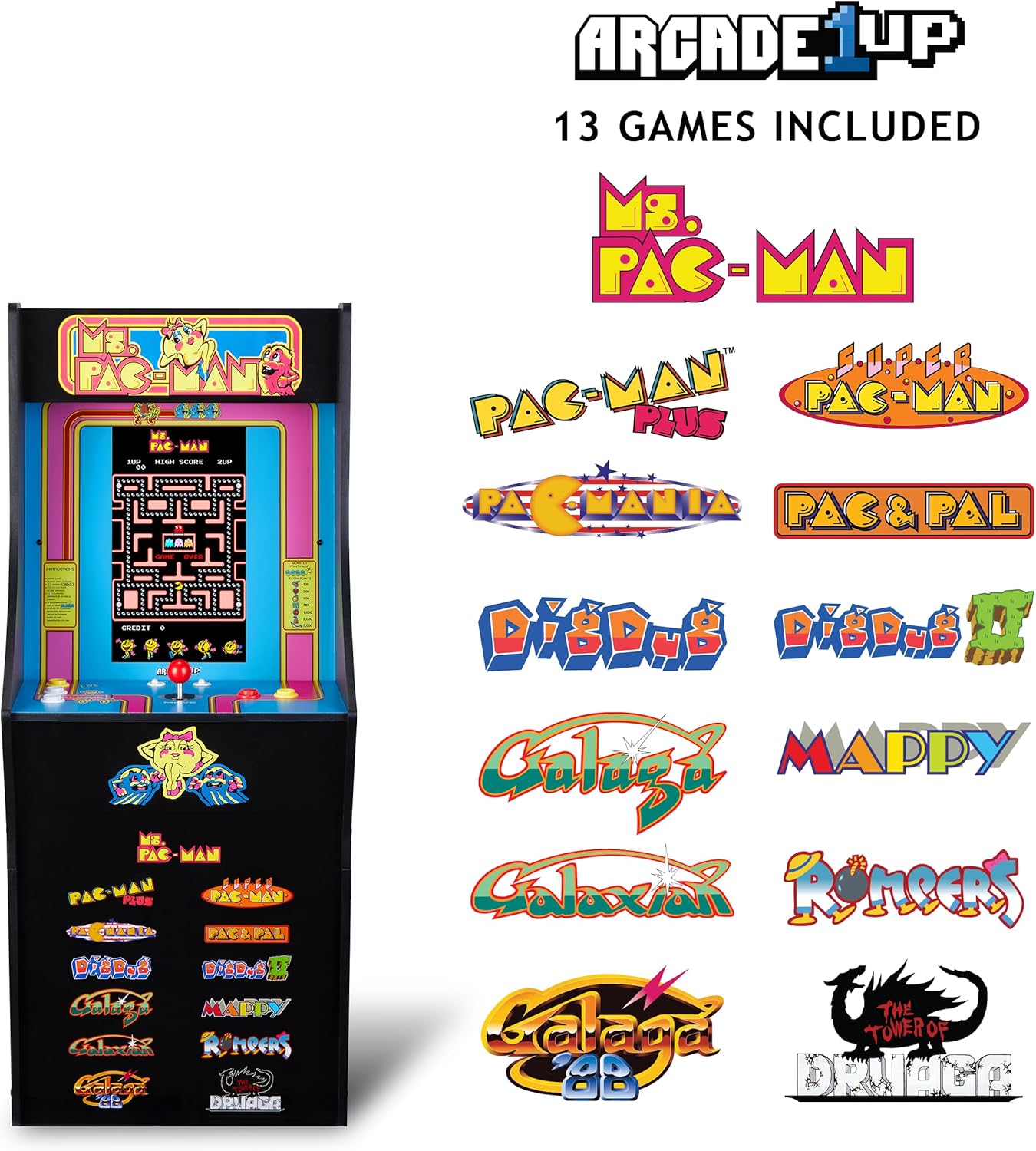
Image 3: The Arcade1Up Ms. Pac-Man Classic SE Arcade Machine displaying the list of 13 included games, such as Ms. Pac-Man, Dig Dug, and Galaga.
5.3 Controles
- Palanca de mando: Se utiliza para el movimiento de personajes en los juegos.
- Start Game Button: Initiates a game or confirms selection.
- Botones de acción: Used for specific in-game actions (e.g., firing, jumping).
- Control de volumen: Adjust the game sound level using the dedicated volume buttons.
- To return to the game selection menu or save a high score, hold the 'Start Game' button for 5 seconds.
- To reset a game, hold the 'Start Game' button for 5 seconds.

Imagen 4: Un detalle view of the control panel, highlighting the joystick, start game button, and other action buttons for gameplay.
5.4 Included Games
Your Arcade1Up Ms. Pac-Man Classic SE Arcade Machine includes 13 classic games:
- Sra. PAC-MAN
- PAC-MAN PLUS
- SUPER PAC-MAN
- PAC & PAL
- PACMANIA
- CAVAR CAVADO
- DIG DUG 2
- GALAGA
- GALAXIAN
- GALAGA 88
- MAPPY
- MONO
- THE TOWER OF DRUAGA
5.5 WiFi Leaderboards
Connect your arcade machine to WiFi to access online leaderboards and compete for high scores globally. Refer to the on-screen prompts for WiFi setup and leaderboard access.
Video 2: Gameplay footage of the Arcade1Up Ms. Pac-Man Classic SE Arcade Machine, showcasing the classic arcade experience and the online leaderboard feature. This video is provided by the seller.
6. Mantenimiento
- Limpieza: Utilice un paño suave y seco para limpiar el gabinete y la pantalla. Evite los limpiadores abrasivos y la humedad excesiva.
- Almacenamiento: Guarde la máquina en un lugar fresco y seco, alejado de la luz solar directa y de temperaturas extremas.
- Cable de alimentación: Inspeccione periódicamente el cable de alimentación para detectar signos de daño.
7. Solución de problemas
| Problema | Posible causa | Solución |
|---|---|---|
| La máquina no se enciende. | El cable de alimentación no está conectado, la toma de corriente no funciona. | Asegúrese de que el cable de alimentación esté bien enchufado. Pruebe la toma de corriente con otro dispositivo. |
| No hay sonido. | Volume turned down; speaker issue. | Check volume settings on the control panel. If problem persists, contact support. |
| El juego se congela o falla. | Fallo de software; error temporal. | Power off the machine, wait 10 seconds, then power back on. |
8. Especificaciones
| Característica | Detalle |
|---|---|
| Número de modelo | MSP-A-405629 |
| Dimensiones (alto x ancho x profundidad) | 45.4" x 17.35" x 45.4" (without riser) |
| Tamaño de pantalla | 15.6 Inches IPS Color Monitor |
| Número de juegos | 13 |
| Tipo de controlador | Palanca de mando |
| Fuente de poder | Eléctrico con cable |
| Material | Plástico, acrilonitrilo butadieno estireno (ABS) |
| Peso del artículo | 47 libras |
| Edad recomendada por el fabricante | 10 años y más |
| Conectividad | WiFi Leaderboards |
9. Garantía y soporte
For warranty information, technical support, or service inquiries, please refer to the official Arcade1Up webSitio web o contacte con el departamento de atención al cliente. Conserve su comprobante de compra para reclamaciones de garantía.
Soporte en línea: www.arcade1up.com


