Introducción
The CAS S2000 Jr is an NTEP certified electronic price computing scale designed for commercial use. This manual provides detailed instructions for the proper setup, operation, maintenance, and troubleshooting of your scale to ensure accurate and efficient performance. Please read this manual thoroughly before operating the device.
Información de seguridad
- Utilice siempre la báscula sobre una superficie estable y nivelada para garantizar lecturas precisas.
- No exponga la báscula a temperaturas extremas, humedad o luz solar directa.
- Evite dejar caer la báscula o someterla a impactos fuertes.
- Use only the provided AC adapter for power.
- Keep the scale clean and free from debris. Do not use abrasive cleaners.
- No intente desmontar ni reparar la báscula usted mismo. Contacte con personal de servicio técnico cualificado.
Contenido del paquete
Verifique que todos los artículos estén presentes en el paquete:
- CAS S2000 Jr Electronic Price Computing Scale Unit
- Plato de acero inoxidable
- Adaptador de corriente alterna
- Manual de usuario (este documento)
Configuración
1. Desembalaje y colocación
Carefully remove the scale from its packaging. Place the scale on a firm, level surface, away from vibrations, drafts, and direct heat sources. Ensure adequate space for operation and display visibility.
2. Installing the Platter
Gently place the stainless steel platter onto the scale's weighing platform. Ensure it sits securely and does not wobble.
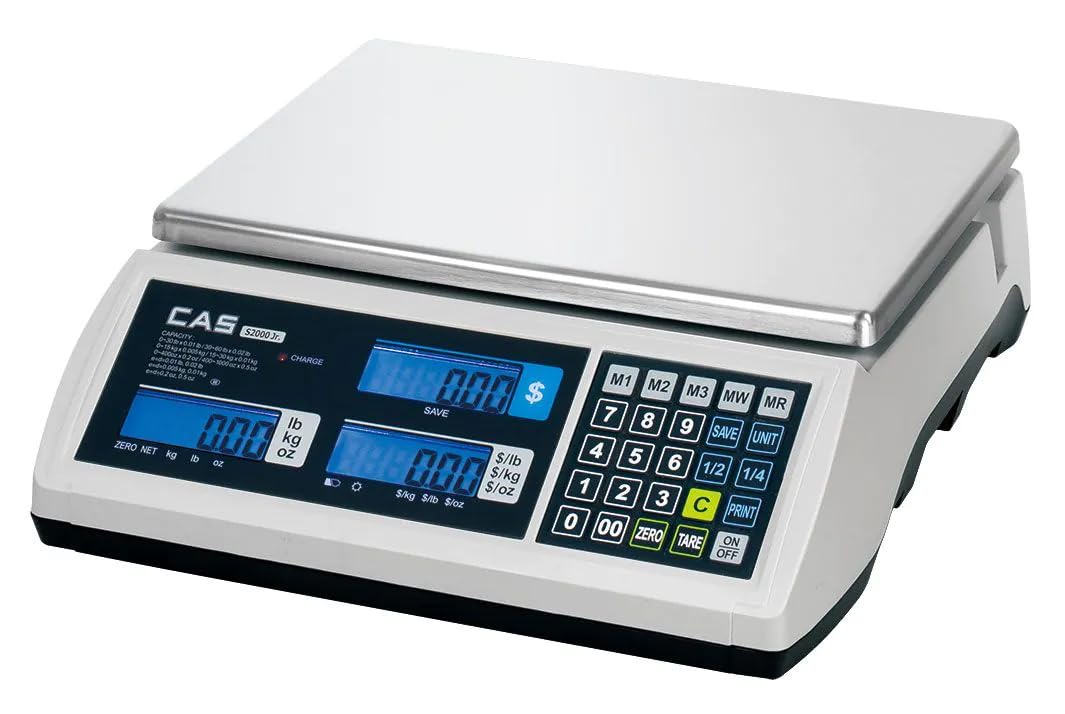
Image: The CAS S2000 Jr Electronic Price Computing Scale with its stainless steel platter correctly installed on the weighing platform. The scale features three blue backlit LCD displays on the front panel.
3. Conexión de alimentación
Connect the AC power adapter to the scale's power input port and then plug it into a standard electrical outlet. The scale also features a rechargeable battery, providing up to 200 hours of operation, allowing for portability and use in areas without immediate AC power. Ensure the battery is sufficiently charged before portable use.
4. Nivelando la escala
The scale must be perfectly level for accurate measurements. Adjust the leveling feet located at the bottom of the scale until the bubble in the level indicator (if present) is centered. If no bubble level is present, ensure the scale is stable and does not rock.
Instrucciones de funcionamiento
1. Encendido y apagado
Presione el [ENCENDIDO/APAGADO] button to turn the scale on. The display will perform a self-test and then show '0.00' or '0.000'. Press and hold the [ENCENDIDO/APAGADO] Botón para apagar la báscula.
2. Pesaje básico
Place the item to be weighed on the center of the stainless steel platter. The weight will be displayed on the left LCD screen. The scale supports measurements in pounds (lb), kilograms (kg), and ounces (oz). Use the [UNIDAD] button to cycle through the desired unit of measurement.
3. Función de tara
To subtract the weight of a container, place the empty container on the platter and press the [TARA] button. The display will reset to zero. You can then add the product to the container, and only the net weight of the product will be displayed.
4. Price Computing
The S2000 Jr features dual displays, allowing both the operator and customer to view the total price, weight, and unit price simultaneously. To compute the price:
- Place the item on the platter to get its weight.
- Enter the unit price using the numeric keypad. The unit price will appear on the middle display.
- The total price will be calculated and shown on the right display.
5. Price Look-Up (PLU) Options
The scale includes Price Look-Up (PLU) options to store and recall frequently used item prices. Refer to the detailed PLU programming section in the full manual for specific instructions on how to program and recall PLU items. This feature streamlines the retail experience by quickly recalling piece weight and cost.
Mantenimiento
1. Limpieza
Wipe the scale's surface and stainless steel platter with a soft, damp cloth. Use a mild detergent if necessary. Do not use abrasive cleaners, solvents, or immerse the scale in water. Ensure the scale is dry before use.
2. Cuidado de la batería
To maximize battery life, fully charge the scale before its first use and after extended periods of storage. Avoid completely draining the battery frequently. If the scale will not be used for a long time, charge it periodically to maintain battery health.
3. Almacenamiento
When not in use, store the scale in a clean, dry environment, away from extreme temperatures and direct sunlight. Protect it from dust and potential physical damage.
Solución de problemas
| Problema | Posible causa | Solución |
|---|---|---|
| La báscula no enciende | No power, discharged battery, faulty adapter | Check AC adapter connection. Charge the battery. Ensure power outlet is functional. |
| Lecturas inexactas | Not level, unstable surface, drafts, overload, dirty platter | Level the scale. Place on a stable surface. Avoid drafts. Do not exceed weight limit. Clean platter. |
| La pantalla muestra 'SOBRECARGA' | El peso excede la capacidad máxima | Retire el exceso de peso inmediatamente para evitar daños. |
| La pantalla está tenue o parpadea | Batería baja | Connect the scale to AC power and charge the battery. |
Presupuesto
| Característica | Descripción |
|---|---|
| Marca | CAS |
| Modelo | S2000 Jr |
| Límite de peso | 60 libras (27.2 kg) |
| Precisión de lectura | 0.005 libras (2g) |
| Tipo de pantalla | LCD con luz de fondo |
| Características especiales | Dual Displays, Price Look-Up Options, Rechargeable Battery, NTEP Certification |
| Fuente de poder | AC Adapter, Rechargeable Battery (up to 200 hours operation) |
| Color | Blanco |
| Factor de forma | Escala de contador |
| Código Postal | 850072510187 |
Información de garantía
CAS products are manufactured under strict quality control standards. This product is covered by a limited warranty against defects in materials and workmanship. The specific terms and duration of the warranty may vary by region. Please retain your proof of purchase for warranty claims. For detailed warranty information, refer to the warranty card included with your product or visit the official CAS websitio.
Atención al cliente
If you encounter any issues or have questions regarding your CAS S2000 Jr scale that are not addressed in this manual, please contact CAS customer support. You can typically find contact information (phone number, email, or support portal) on the official CAS websitio o en el embalaje del producto.


