Introducción
This manual provides essential information for the setup, operation, and maintenance of your WalkerFit M6 GPS Smart Watch. Designed for active users, this smartwatch features multi-satellite positioning, a durable full-metal body, long battery life, 5ATM water resistance, Bluetooth calling, and a vibrant 1.43-inch AMOLED screen. Please read this manual thoroughly to ensure proper usage and to maximize your device's capabilities.
Contenido del paquete
Verify that all items listed below are present in your product box:
- 1x WalkerFit M6 GPS Smart Watch
- 1x Magnetic Base Charger
- 1x Manual de usuario
- 1x Black Silicone Band
- 1x Camouflage Band

Image: Contents of the WalkerFit M6 GPS Smart Watch package, showing the watch, magnetic charger, user manual, and two interchangeable bands.
Configuración
Carga inicial
Before first use, fully charge your WalkerFit M6 GPS Smart Watch. Connect the magnetic charging cable to the charging points on the back of the watch and plug the USB end into a compatible power source. A full charge typically takes approximately 2.5 hours.
Encendido/apagado
- Para encender: Press and hold the power button (typically the top right button) until the screen illuminates.
- Para apagar: Mantenga presionado el botón de encendido, luego seleccione la opción “Apagar” en la pantalla.
Video: Instructions on how to power on the WalkerFit M6 GPS Smart Watch.
Descarga de aplicaciones y emparejamiento
To unlock the full functionality of your smartwatch, download the companion app. The app is compatible with both Android and iPhone devices.
- Scan the QR code provided in the user manual or on the watch screen to download the 'FitCloudPro' app from your device's app store.
- Abra la aplicación 'FitCloudPro' y siga las instrucciones en pantalla para crear una cuenta o iniciar sesión.
- Habilite Bluetooth en su teléfono inteligente.
- Within the app, navigate to the 'Device' section and select 'Add Device' or 'Scan for Device'.
- Select 'M6 GPS' from the list of available devices to initiate pairing. Confirm the pairing request on both your smartphone and the smartwatch.
Instrucciones de funcionamiento
Navegación y visualización
- Pantalla táctil: Desliza el dedo hacia la izquierda, derecha, arriba o abajo para navegar por los menús y funciones. Toca para seleccionar opciones.
- Botones físicos: The watch features multiple physical buttons for quick access to functions like Sport mode, Menu, and Back.
- Esferas de reloj personalizables: Change your watch face directly from the device settings or through the companion app to personalize your display.

Image: The 1.43-inch AMOLED display of the WalkerFit M6 GPS Smart Watch, showcasing different customizable watch faces and the Always-On Display feature.
Multi-Satellite GPS and Outdoor Features
The WalkerFit M6 GPS Smart Watch is equipped with advanced multi-system positioning (GPS, GLONASS, Galileo, BeiDou) for accurate outdoor tracking. It also includes a built-in compass, altimeter, and barometer.
- Route Recording: Activate a sports mode (e.g., hiking, trail running, cycling) to automatically record your route, distance, and other metrics using GPS.
- Advertencia ambiental: Utilize the compass for real-time directional guidance, the altimeter to track elevation changes, and the barometer to monitor air-pressure trends.

Image: A user wearing the WalkerFit M6 GPS Smart Watch while hiking, demonstrating its multi-satellite GPS tracking capabilities, compass, altimeter, and barometer features.
Modos deportivos y seguimiento de la salud
Access over 170 indoor and outdoor sports modes directly from your watch. The device continuously monitors various health metrics.
- Modos deportivos: Select your desired activity (e.g., running, cycling, swimming, strength training) to track performance data such as heart rate, calories burned, and duration.
- Daily Wellness: The watch provides all-day tracking for heart rate, SpO₂, sleep patterns, stress levels, and activity trends. Review detailed insights in the companion app.

Image: A user engaging in water sports while wearing the WalkerFit M6 GPS Smart Watch, highlighting its 5ATM waterproof rating and the availability of over 170 sports modes.
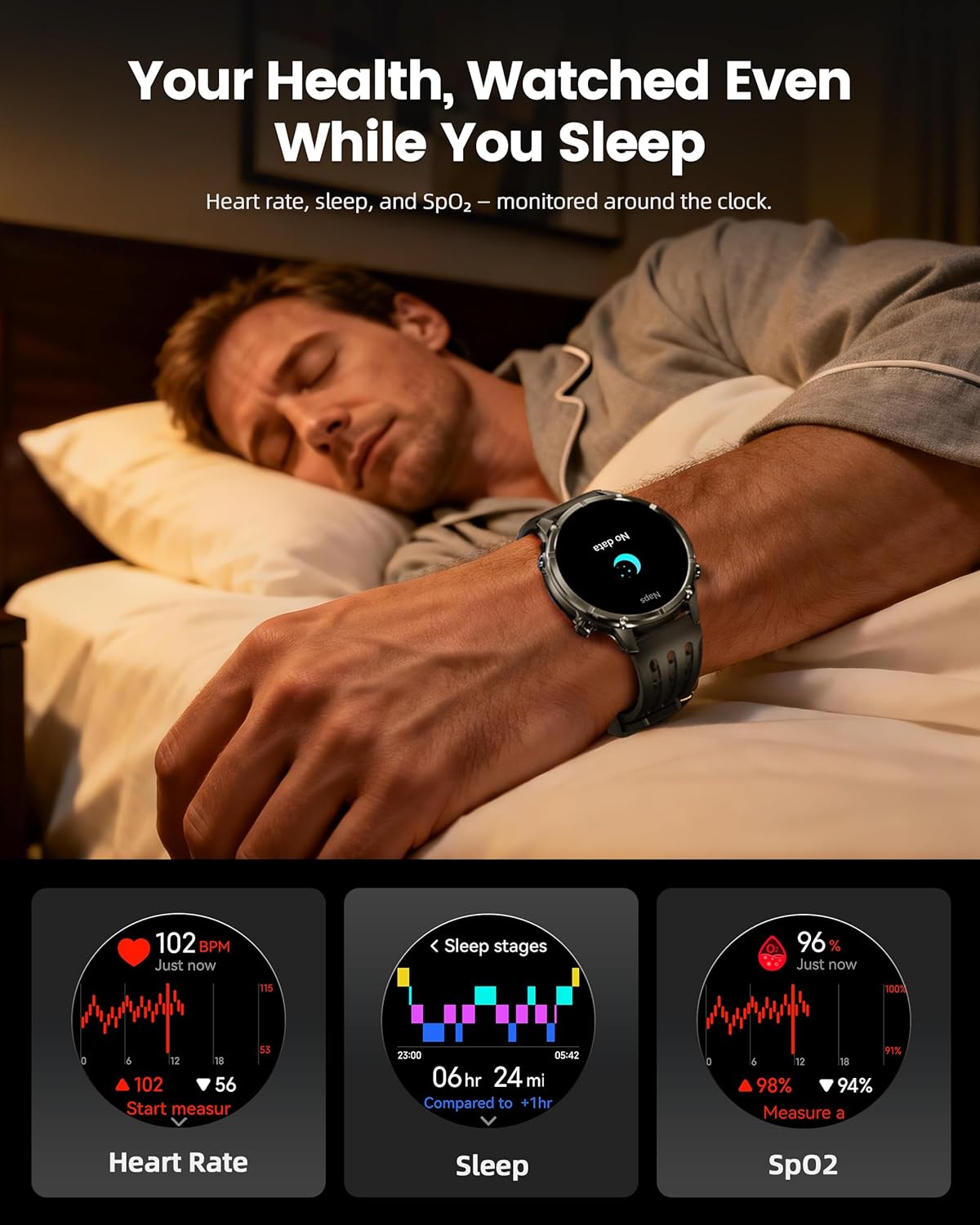
Image: The WalkerFit M6 GPS Smart Watch monitoring health metrics such as heart rate, sleep stages, and SpO₂ levels, even during sleep.
Llamadas Bluetooth y notificaciones inteligentes
Stay connected with Bluetooth calling and smart notifications directly on your wrist.
- Llamadas Bluetooth: Answer or place calls directly from your smartwatch when connected to your smartphone.
- Notificaciones: Receive alerts for SMS, email, and app notifications (e.g., WhatsApp, Facebook, InstagRAM).
- Herramientas adicionales: Access music control, weather updates, world clock, timer, alarm, calculator, flashlight, find-phone, and camera control.
Video: Demonstration of the smartwatch's communication functions, including Bluetooth calls and smart notifications.

Image: The WalkerFit M6 GPS Smart Watch showing smart notifications from various apps and its AI assistant capabilities for calls and messages.
Características claveview
Diseño y pantalla robustos
The WalkerFit M6 GPS Smart Watch is built with a durable full-metal zinc-alloy body and features a 1.43-inch AMOLED display with Always-On Display (AOD) functionality. The screen is designed for clear visibility even under strong sunlight and is protected with 8H hardness.
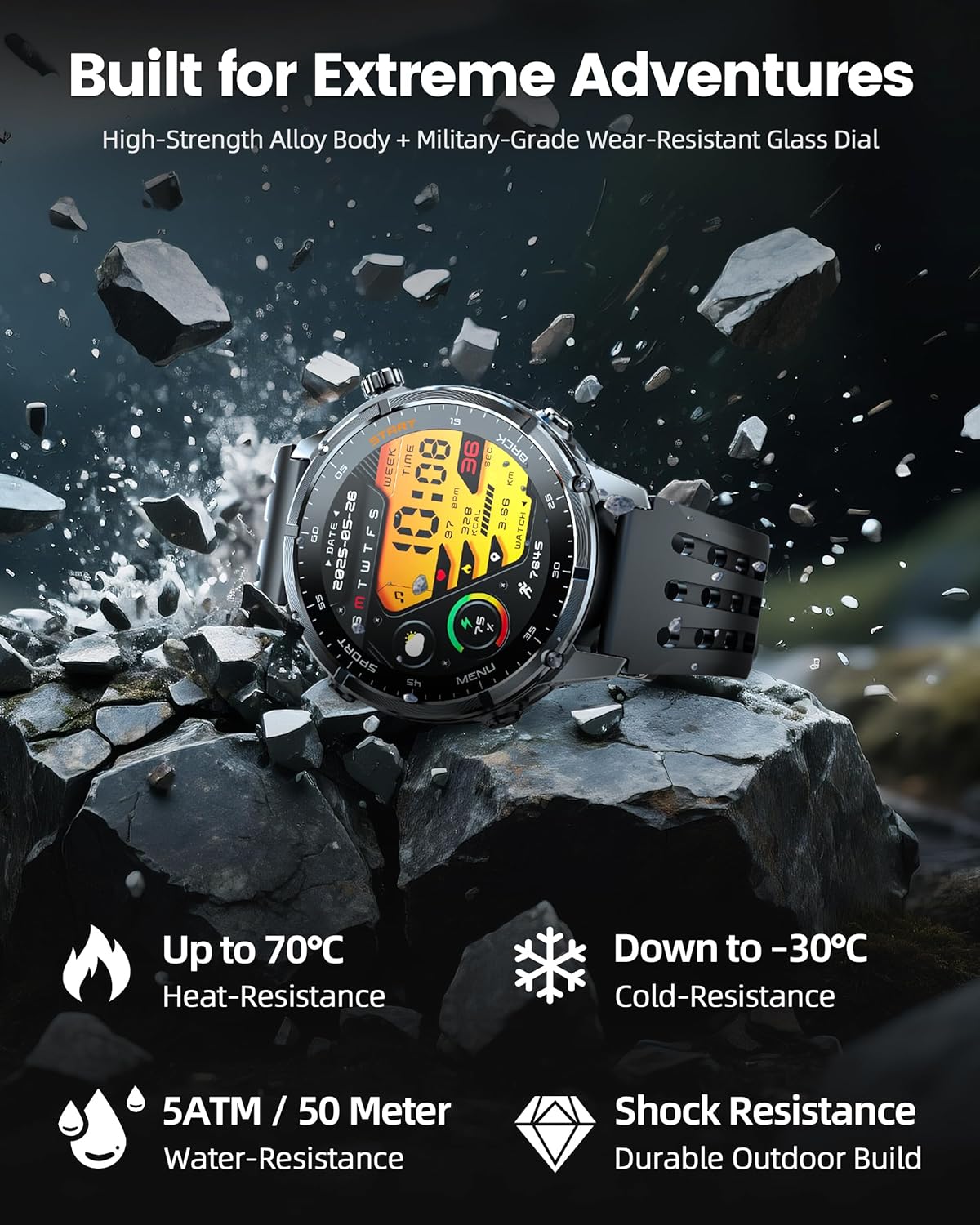
Image: The WalkerFit M6 GPS Smart Watch in a rugged outdoor setting, illustrating its high-strength alloy body, military-grade wear-resistant glass, and resistance to heat, cold, water, and shock.
Batería de larga duración
Equipped with a 520mAh battery, the smartwatch offers extended usage times:
- Up to 14 days for daily use.
- 7+ days during active outdoor training.
- Hasta 60 días en modo de espera.
Recharging to full capacity takes approximately 2.5 hours.

Image: The WalkerFit M6 GPS Smart Watch on its magnetic charger, emphasizing its 520mAh battery capacity and multi-day usage capabilities.
Mantenimiento
Limpieza y cuidado
- Regularly clean the watch and bands with a soft, damp paño.
- Avoid using harsh chemicals or abrasive materials that could damage the watch's finish or sensors.
- Asegúrese de que los contactos de carga estén limpios y secos antes de cargar para evitar la corrosión.
Resistencia al agua
The WalkerFit M6 GPS Smart Watch is rated 5ATM, making it suitable for swimming in pools, use in rainy weather, splashes, and sweat during workouts. It is not recommended for diving or high-pressure water activities.
Solución de problemas
- El reloj no se enciende: Ensure the watch is fully charged. If the issue persists, try connecting it to the charger for a few minutes before attempting to power on again.
- Problemas de emparejamiento: Confirm Bluetooth is enabled on your smartphone and the watch is within range. Restart both devices and try pairing again through the 'FitCloudPro' app.
- Inaccurate Heart Rate/SpO₂ Readings: Asegúrese de que el reloj esté bien ajustado a su muñeca, ni demasiado apretado ni demasiado suelto. Limpie el sensor de la parte trasera del reloj.
- Pérdida de señal GPS: Move to an open area away from tall buildings or dense foliage for better signal reception.
- Duración corta de la batería: Adjust display brightness, reduce the display duration, or disable features like Always-On Display if not needed to extend battery life.
Presupuesto
| Característica | Detalle |
|---|---|
| Número de modelo | GPS M6 |
| Mostrar | AMOLED de 1.43 pulgadas, resolución de 466 x 466 |
| Capacidad de la batería | 520 miliamp Horas (520 mAh) |
| Conectividad | Bluetooth |
| GPS | Built-in GPS (Multi-Satellite Positioning) |
| Resistencia al agua | 5 cajeros automáticos |
| Sistema operativo | Desgaste OS 1.1 |
| Peso del artículo | 4.8 onzas |
| Material | Full Metal Zinc-Alloy Body |
Garantía y soporte
For warranty information, technical support, or service inquiries, please refer to the contact details provided on the product packaging or visit the official WalkerFit webSitio. Conserve su recibo de compra como comprobante para reclamaciones de garantía.


