1. Producto terminadoview
The GIGABYTE B760M DS3H WIFI6E GEN5 is an M-ATX motherboard designed to support 14th and 13th Generation Intel Core Processors. It features an LGA 1700 socket and is built with a focus on performance and connectivity for modern computing needs.
Características principales:
- Zócalo Intel LGA 1700: Admite procesadores Intel Core de la serie 14.ª y 13.ª generación.
- Compatibilidad DDR5: Features Dual Channel DDR5 memory support across 4 DIMM slots.
- Diseño de potencia robusta: Equipped with a Hybrid 8+2+1 Phases Digital VRM Solution for stable power delivery.
- Conectividad de próxima generación: Includes PCIe 5.0, M.2 slots, and USB 3.2 Gen 2x2 Type-C ports.
- High-Speed Networking: Integrated Intel Wi-Fi 6E and 2.5GbE LAN for fast and reliable network connections.
- Características fáciles de usar: Incorporates Smart Fan 6 for advanced cooling control and Q-Flash Plus for BIOS updates without CPU, memory, or GPU installation.

Figura 1.1: De arriba hacia abajo view of the GIGABYTE B760M DS3H WIFI6E GEN5 motherboard, showing the LGA 1700 socket, DDR5 DIMM slots, PCIe slots, and M.2 slots.
2. Configuración e instalación
This section provides general guidelines for installing your GIGABYTE B760M DS3H WIFI6E GEN5 motherboard. Always refer to the detailed instructions provided with your CPU, cooler, and other components for specific installation steps.
2.1 Orden de instalación de los componentes
- Instalación de CPU: Carefully open the LGA 1700 socket lever, align the CPU with the triangular mark on the socket, place the CPU gently, and close the lever to secure it.
- Instalación del enfriador de CPU: Instale el disipador de CPU elegido según las instrucciones del fabricante. Asegúrese de aplicar correctamente la pasta térmica.
- Instalación de memoria (RAM): Insert DDR5 memory modules into the DIMM slots. For dual-channel operation, refer to the motherboard manual for recommended slot configurations (typically slots A2 and B2 first). Press firmly until the clips on both ends lock the module in place.
- Instalación de SSD M.2: Locate the M.2 slots on the motherboard. Insert the M.2 SSD at an angle and secure it with the provided screw or EZ-Latch mechanism.
- Instalación de la tarjeta gráfica (GPU): Insert your graphics card into the primary PCIe 5.0 x16 slot. Ensure it is fully seated and secured by the PCIe EZ-Latch.
- Conexión de la fuente de alimentación: Conecte el conector de alimentación ATX de 24 pines y el conector de alimentación de CPU de 8 pines de su fuente de alimentación a la placa base.
- Dispositivos SATA: Connect SATA data cables to your storage drives (HDDs/SSDs) and the SATA 6Gb/s ports on the motherboard.
- Conectores del panel frontal: Connect the case's front panel headers (power button, reset button, USB ports, audio jacks) to the corresponding pins on the motherboard. Refer to the motherboard's silkscreen labels for correct orientation.
- Instalación de antena: For Wi-Fi functionality, screw the included Wi-Fi antennas onto the rear I/O panel's antenna connectors (WiFi EZ-Plug).

Figure 2.1: Motherboard layout diagram highlighting key connectors such as USB ports, Wi-Fi antenna connectors, HDMI, DisplayPort, LAN, and audio jacks.
3. Instrucciones de funcionamiento
3.1 Arranque inicial y acceso al BIOS/UEFI
- Después de ensamblar el sistema, conecte un monitor, un teclado y un mouse.
- Encienda el sistema. Durante el proceso de arranque, presione repetidamente el botón DEL Tecla para ingresar a la utilidad de configuración BIOS/UEFI.
- In the BIOS/UEFI, you can configure boot order, enable/disable features, adjust fan speeds (Smart Fan 6), and monitor system status.
3.2 Instalación del controlador
- After installing your operating system, install the necessary drivers for the motherboard components.
- Drivers can be found on the official GIGABYTE website for your specific motherboard model. Key drivers include chipset, LAN, Wi-Fi, audio, and USB drivers.
3.3 BIOS Update with Q-Flash Plus
- The Q-Flash Plus feature allows you to update the BIOS without installing the CPU, memory, or graphics card.
- Descarga la última BIOS file de GIGABYTE websitio y cámbiale el nombre a GIGABYTE.bin.
- Copiar el BIOS renombrado file to a USB flash drive (FAT32 format).
- Inserte la unidad flash USB en el puerto USB Q-Flash Plus designado en el panel de E/S trasero.
- With the power supply connected and turned on (but the system off), press the Q-Flash Plus button. The LED will flash, indicating the update process. Wait until the LED stops flashing.
4. Mantenimiento
El mantenimiento regular ayuda a garantizar la longevidad y el rendimiento óptimo de la placa base y el sistema.
- Eliminación de polvo: Periodically clean dust from inside your computer case, especially from heatsinks, fans, and motherboard surfaces, using compressed air. Ensure the system is powered off and unplugged before cleaning.
- Actualizaciones del BIOS: Keep your BIOS updated to the latest version to benefit from performance improvements, bug fixes, and support for new hardware. Use the Q-Flash Plus feature or the BIOS utility.
- Actualizaciones de controladores: Revise periódicamente el GIGABYTE website for updated drivers for your motherboard's components.
- Inspección física: Occasionally inspect all cable connections (power, SATA, front panel) to ensure they are secure.
5. Solución de problemas
Esta sección aborda problemas comunes que podrías encontrar.
5.1 Problemas comunes y soluciones
- No Power / System Does Not Turn On:
- Ensure the power supply is connected to the motherboard (24-pin ATX and 8-pin CPU) and the wall outlet.
- Check if the power supply switch is in the ON position.
- Verifique que el cable del botón de encendido del panel frontal esté conectado correctamente a la placa base.
- No Display / No POST (Power-On Self-Test):
- Confirm that the monitor is connected to the graphics card (or integrated graphics if applicable) and powered on.
- Reseat the RAM modules firmly in their slots. Try booting with only one RAM module.
- Reseat the graphics card in its PCIe slot. Ensure any required PCIe power cables are connected to the GPU.
- Clear the CMOS by removing the CMOS battery for 5-10 minutes or using the Clear CMOS jumper (refer to the full manual for location).
- El sistema operativo no arranca:
- Check the boot order in the BIOS/UEFI to ensure your primary storage drive is selected.
- Verify that the SATA data and power cables are securely connected to your storage drive.
- If using an M.2 SSD, ensure it is properly seated and detected in the BIOS.
- Problemas de conectividad de red:
- For wired LAN, ensure the Ethernet cable is securely connected and the LAN driver is installed.
- For Wi-Fi, ensure the antennas are properly attached to the WiFi EZ-Plug connectors and the Wi-Fi driver is installed.
- Verifique la configuración de red en su sistema operativo.
If issues persist, consult the comprehensive GIGABYTE user manual or contact technical support.
6. Especificaciones técnicas
| Característica | Detalle |
|---|---|
| Marca | GIGABYTE |
| Nombre del modelo | B760M DS3H WIFI6E GEN5 |
| Zócalo de CPU | LGA 1700 |
| Procesadores compatibles | 14th, 13th Gen Intel Core Series Processors |
| Conjunto de chips | Conjunto de chips Intel B760 Express |
| Tecnología de memoria RAM | DDR5 |
| Slots de memoria | 4 x DDR5 DIMM sockets (Dual Channel) |
| Max Memory Speed | Up to 5600 MHz (O.C.) |
| Ranuras PCIe | 1 x PCIe 5.0 x16 slot, 2 x PCIe 3.0 x1 slots |
| Conectores M.2 | 2 x M.2 connectors (PCIe 4.0 x4) |
| Puertos SATA | 4 x conectores SATA 6Gb / s |
| Puertos USB (traseros) | 1 x USB 3.2 Gen 2x2 Type-C, 1 x USB 3.2 Gen 2, 2 x USB 3.2 Gen 1, 4 x USB 2.0/1.1 |
| Redes | Intel Wi-Fi 6E, LAN de 2.5 GbE |
| Audio | Realtek Audio CODEC (High Definition Audio) |
| Salidas de video | 1 x HDMI, 1 x DisplayPort (requires CPU with integrated graphics) |
| Factor de forma | Micro ATX (M-ATX) |
| Dimensiones (LxAnxAl) | 8.82 x 8.82 x 1 pulgadas |
| Peso del artículo | 2 libras |
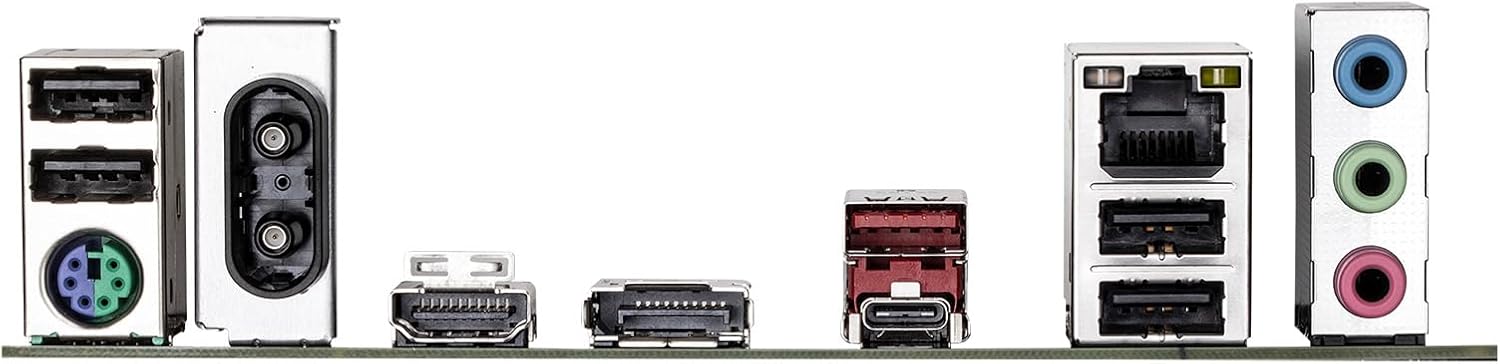
Figure 6.1: Rear I/O panel showing various ports including USB, LAN, Wi-Fi antenna connectors, HDMI, DisplayPort, and audio jacks.
7. Información de garantía
GIGABYTE products are covered by a limited warranty. For detailed and up-to-date warranty terms, conditions, and registration procedures, please refer to the official GIGABYTE website or the warranty card included with your product. Warranty periods may vary by region and product type.
8. Soporte técnico
For technical assistance, driver downloads, BIOS updates, FAQs, and further product information, please visit the official GIGABYTE support websitio:
Before contacting support, please have your motherboard model name (B760M DS3H WIFI6E GEN5) and serial number ready.


