Introducción
The XIAOMI Smart Camera C302 is an indoor security camera designed to provide comprehensive home monitoring. It features 2K UHD resolution, full-color night vision, and advanced AI detection capabilities for humans, pets, and baby cries. The camera offers 360° panoramic viewing, Wi-Fi 6 connectivity, and two-way audio communication. Enhanced privacy is ensured through a physical lens shield and a financial-grade security chip. This manual provides instructions for setting up, operating, maintaining, and troubleshooting your camera.
¿Qué hay en la caja?
Verifique que todos los componentes estén presentes en su paquete:
- Cámara inteligente XIAOMI C302
- Manual de instrucciones
- Adaptador de corriente
Producto terminadoview
Familiarícese con los componentes de la cámara.
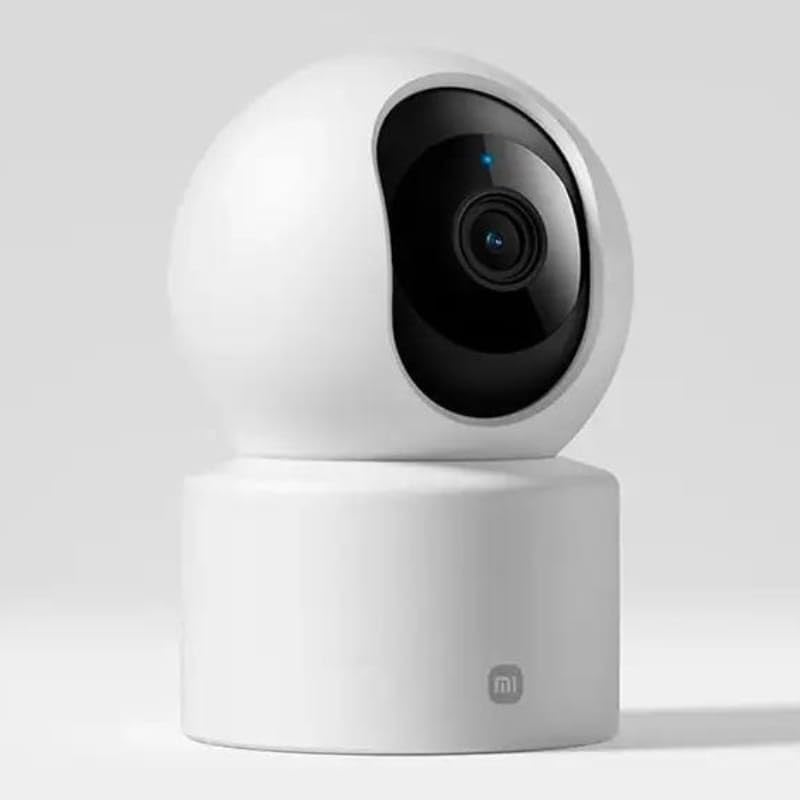
Figura 1: Frente view de la cámara, resaltando la lente.
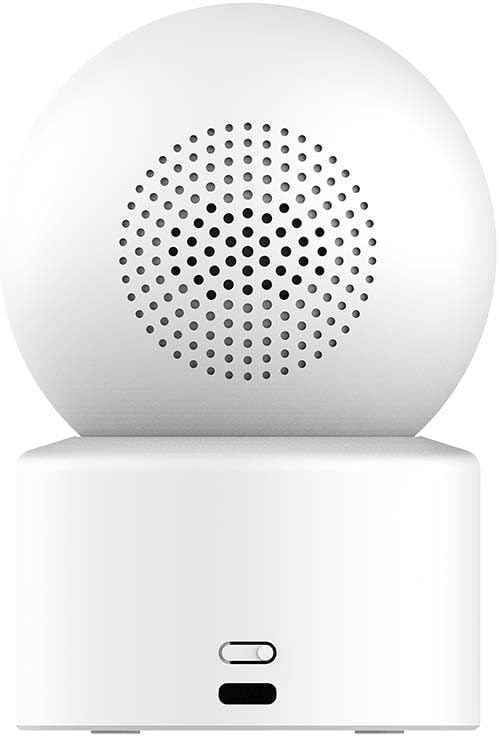
Figura 2: Atrás view of the camera, showing the speaker and power input.

Figure 3: The camera's physical lens shield mechanism.
Configuración
- Encendido: Connect the provided power adapter to the camera's power port and plug it into an electrical outlet. The camera will power on and initiate its startup sequence.
- Descargar la aplicación Xiaomi Home: Download and install the "Xiaomi Home" app on your smartphone from your device's app store.
- Agregar dispositivo: Open the Xiaomi Home app, log in or create an account, and follow the in-app instructions to add the XIAOMI Smart Camera C302. This typically involves scanning a QR code on the camera or selecting it from a list of nearby devices.
- Conexión Wi-Fi: Connect the camera to your home Wi-Fi network (2.4GHz or 5GHz, Wi-Fi 6 compatible) through the app. Ensure your Wi-Fi signal is strong in the camera's intended location.
- Instalación de la tarjeta MicroSD (opcional): For local storage, insert a compatible MicroSD card (8GB to 256GB, not included) into the designated slot on the camera. Format the card via the Xiaomi Home app if prompted.
- Colocación: Place the camera on a flat surface such as a tabletop. Ensure it has a clear view del área que desea monitorear.
Instrucciones de funcionamiento
Using the Xiaomi Home App
The Xiaomi Home app is the primary interface for controlling and managing your camera.
- Vivir View: Acceda a la transmisión de vídeo en tiempo real desde su cámara.
- Control de giro e inclinación: Use the app to remotely rotate the camera 360° horizontally and 107° vertically to adjust the viewángulo de ing.
- Audio bidireccional: Utilice el micrófono y el altavoz integrados para la comunicación bidireccional.
- Grabación y reproducción: View comida grabadatage stored on the MicroSD card or cloud service (subscription may be required).
- Escudo de privacidad: Activate the physical lens shield through the app to retract the lens into the camera body, blocking the view para la privacidad.
Funciones de detección inteligente
The camera utilizes local AI for various detection functions:
- Human Detection & Tracking: Receive alerts when a human is detected and the camera can track their movement.
- Detección de mascotas: Get notifications for pet activity (cats/dogs).
- Baby Cry Detection: Alerts are sent when a baby's cry is detected.
- Virtual Fence & Custom Zones: Define specific areas for monitoring and receive alerts when activity occurs within these zones.
- Detección de sonido anormal: The camera can detect unusual sounds like glass breaking.
Visión nocturna
La cámara ofrece dos modos de visión nocturna:
- Visión nocturna a todo color: In low-light conditions, the high-sensitivity sensor enables extended full-color imaging.
- Visión nocturna en blanco y negro: In complete darkness, six non-glow infrared illuminators provide clear black and white footage.
Integración de control por voz
The camera is compatible with Amazon Alexa and Google Assistant. Link your Xiaomi Home account to these services to control the camera using voice commands, such as viewing vivir footage en pantallas inteligentes compatibles.
Mantenimiento
- Limpieza: Utilice un paño suave y seco para limpiar la lente y el cuerpo de la cámara. Evite usar limpiadores líquidos o materiales abrasivos.
- Actualizaciones de firmware: Regularly check for and install firmware updates through the Xiaomi Home app to ensure optimal performance and security.
- Gestión de tarjetas MicroSD: Repita periódicamenteview and manage recordings on your MicroSD card. Format the card through the app if performance degrades or storage is full.
Solución de problemas
- La cámara no se conecta al Wi-Fi:
- Ensure the camera is within range of your Wi-Fi router. Verify your Wi-Fi password is correct. Try restarting both the camera and your router. Ensure your Wi-Fi network is 2.4GHz or 5GHz and compatible with Wi-Fi 6 standards.
- Mala calidad de imagen:
- Check the camera lens for dirt or smudges and clean it gently. Ensure adequate lighting in the monitored area. Verify your internet connection speed is sufficient for streaming 2K video.
- No detection alerts:
- Confirm that detection settings (human, pet, baby cry, virtual fence) are enabled in the Xiaomi Home app. Adjust sensitivity settings if necessary. Ensure the camera's view no está obstruido.
- El audio bidireccional no funciona:
- Check microphone and speaker permissions for the Xiaomi Home app on your smartphone. Ensure the camera's volume is not muted in the app.
- La cámara no responde:
- Unplug the power adapter, wait 10 seconds, and plug it back in to restart the camera. If the issue persists, a factory reset may be required (refer to the Xiaomi Home app for instructions).
Presupuesto
| Nombre del modelo | Cámara inteligente Xiaomi C302 |
| Número de modelo | MBC28 |
| Uso en interiores y exteriores | Interior |
| Resolución de captura de video | 2K (resolución fija efectiva de 3 MP) |
| Protocolo de conectividad | Wi-Fi (Wi-Fi 6 compatible) |
| Fuente de poder | Eléctrico con cable (5 V, 5 W) |
| Tipo de montaje | Montaje de mesa |
| Rango de movimiento horizontal y vertical | 360 ° Horizontal, Vertical ° 107 |
| Visión nocturna | Full-Color (low light), Black & White (IR) |
| Opciones de almacenamiento | MicroSD Card (8-256GB, not included), Cloud Service |
| Compatibilidad con hogares inteligentes | Amazon Alexa, Asistente de Google |
| Dimensiones (L x An x Al) | 3.07 x 2.99 x 4.53 pulgadas |
| Peso del artículo | 0.34 kilogramos (12 onzas) |
Información de garantía
Warranty terms and conditions for the XIAOMI Smart Camera C302 are typically provided with your purchase documentation or can be found on the official XIAOMI webSitio web. Conserve su comprobante de compra para reclamaciones de garantía.
Apoyo
For further assistance, please refer to the help section within the Xiaomi Home app or visit the official XIAOMI support website. You may also find frequently asked questions and additional resources there.


