1. Introducción
This manual provides essential information for setting up, operating, maintaining, and troubleshooting your HP EliteDesk 800 G9 Mini Desktop. Please read these instructions carefully before using your device to ensure optimal performance and longevity.
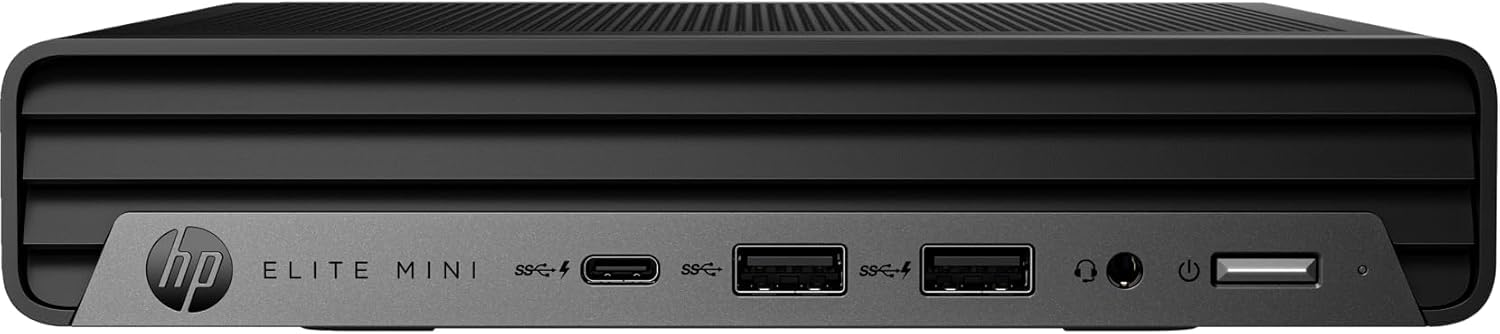
Figure 1: HP EliteDesk 800 G9 Mini Desktop
The HP EliteDesk 800 G9 Mini Desktop is a compact and powerful computing solution designed for efficiency. It features an Intel 12th Generation Core i5-12500T (6-Core) processor, 16GB of RAM, and a 256GB PCIe SSD, running on Windows 11 Pro. Integrated Intel WiFi 6 AX211 and Bluetooth provide robust wireless connectivity.
2. ¿Qué hay en la caja?
Upon unboxing your HP EliteDesk 800 G9 Mini Desktop, verify that all the following components are included:
- HP EliteDesk 800 G9 Mini Desktop PC
- Adaptador de corriente HP OEM de 90 W
- Teclado con cable
- Ratón con cable
- Documentación (Guía de inicio rápido, Información de seguridad)
3. Producto terminadoview
3.1 Panel frontal

Figure 2: Front Panel Ports and Features
- 1 Conector de auriculares
- 1 USB SuperSpeed Tipo-A con velocidad de señalización de 10 Gbps
- 1 USB SuperSpeed tipo A con velocidad de señalización de 10 Gbps (carga)
- 1 SuperSpeed USB Tipo-C con velocidad de señalización de 20 Gbps
3.2 Panel trasero
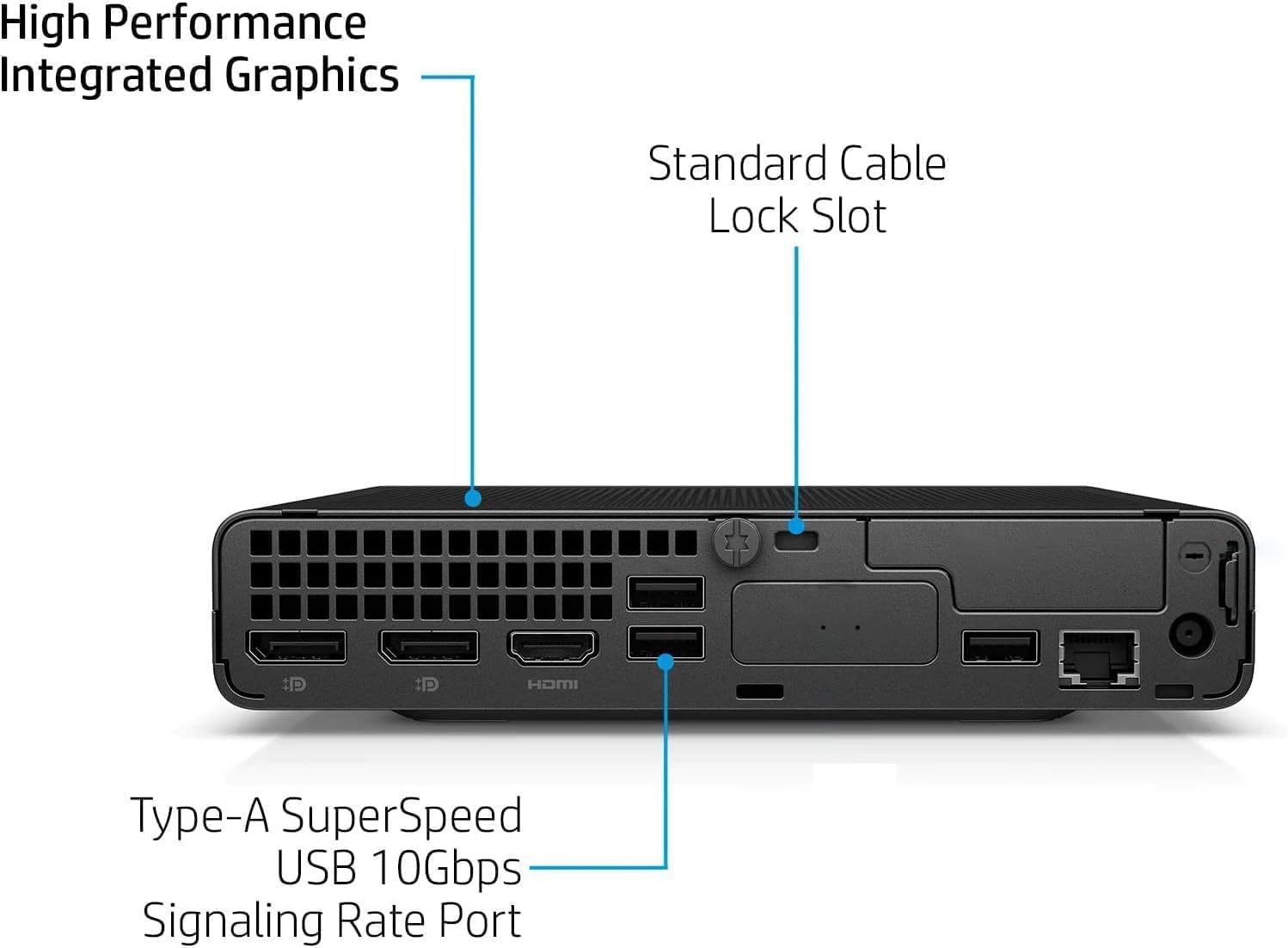
Figure 3: Rear Panel Ports and Features
- 1 External antenna connector
- 1 conector de alimentación
- 1 RJ-45 (Ethernet)
- 3 USB SuperSpeed Tipo-A con velocidad de señalización de 10 Gbps
- 2 DisplayPort 1.4
- 1 2.1 HDMI
4. Instrucciones de configuración
Follow these steps to set up your HP EliteDesk 800 G9 Mini Desktop:
- Conectar periféricos: Connect your monitor(s) to the DisplayPort 1.4 or HDMI 2.1 ports. Connect the wired keyboard and mouse to the available USB Type-A ports.
- Conexión de energía: Connect the HP OEM 90W Power Adapter to the power connector on the rear panel, then plug the power adapter into a wall outlet.
- Conexión de red (opcional): For a wired internet connection, connect an Ethernet cable to the RJ-45 port. For wireless, ensure the external antenna is connected (if applicable) and configure Wi-Fi during the initial Windows setup.
- Encendido: Press the power button on the front panel to turn on the Mini Desktop.
- Configuración inicial de Windows: Siga las instrucciones en pantalla para completar la configuración de Windows 11 Pro, incluido el idioma, la región, la red y la creación de la cuenta de usuario.
5. Sistema operativo
Your HP EliteDesk 800 G9 Mini Desktop comes pre-installed with Windows 11 Pro. This operating system offers a modern interface, enhanced security features, and improved productivity tools. For detailed information on Windows 11 Pro features and usage, refer to the official Microsoft documentation or support websitio.
6. Especificaciones
Below are the key technical specifications for your HP EliteDesk 800 G9 Mini Desktop:
| Característica | Especificación |
|---|---|
| Procesador | Intel Core i5-12500T de 12.ª generación (6 núcleos, 18 MB de caché, hasta 4.0 GHz) |
| RAM | Memoria SDRAM DDR16 de 5 GB |
| Almacenamiento | SSD PCIe de 256 GB |
| Coprocesador gráfico | Gráficos Intel UHD |
| Sistema operativo | Windows 11 Pro |
| Conectividad inalámbrica | Integrated Intel WiFi 6 AX211 + Bluetooth |
| Adaptador de corriente | 90 W external power adapter, up to 89% efficiency, active PFC |
| Peso | 3.13 libra (aprox. 1.42 kg) |
| Resolución máxima de pantalla | 3840x2160 |
| Puertos USB (frontales) | 1 Headset connector; 1 SuperSpeed USB Type-A 10Gbps (charging); 1 SuperSpeed USB Type-A 10Gbps; 1 SuperSpeed USB Type-C 20Gbps |
| Puertos USB (traseros) | 3 SuperSpeed USB Type-A 10Gbps |
| Video Ports (Rear) | 2 DisplayPort 1.4; 1 HDMI 2.1 |
| Red | 1 RJ-45 |
7. Mantenimiento
To ensure the longevity and optimal performance of your HP EliteDesk 800 G9 Mini Desktop, regular maintenance is recommended:
- Mantenlo limpio: Regularly clean the exterior of the device with a soft, dry cloth. Ensure ventilation openings are free from dust and debris to prevent overheating.
- Actualizaciones de software: Keep your Windows 11 Pro operating system and drivers updated to the latest versions. This ensures security patches and performance improvements.
- Copia de seguridad de datos: Realice copias de seguridad periódicas de sus datos importantes en una unidad externa o en un almacenamiento en la nube para evitar la pérdida de datos.
- Evite condiciones extremas: No exponga el dispositivo a temperaturas extremas, humedad o luz solar directa.
8. Solución de problemas
If you encounter issues with your Mini Desktop, try the following basic troubleshooting steps:
- Sin energía: Asegúrese de que el adaptador de corriente esté bien conectado tanto al dispositivo como a una toma de corriente que funcione. Compruebe que la toma de corriente funcione.
- Sin pantalla: Verify that your monitor is properly connected to the Mini Desktop and powered on. Try connecting to a different video port or monitor if available.
- Problemas periféricos: If the keyboard or mouse is not responding, ensure they are correctly plugged into the USB ports. Try different USB ports or restart the system.
- Rendimiento lento: Close unnecessary applications, check for malware, and ensure your system has sufficient free storage space. Consider running a disk cleanup.
- Conectividad de red: For Wi-Fi issues, restart your router and the Mini Desktop. For wired connections, check the Ethernet cable and router status.
Para una solución de problemas más avanzada o problemas persistentes, consulte el soporte de HP. websitio o póngase en contacto con el servicio de atención al cliente.
9. Garantía y soporte
This HP EliteDesk 800 G9 Mini Desktop is an Amazon Renewed - Certified Refurbished product. It is backed by the Amazon Renewed Guarantee, which provides a replacement or refund within 90 days of receipt if the product does not work as expected. For specific warranty details and support, please refer to the Amazon Renewed program terms and conditions or contact Amazon customer service.