1. Producto terminadoview
The OnePlus 15 is an advanced Android smartphone designed for high performance and extended usage. It features a powerful Snapdragon 8 Elite Gen 5 processor, a large 7,300mAh battery, and a vibrant 6.78-inch 165 Hz AMOLED display. The device is equipped with a triple 50 MP camera system for detailed photography and offers robust durability with IP66/IP68/IP69 and IP19K ratings for dust and water resistance.
Características principales:
- Massive 7,300 mAh Battery: Provides extended power for all-day use and beyond.
- Tri-Chip System: Integrates the Snapdragon 8 Elite Gen 5, a dedicated Wi-Fi chip, and a CPU scheduler for optimized performance, connectivity, and efficiency.
- Triple 50 MP Camera System: Captures high-quality images with wide, ultra-wide, and telephoto capabilities.
- Diseño duradero: Built to resist dust and water, with IP66/IP68/IP69 and IP19K ratings for enhanced protection.
- 6.78-inch 165 Hz AMOLED Display: Delivers vivid colors, smooth motion, and exceptional clarity.
2. ¿Qué hay en la caja?
Verifique que todos los artículos estén presentes en el embalaje de su producto:
- OnePlus 15 Smartphone x1
- Cargador x1
- Cable de datos USB x1
- SIM Ejector Tool x1
- Guía rápida x1
- Safety Guide x1

Image: Contents of the OnePlus 15 retail box, showing the smartphone, charger, USB data cable, SIM ejector tool, quick guide, and safety guide.
3. Configuración
3.1 Instalación de la tarjeta SIM
- Locate the SIM card tray on the side of your OnePlus 15.
- Inserte la herramienta de extracción de SIM incluida en el pequeño orificio de la bandeja. Presione firmemente hasta que la bandeja salga.
- Place your Nano-SIM card(s) into the tray with the gold contacts facing down. Ensure they are correctly oriented according to the tray's outline.
- Carefully push the SIM tray back into the phone until it is flush with the device.
3.2 Encendido inicial y configuración
- Press and hold the Power button (located on the right side of the device) until the OnePlus logo appears.
- Siga las instrucciones en pantalla para seleccionar su idioma, conectarse a una red Wi-Fi y configurar su cuenta de Google.
- You may be prompted to transfer data from an old device. Follow the instructions or skip this step to set up as a new device.
- Configure ajustes de seguridad como desbloqueo por huella digital, desbloqueo facial o un PIN/patrón.

Imagen: Frente view of the OnePlus 15 smartphone, showcasing su pantalla y cámara frontal.
4. Operar su dispositivo
4.1 Pantalla y navegación
The OnePlus 15 features a 6.78-inch 165 Hz AMOLED display. Navigate the interface using touch gestures:
- Grifo: Seleccione un elemento o active una función.
- Golpe fuerte: Desplácese por las pantallas o listas.
- Pellizco: Acercar o alejar las imágenes y web páginas.
- Pulsación larga: Acceder a los menús contextuales o mover iconos.
4.2 Botones y puertos
Familiarize yourself with the physical controls and connections:
- Botón de encendido: Located on the right side. Press to wake/sleep the screen, long press to power off or restart.
- Botones de volumen: Located on the left side. Adjust media volume, ringtone volume, and alarm volume.
- Puerto USB tipo C: Located at the bottom. Used for charging, data transfer, and connecting Type-C headphones.
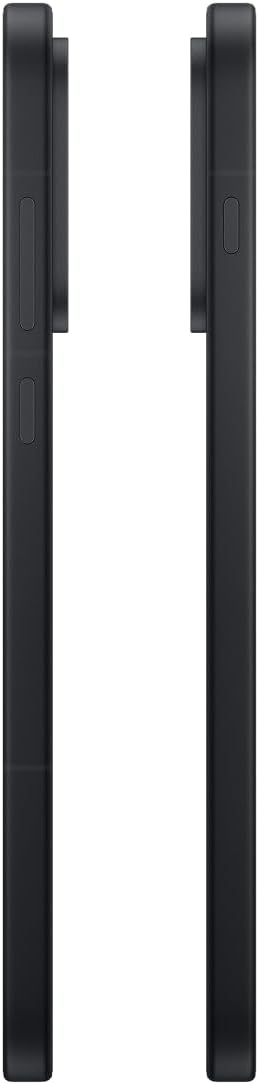
Imagen: Lateral view of the OnePlus 15, showing the placement of the power and volume buttons.
4.3 Uso de la cámara
The OnePlus 15 features a versatile triple 50 MP camera system. To open the camera app, tap the camera icon on your home screen or lock screen.
- Cambiar modos: Swipe left or right on the screen to switch between Photo, Video, Portrait, and other modes.
- Zoom: Pinch in or out on the viewfinder, or tap the zoom icons (e.g., 0.6x, 1x, 2x) to adjust magnification.
- Captura: Toque el botón del obturador para tomar una fotografía o iniciar/detener la grabación de un video.
- Ajustes: Access camera settings for features like flash, timer, aspect ratio, and more.

Imagen: Parte posterior view of the OnePlus 15, highlighting the triple 50 MP camera system.
4.4 Gestión de la batería
Your OnePlus 15 is equipped with a 7,300 mAh battery. To optimize battery life:
- Ajuste el brillo de la pantalla y establezca un tiempo de espera de pantalla más corto.
- Deshabilite Wi-Fi, Bluetooth y GPS cuando no estén en uso.
- Cierre las aplicaciones en segundo plano que consumen energía.
- Utilize Battery Saver mode when your battery is low.
- Use the provided charger and USB cable for optimal fast charging.
5. Mantenimiento
5.1 Limpieza del dispositivo
To clean your OnePlus 15:
- Utilice un paño suave que no suelte pelusa para limpiar la pantalla y el panel posterior.
- Para manchas difíciles, un poco deampEnjuague el paño con agua o un limpiador de pantallas.
- Evite utilizar productos químicos agresivos, materiales abrasivos o aire comprimido.
5.2 Actualizaciones de software
Las actualizaciones periódicas del software ofrecen nuevas funciones, mejoras de seguridad y correcciones de errores. Para buscar actualizaciones:
- Ir a Ajustes > Acerca del dispositivo > Versión de OxygenOS.
- Grifo Buscar actualizaciones.
- If an update is available, follow the on-screen instructions to download and install it. Ensure your device has sufficient battery and is connected to Wi-Fi before updating.
6. Solución de problemas
Si tiene problemas con su OnePlus 15, pruebe los siguientes pasos comunes de solución de problemas:
- El dispositivo no responde: Mantenga presionado el botón de encendido durante aproximadamente 10 segundos para forzar el reinicio.
- Las aplicaciones se bloquean: Borre la memoria caché y los datos de la aplicación problemática en Ajustes > Aplicaciones > [Nombre de la aplicación] > Almacenamiento y caché.
- La batería se agota rápidamente: Review uso de la batería en Ajustes > Batería to identify power-hungry apps. Adjust settings as described in Section 4.4.
- Problemas de conectividad de red: Toggle Airplane Mode on and off, restart your device, or reset network settings in Ajustes > Configuración del sistema > Copia de seguridad y restablecimiento > Reiniciar el teléfono > Restablecer Wi-Fi, móvil y Bluetooth.
- Screen protector installation: For assistance with screen protector installation, refer to the following video guide:
Video: Installation guide for a screen protector on the OnePlus 15 5G. This video demonstrates the steps to correctly apply a screen protector to your device.
7. Especificaciones
| Nombre del modelo | OnePlus 15 |
| Número de modelo del artículo | CPH2749 |
| Dimensiones del producto | 6.36 x 3.02 x 0.33 pulgadas |
| Peso del artículo | 1.29 libras |
| Sistema operativo | Androide 16 |
| Modelo de CPU | Snapdragon 8 Elite Gen 5 |
| Velocidad de la CPU | 4.61 GHz |
| Tamaño de la memoria RAM instalada | 12 GB |
| Capacidad de almacenamiento de memoria | 256 GB |
| Tamaño de pantalla | 6.78 pulgadas |
| Resolución | 2772*1272 |
| Frecuencia de actualización | 165 Hz |
| Capacidad de la batería | 7300 miliamp Horas |
| Tiempo de conversación telefónica | 68.7 horas |
| Tecnologías de conectividad | Bluetooth, infrarrojos, NFC, USB, Wi-Fi |
| Características especiales | Dual SIM, Wireless Charging |
| Fabricante | OnePlus |
8. Información importante de seguridad
Lea toda la información de seguridad antes de usar el dispositivo para garantizar un uso seguro y correcto. El uso inadecuado puede causar daños al dispositivo o lesiones personales.
- No exponga el dispositivo a temperaturas extremas ni a la luz solar directa durante períodos prolongados.
- Utilice únicamente cargadores, baterías y accesorios aprobados.
- Evite dejar caer o someter el dispositivo a impactos fuertes.
- Keep the device away from water and liquids, despite its water resistance ratings, to prevent potential damage.
- No intente desarmar o modificar el dispositivo.
9. Garantía y soporte
Your OnePlus 15 is covered by a manufacturer's warranty. For detailed warranty information, technical support, or service inquiries, please visit the official OnePlus websitio o póngase en contacto con el servicio de atención al cliente.
Puede encontrar soporte adicional e información del producto en OnePlus Store.


