1. Introducción
The Audizio Desio is a versatile digital radio that combines classic aesthetics with modern audio technology. It features DAB, DAB+, and FM tuning for clear radio reception, along with Bluetooth 5.0 for wireless streaming, a USB port for media playback, and a 3.5mm AUX input for wired connections. The radio is equipped with a 2.4-inch color LCD display and integrated stereo speakers, making it suitable for various environments such as living rooms, kitchens, or bedrooms.
This manual provides detailed instructions for setting up, operating, and maintaining your Audizio Desio radio. Please read it thoroughly before use to ensure proper functionality and to maximize your listening experience.
2. Información de seguridad
- Asegúrese de que el adaptador de corriente tenga volumentagCompruebe que coincida con la fuente de alimentación local antes de conectarlo.
- No exponga la unidad a la lluvia, la humedad o temperaturas extremas.
- Evite colocar la unidad cerca de fuentes de calor o bajo la luz solar directa.
- No abra la casing; delegue cualquier servicio a personal calificado.
- Mantenga la unidad alejada de campos magnéticos fuertes.
- Limpie la unidad únicamente con un paño suave y seco.
3. Contenido del paquete
Por favor, compruebe que todos los artículos estén presentes al desembalar:
- Audizio Desio DAB/DAB+/FM Radio
- Adaptador de corriente (DC 5V)
- Mando a distancia
- Manual de usuario
4. Controles y conexiones
Controles del panel frontal
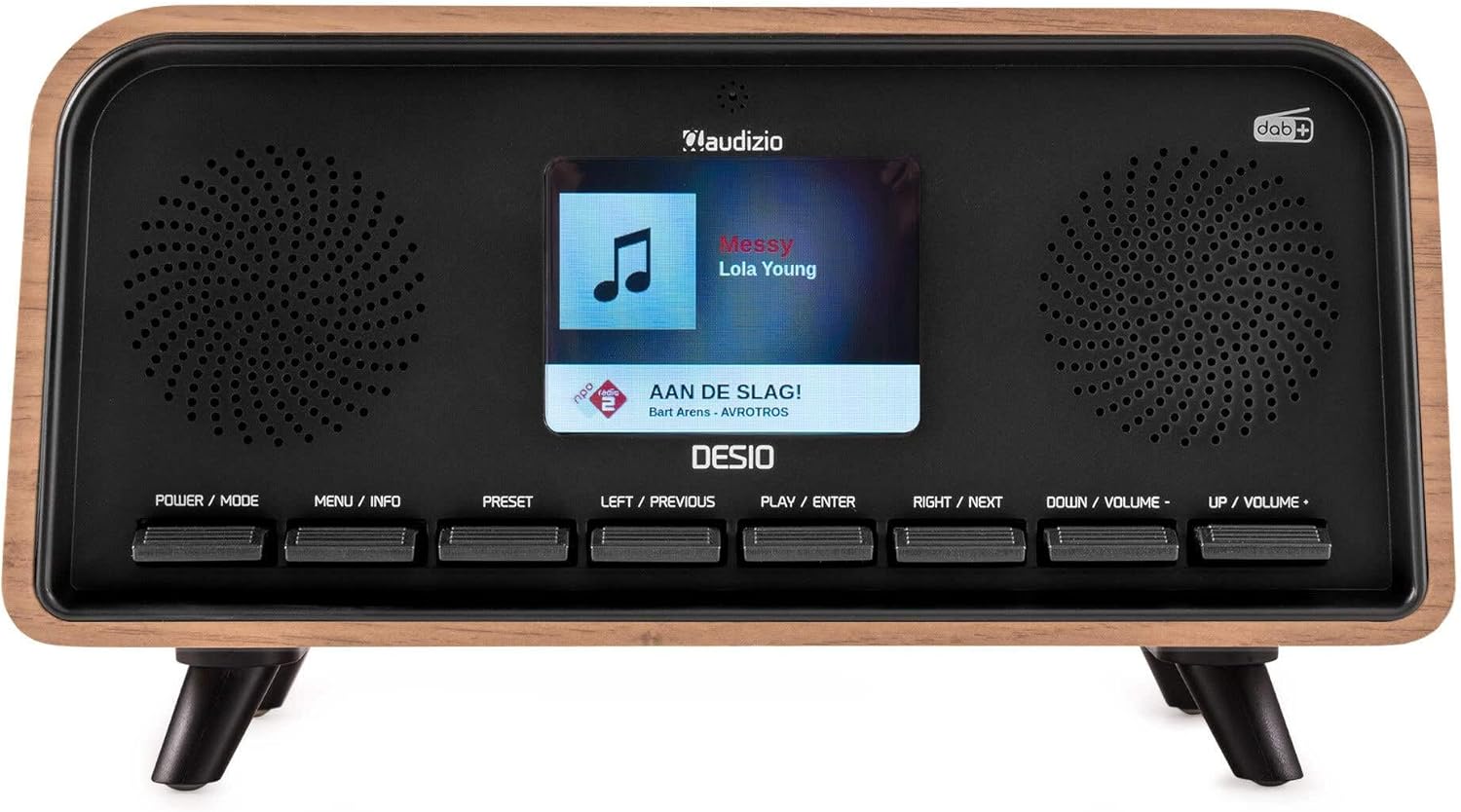
Frente view of the Audizio Desio radio, showing the display playing music with artist and track information. The control buttons are visible below the screen.
- POWER / MODE: Press to turn on/off. Press and hold to switch between DAB, FM, Bluetooth, USB, and AUX modes.
- MENU / INFO: Press to access menu options. In playback mode, press to cycle through information display.
- PREESTABLECIDO: Press to recall saved stations. Press and hold to save current station.
- LEFT / PREVIOUS: Navigate left in menus, or skip to previous track/station.
- PLAY / ENTER: Confirm selection in menus, or play/pause media.
- RIGHT / NEXT: Navigate right in menus, or skip to next track/station.
- DOWN / VOLUME -: Decrease volume, or navigate down in menus.
- UP / VOLUME +: Increase volume, or navigate up in menus.
Conexiones del panel trasero
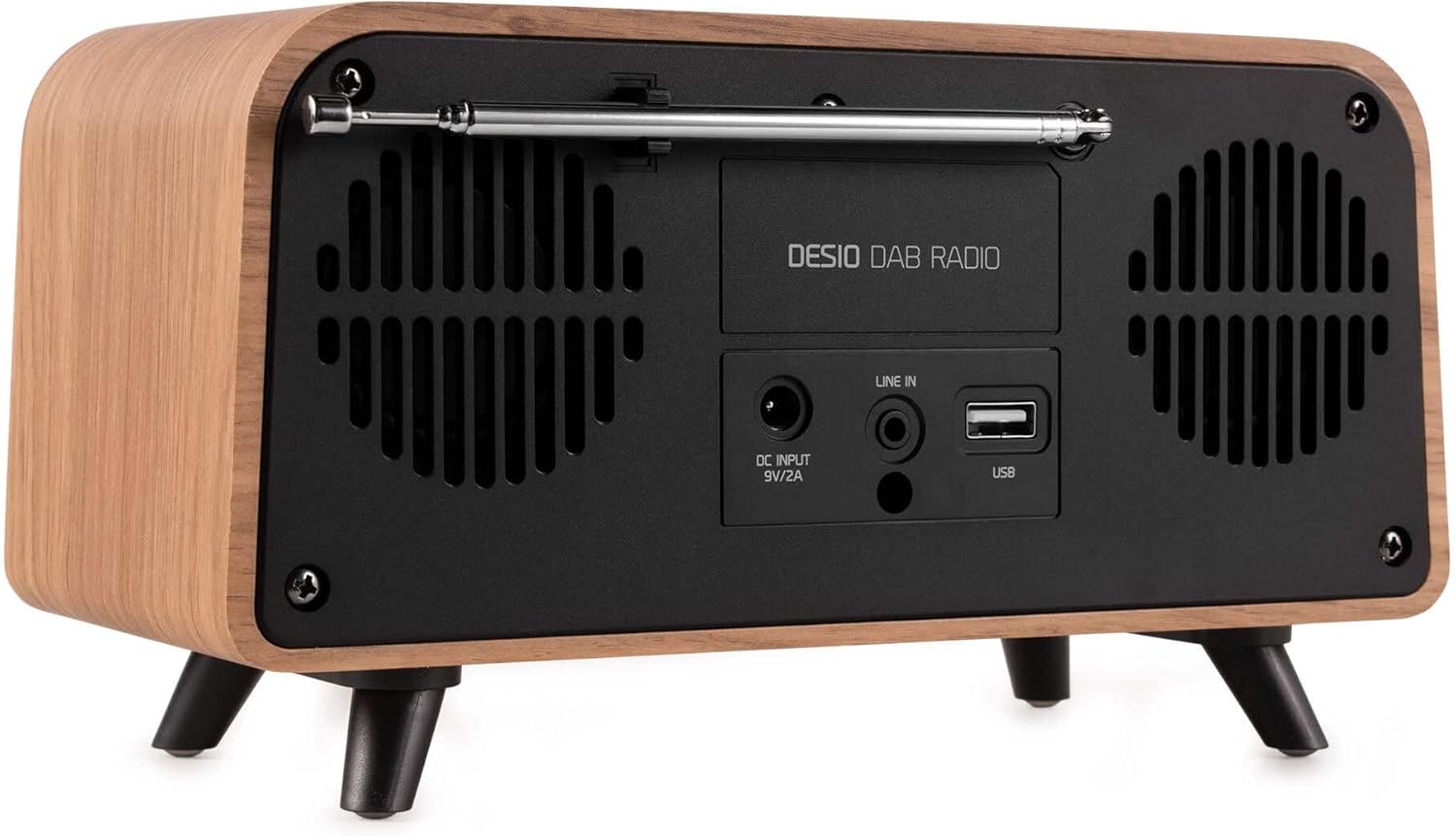
Trasero view of the Audizio Desio radio, highlighting the DC INPUT 9V/2A, LINE IN (3.5mm AUX), and USB ports. The telescopic antenna is extended.
- DC INPUT 9V/2A: Conecte aquí el adaptador de corriente proporcionado.
- LINE IN (3.5mm AUX): Conecte dispositivos de audio externos mediante un cable de audio de 3.5 mm.
- USB: Inserte una unidad flash USB para reproducir MP3.
- Antena telescópica: Extend fully for optimal DAB/DAB+ and FM reception.
5. Configuración inicial
- Conecte la electricidad: Plug the provided DC 5V power adapter into the DC INPUT port on the rear of the radio, then plug the adapter into a wall outlet.
- Extender antena: Fully extend the telescopic antenna located on the rear of the unit for best reception.
- Encendido: Presione el POTENCIA / MODO Botón para encender la radio.
- First-time DAB Scan: Upon first power-on, the radio will automatically perform a full scan for DAB/DAB+ stations. This may take a few minutes. The display will show the scanning progress.
- Establecer hora/fecha: The time and date will usually be set automatically via DAB signal. If not, you can manually set them via the menu.
6. Instrucciones de funcionamiento
6.1 Funcionamiento de la radio DAB/DAB+

Frente view of the Audizio Desio radio, displaying a DAB radio station ('NPO Klassiek') and current time.
- Select DAB Mode: Presione el POTENCIA / MODO button repeatedly until 'DAB' is displayed.
- Buscar estaciones: If no stations are found or you wish to rescan, press MENÚ / INFORMACIÓN, luego usa LEFT / PREVIOUS or JUSTO AL LADO to select 'Full Scan' and press PLAY / ENTER.
- Seleccionar estación: Utilice el LEFT / PREVIOUS or JUSTO AL LADO buttons to browse available stations. Press PLAY / ENTER para seleccionar una estación.
- Guardar preajuste: Para guardar una estación, mantenga presionada la tecla PROGRAMAR botón. Usar LEFT / PREVIOUS or JUSTO AL LADO to choose a preset number (1-50), then press PLAY / ENTER Para confirmar.
- Recuperar preajuste: Para recuperar una estación guardada, presione el botón PROGRAMAR button (do not hold). Use LEFT / PREVIOUS or JUSTO AL LADO para seleccionar el ajuste preestablecido deseado, luego presione PLAY / ENTER.

Frente view of the Audizio Desio radio, showing the 'Preset Recall' menu on the display, indicating empty preset slots.
6.2 Funcionamiento de la radio FM
- Seleccionar modo FM: Presione el POTENCIA / MODO Presione el botón repetidamente hasta que aparezca 'FM'.
- Auto escáner: Mantenga pulsado PLAY / ENTER to automatically scan for and save available FM stations.
- Sintonización manual: Usar LEFT / PREVIOUS or JUSTO AL LADO para afinar la frecuencia.
- Save/Recall Presets: Follow the same procedure as for DAB radio (Section 6.1).
6.3 Funcionamiento de Bluetooth (BT)

Frente view of the Audizio Desio radio, with the display showing 'BT' (Bluetooth) mode and 'Connected' status.
- Select BT Mode: Presione el POTENCIA / MODO button repeatedly until 'BT' is displayed. The radio will enter pairing mode, indicated by a flashing Bluetooth icon.
- Emparejar dispositivo: On your smartphone, tablet, or laptop, enable Bluetooth and search for available devices. Select 'Audizio Desio' from the list.
- Conectar: Once paired, the display will show 'Connected'. You can now stream audio from your device to the radio.
- Control de reproducción: Use your connected device or the radio's PLAY / ENTER, LEFT / PREVIOUS, y JUSTO AL LADO Botones para controlar la reproducción.
Reproducción USB 6.4

Frente view of the Audizio Desio radio, with the display showing 'USB' mode, current time, and details of an MP3 file siendo jugado.
- Insertar unidad USB: Inserte una unidad flash USB (formateada en FAT32) que contenga MP3 files en el puerto USB en la parte posterior de la radio.
- Seleccionar modo USB: Presione el POTENCIA / MODO button repeatedly until 'USB' is displayed. The radio will automatically start playing the first compatible audio file.
- Navegar por Files: Usar LEFT / PREVIOUS or JUSTO AL LADO to skip tracks. Press PLAY / ENTER para pausar/reanudar la reproducción.
6.5 entrada auxiliar
- Conectar dispositivo: Connect an external audio device (e.g., MP3 player, smartphone) to the 'LINE IN' (3.5mm AUX) port on the rear of the radio using a 3.5mm audio cable (not included).
- Seleccionar modo AUX: Presione el POTENCIA / MODO botón repetidamente hasta que se muestre 'AUX'.
- Control de reproducción: Playback is controlled directly from your connected external device. Adjust volume using the radio's volume controls.
6.6 Funciones de alarma y temporizador
- Configuración de alarmas: Acceda a la configuración de la alarma a través del MENÚ / INFORMACIÓN button. You can set multiple alarms with customizable sources (DAB, FM, Buzzer), volume, and recurrence (daily, weekdays, weekends).
- Tiempo de dormir: The sleep timer allows the radio to turn off automatically after a set period. Access this function via the MENÚ / INFORMACIÓN Botón y seleccione la duración deseada.
- Función de repetición: When an alarm sounds, press any button (except Power) to activate the snooze function for a short period.
7. Mantenimiento
- Limpieza: Use a soft, dry, lint-free cloth to clean the radio's surface. Do not use abrasive cleaners, waxes, or solvents.
- Cuidado de la antena: Manipule la antena telescópica con cuidado para evitar que se doble o se rompa.
- Almacenamiento: Si va a almacenar la radio durante un período prolongado, desconéctela de la fuente de alimentación y guárdela en un lugar fresco y seco.
8. Solución de problemas
| Problema | Posible causa | Solución |
|---|---|---|
| Sin poder | Adaptador de corriente no conectado o toma de corriente defectuosa. | Verifique la conexión del adaptador de corriente y pruebe con una toma de corriente diferente. |
| Mala recepción de DAB/FM | Antena no completamente extendida o área de señal deficiente. | Fully extend the antenna. Try repositioning the radio. Perform a full scan. |
| El Bluetooth no se conecta | Radio not in BT mode, device not in pairing mode, or too far away. | Ensure radio is in BT mode. Put your device in pairing mode. Move device closer to the radio (within 10m). |
| La reproducción USB no funciona | La unidad USB no se insertó correctamente, no es compatible file format, or drive not FAT32. | Vuelva a insertar la unidad USB. Asegúrese files are MP3. Check USB drive format (FAT32). |
| No hay sonido desde AUX | Radio not in AUX mode, cable faulty, or external device volume low. | Select AUX mode. Check 3.5mm cable. Increase volume on both radio and external device. |
9. Especificaciones técnicas
- Marca: Audizio
- Modelo: Desio
- Tecnología de sintonizador: FM, DAB+
- Bluetooth: Version 5.0 (Range: 10m)
- Opciones de reproducción: Bluetooth, USB, 3.5mm AUX input
- Estaciones preestablecidas: 50
- Mostrar: LCD en color de 2.4 pulgadas
- Funciones: Alarm, Sleep Timer, Snooze, Dimming, Week/Weekend Alarm
- Max Speaker Power: 30 vatios
- Fuente de alimentación: DC 5V (Power Adapter)
- Dimensiones del producto (alto x ancho x profundidad): 32 x 16 x 18 cm
- Peso: 1.66 kilogramos
10. Garantía y soporte
Este producto incluye una garantía estándar del fabricante. Para conocer los términos y condiciones detallados de la garantía, consulte la documentación proporcionada al momento de la compra o póngase en contacto con su distribuidor.
For technical support, troubleshooting assistance, or service inquiries, please contact the Audizio customer support team or your local dealer. Please have your product model number (Desio) and purchase information ready when contacting support.