Introducción
Thank you for choosing the OUKITEL Smartwatch. This device is designed to enhance your daily life with smart features, comprehensive health monitoring, and various sports modes. This manual provides detailed instructions to help you set up, operate, and maintain your smartwatch effectively. Please read this manual thoroughly before use to ensure optimal performance and longevity of your device.
¿Qué hay en la caja?
- OUKITEL Smartwatch
- Cable de carga
- Manual de usuario
Guía de configuración
1. Carga del reloj inteligente
Antes del primer uso, cargue completamente su reloj inteligente. Conecte el cable de carga magnético a los contactos de carga en la parte posterior del reloj y conecte el extremo USB a un adaptador de corriente (no incluido) o al puerto USB de una computadora. Una carga completa suele tardar unas 2.5 horas.

Image: The OUKITEL Smartwatch connected to its magnetic charging cable, displaying a charging icon on its screen.
A full charge provides approximately 5-10 days of normal usage and up to 30 days in standby mode.
2. Instalación y emparejamiento de la aplicación
To unlock all features, download the companion app (e.g., "GloryFit" as mentioned in reviews) on your smartphone. The app is compatible with iOS 9.0+ and Android 6.0+ devices.
- Scan the QR code in the user manual or search for the app name in your phone's app store (Apple App Store for iOS, Google Play Store for Android).
- Instalar y abrir la aplicación.
- Siga las instrucciones en pantalla para crear una cuenta y configurar su cuenta profesional.file.
- Habilite Bluetooth en su teléfono inteligente.
- In the app, search for your OUKITEL Smartwatch and select it to pair. Confirm the pairing request on both your phone and the smartwatch.
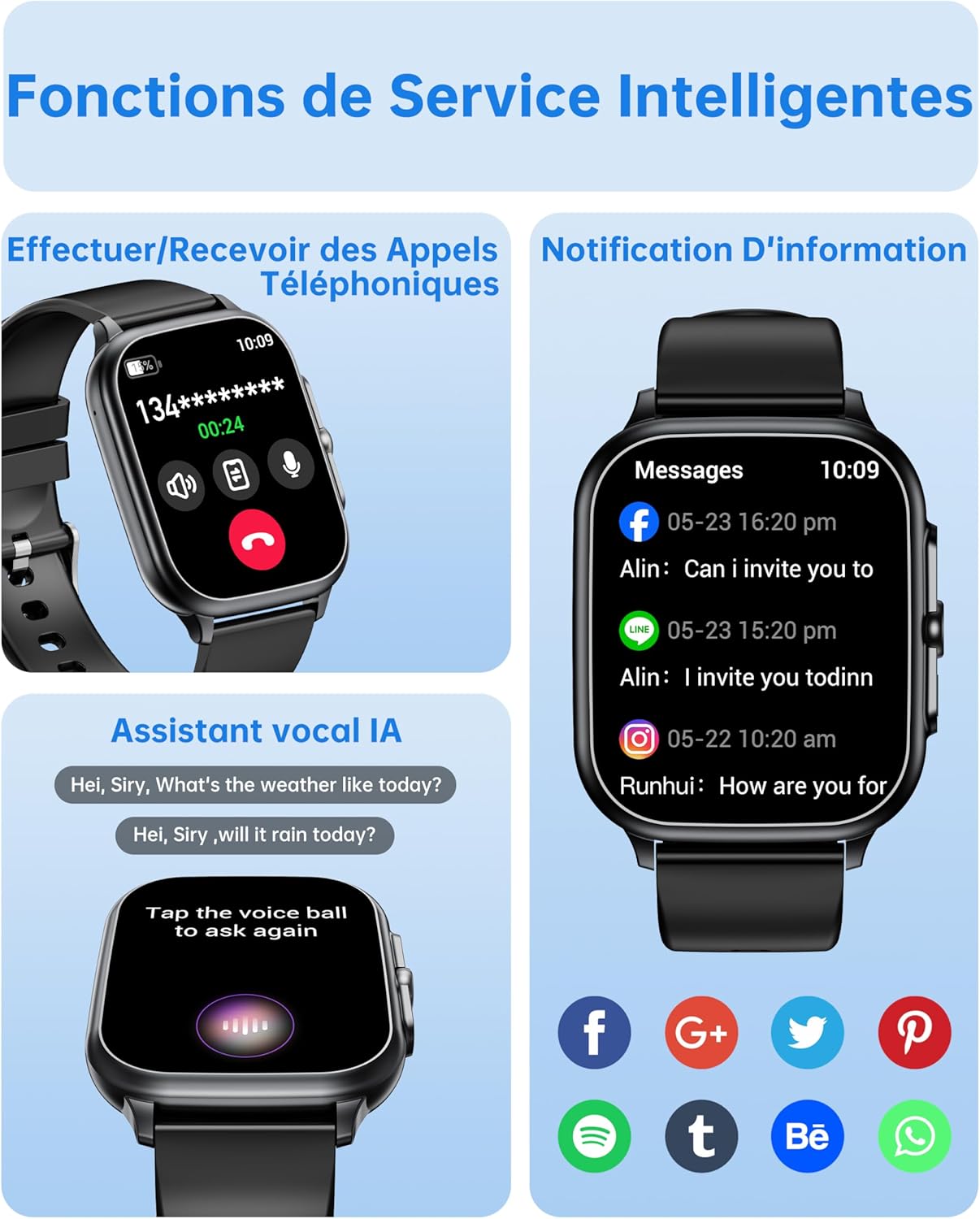
Image: The OUKITEL Smartwatch screen showing an incoming call interface, illustrating its Bluetooth call functionality and readiness for connection.
Instrucciones de funcionamiento
Navegación básica
The OUKITEL Smartwatch features a 1.91-inch HD touchscreen for intuitive control. Swipe left, right, up, or down to navigate through menus and functions. Press the side button to return to the home screen or access the app list.
Funciones inteligentes
- Llamadas Bluetooth: Once paired with your phone, you can make and receive calls directly from your smartwatch. Access the dial pad, call history, or contacts on your watch.
- Asistente de voz con IA: Utilize the integrated AI voice assistant (e.g., Alexa) to perform voice commands such as asking questions, checking the weather, or initiating calls.
- Notificaciones: Receive real-time notifications for calls, SMS, and various social media apps (WhatsApp, Facebook, etc.) directly on your wrist.
- Control de música: Control music playback on your smartphone (play, pause, skip tracks) directly from your smartwatch.
- Otras funciones: Includes weather forecasts, stopwatch, timer, alarm clock, remote camera control, and a "Find My Phone" feature.

Image: A composite image showing the smartwatch interface for making/receiving calls, displaying app notifications, and interacting with the AI voice assistant.
Vigilancia de la salud
The smartwatch provides 24/7 health tracking to help you monitor your well-being.
- Monitoreo del ritmo cardíaco: Realiza un seguimiento continuo de tu frecuencia cardíaca durante todo el día. View Datos en tiempo real y tendencias históricas en la aplicación.
- Monitoreo de oxígeno en sangre (SpO2): Mide tus niveles de saturación de oxígeno en sangre.
- Seguimiento del sueño: Analiza tus patrones de sueño, incluido el sueño profundo, el sueño ligero y los tiempos de vigilia, para ayudarte a mejorar la calidad del sueño.
- Monitoreo del estrés: Monitorea tus niveles de estrés.

Image: A composite image showing the smartwatch displaying heart rate, blood oxygen levels, and sleep duration data, alongside a person running outdoors.
Modos deportivos y seguimiento de actividad
The smartwatch offers over 100 indoor and outdoor sports modes, including walking, running, cycling, hiking, basketball, and football. It records exercise data such as steps, heart rate, and calories burned.

Image: A person on a bicycle, with the smartwatch displaying various sports modes and an activity analysis screen showing duration, heart rate, calories, and steps.
Personalización
Personalize your smartwatch with over 100 built-in watch faces. You can also upload your favorite photos to create unique custom dials through the companion app. The watch supports 6 different menu styles.

Image: The OUKITEL Smartwatch showcasing different menu styles and customizable watch faces, including options to use personal photos.
Mantenimiento
Resistencia al agua (IP68)
The OUKITEL Smartwatch is IP68 waterproof, meaning it is resistant to splashes, rain, and sweat. It can withstand daily water exposure like hand washing. However, it is no apto for hot baths, saunas, diving, or exposure to corrosive liquids like seawater.

Image: The OUKITEL Smartwatch highlighting its IP68 water resistance with icons representing protection against rain, hand washing, and perspiration.
Limpieza y cuidado
- Limpie el reloj y la correa periódicamente con un paño suave y seco.
- Evite utilizar productos químicos agresivos o materiales abrasivos.
- Asegúrese de que los contactos de carga estén limpios y secos antes de cargar.
Solución de problemas
| Problema | Posible solución |
|---|---|
| El reloj inteligente no se enciende. | Asegúrese de que el reloj esté completamente cargado. Conéctelo al cargador durante al menos 30 minutos. |
| No se puede emparejar con el teléfono inteligente. |
|
| Lecturas de datos de salud inexactas. |
|
| Screen turns on too frequently (as noted in reviews). | Check the watch settings for "Raise to Wake" or "Wrist Sense" features. You may be able to adjust sensitivity or disable it if it's causing unwanted screen activation. |
| Las notificaciones no aparecen. |
|
Presupuesto
| Marca | Oukitel |
| Número de modelo | B0FXGFXMT5 |
| Sistema operativo | iOS, Android |
| Tamaño de pantalla | 1.91 pulgadas |
| Tecnología de conectividad | Bluetooth |
| Características especiales | AI Voice Assistant & Notifications, 100+ Sports Modes, 1.91 Inch HD Screen |
| Dispositivos compatibles | Teléfono inteligente |
| Resistencia al agua | IP68 |
| GPS | Sin GPS |
| Forma | Rectangular |
| Público objetivo | Mujeres, Hombres |
Garantía y soporte
The OUKITEL Smartwatch comes with a Garantía del fabricante de 1 añosEsta garantía cubre defectos de materiales y mano de obra en condiciones normales de uso.
For technical support, troubleshooting assistance, or warranty claims, please contact OUKITEL customer service through their official website or the contact information provided with your purchase. Please have your model number (B0FXGFXMT5) and proof of purchase ready when contacting support.