Introducción
Gracias por la compraasing the Klipsch ProMedia Lumina 2.1 Computer Gaming Speaker System. This manual provides essential information for setting up, operating, and maintaining your new speaker system to ensure optimal performance and longevity. The ProMedia Lumina system is designed to deliver powerful audio with deep bass and customizable RGB lighting, enhancing your gaming, music, and movie experiences.
Información de seguridad
Lea todas las instrucciones de seguridad antes de usar este producto. Conserve este manual para futuras consultas.
- Fuente de energía: Connect the system only to the type of power source indicated on the marking label.
- Ventilación: Ensure proper ventilation around the speakers and subwoofer. Do not block any ventilation openings.
- Agua y humedad: Do not expose the system to water, rain, or moisture. Do not place objects filled with liquids on the system.
- Calor: Keep the system away from heat sources such as radiators, heat registers, stoves, or other apparatus that produce heat.
- Limpieza: Limpiar únicamente con un paño seco.
- Servicio: No intente reparar este producto usted mismo. Refiera todo el servicio a personal de servicio calificado.
Contenido del paquete
Verifique que todos los artículos estén presentes en su paquete:
- 1 x Klipsch ProMedia Lumina Subwoofer
- 2 x Satellite Speakers (Left and Right)
- 1 x Bluetooth Speaker (This is listed as "Included Components" in the product data, but typically refers to the system's Bluetooth capability rather than a separate speaker unit. The system itself has Bluetooth functionality.)
- Cable de alimentación
- Speaker Connection Cables
- Cable USB-C
- Cable AUX de 3.5 mm
- Manual de usuario (este documento)
Producto terminadoview
The Klipsch ProMedia Lumina system consists of a powerful subwoofer and two satellite speakers, designed for a rich 2.1 audio experience. The system features integrated controls and multiple connectivity options.

Figura 1: The complete Klipsch ProMedia Lumina 2.1 speaker system, showing the central subwoofer unit flanked by two satellite speakers. The speakers are black with silver accents and sit on small stands.
Altavoces satélite
The two satellite speakers feature a re-envisioned cabinet design with tiltable stands for optimal sound projection. They are equipped with Microtractrix horn tweeters for pinpoint clarity.
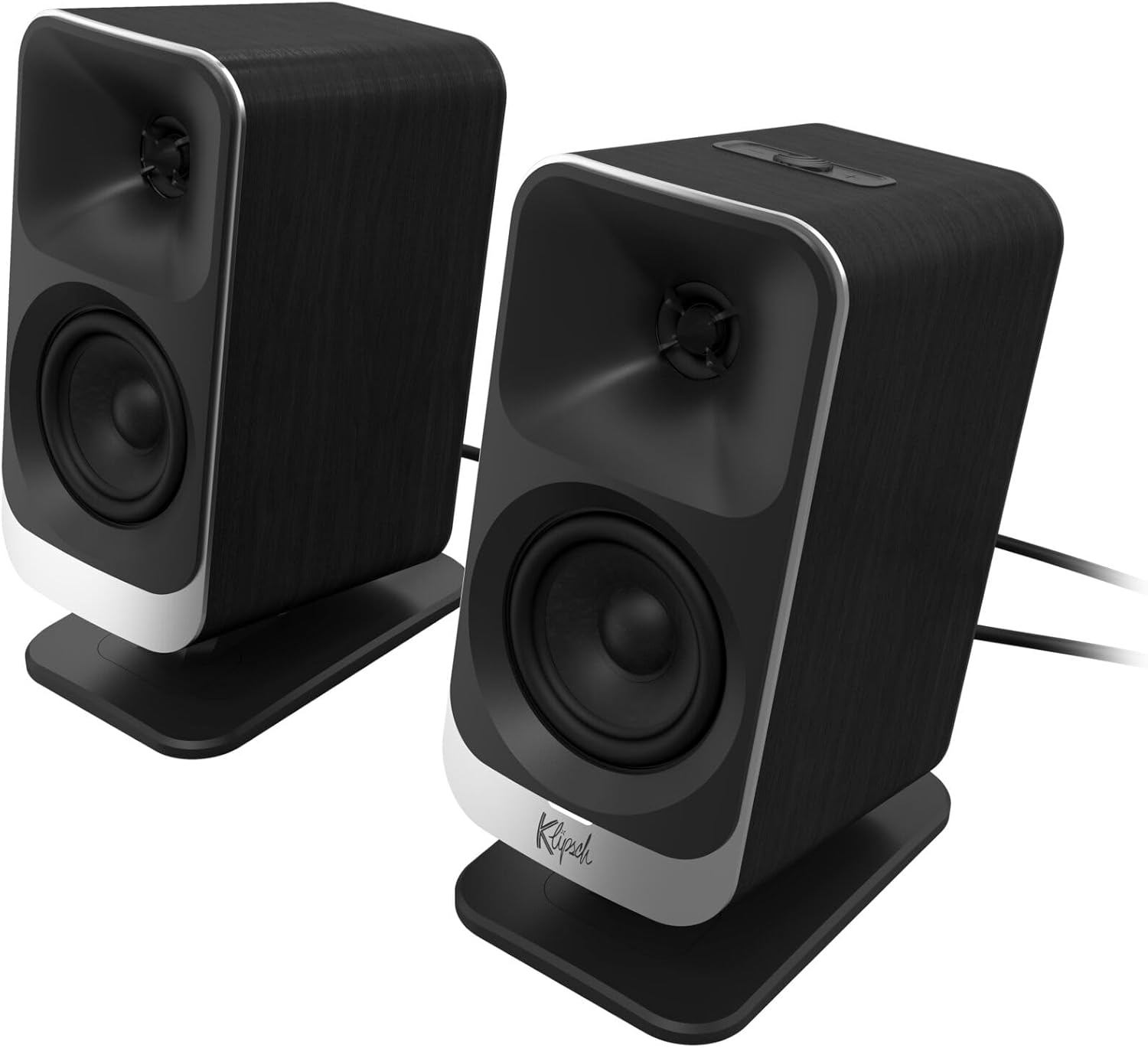
Figura 2: Un primer plano frontal view of the two Klipsch ProMedia Lumina satellite speakers, highlighting their black finish, silver base, and speaker cones.

Figura 3: Una parte trasera view of the two Klipsch ProMedia Lumina satellite speakers, showing the various ports and controls on their back panels. The left speaker has a settings button and a headphone jack, while the right speaker has a USB-C port and a power/Bluetooth button.
Altavoz de subgraves
El bajo profesionalfile subwoofer delivers powerful low-end punch. It features an adjustable gain knob and cable management design for minimal floor space and maximum impact.

Figura 4: Un lado view of the Klipsch ProMedia Lumina subwoofer, showcasing its compact design and textured black finish.
Vídeo 1: An official product video from Klipsch showcasing the ProMedia Lumina Computer Speakers with LED Lighting. The video highlights the design and lighting features of the speaker system.
Configuración
Follow these steps to set up your Klipsch ProMedia Lumina speaker system:
- Colocación: Place the subwoofer on the floor or a sturdy surface near your computer. Position the satellite speakers on either side of your monitor, ensuring they are at ear level for the best audio experience.
- Conectar altavoces satélite: Connect the left and right satellite speakers to the corresponding outputs on the back of the subwoofer using the provided speaker cables. Ensure a secure connection.
- Conectar a la fuente de audio:
- USB-C: Connect the USB-C cable from your computer to the USB-C input on the right satellite speaker.
- AUX (3.5 mm): Connect the 3.5mm AUX cable from your audio source (e.g., computer, smartphone) to the AUX input on the left satellite speaker.
- Bluetooth: For wireless connection, ensure Bluetooth is enabled on your device and the speaker system. Press and hold the power/Bluetooth button on the right satellite speaker to enter pairing mode. Select "Klipsch ProMedia Lumina" from your device's Bluetooth settings.
- Conexión de energía: Conecte el cable de alimentación al subwoofer y luego conéctelo a una toma de pared.
- Encendido: Press the power/Bluetooth button on the right satellite speaker to turn on the system.

Figura 5: The Klipsch ProMedia Lumina speaker system integrated into a gaming desktop setup, showing the satellite speakers flanking a monitor and the subwoofer placed discreetly.
Operante
Once your system is set up, you can begin enjoying your audio. The main controls are located on the subwoofer and the right satellite speaker.
Controles básicos
- Volumen: Use the volume knob on the subwoofer to adjust the overall sound level.
- Agudos / Graves: Adjust the treble and bass knobs on the subwoofer to fine-tune your audio preferences.
- Selección de entrada: Use the input button (if available on the subwoofer or remote) to switch between connected sources (USB-C, AUX, Bluetooth).
Klipsch Control App
Enhance your experience with the Klipsch Control desktop app, available on all app stores. The app allows for precision command over various settings:
- Personalización del ecualizador: Adjust equalization settings to match your audio content.
- Modos de iluminación: Customize RGB lighting effects, including night mode and music react mode.
- Control de funciones: Access additional features and settings for personalized audio.

Figura 6: A laptop screen displaying the Klipsch Control App interface, with a satellite speaker visible next to it, illustrating the app's role in customizing the speaker system.

Figura 7: The rear of the Klipsch ProMedia Lumina satellite speakers displaying different customizable light patterns, showcasing los efectos de iluminación RGB.
Mantenimiento
To ensure the longevity and optimal performance of your Klipsch ProMedia Lumina system, follow these maintenance guidelines:
- Limpieza: Utilice un paño suave y seco para limpiar las superficies de los altavoces y el subwoofer. Evite el uso de limpiadores abrasivos, ceras o disolventes.
- Limpiar el polvo: Regularly dust the speaker grilles and vents to prevent dust buildup, which can affect sound quality and ventilation.
- Sistema de organización de cables: Keep cables organized and untangled to prevent damage and ensure a tidy setup.
- Condiciones ambientales: Evite exponer el sistema a temperaturas extremas, alta humedad o luz solar directa.
Solución de problemas
Si encuentra algún problema con su sistema de altavoces, consulte los siguientes pasos comunes de solución de problemas:
| Problema | Solución |
|---|---|
| Sin sonido |
|
| Static or Distortion |
|
| Problemas de emparejamiento de Bluetooth |
|
Presupuesto
| Característica | Detalle |
|---|---|
| Nombre del modelo | Klipsch ProMedia Lumina |
| Número de modelo del artículo | 1073625 |
| Tipo de altavoz | Altavoz de la computadora |
| Modo de salida de audio | Rodear |
| Tecnología de conectividad | Bluetooth (5.3), USB-C, AUX (3.5mm) |
| Característica especial | LED Light (Customizable RGB) |
| Potencia máxima de salida del altavoz | 10 vatios |
| Respuesta de frecuencia | 20 Hz |
| Dimensiones del producto | 6.5" de profundidad x 4" de ancho x 9.75" de alto |
| Peso del artículo | 13.1 libras |
| Color | Negro |
Garantía y soporte
Klipsch products are designed for years of enjoyment. For warranty information and technical support, please refer to the official Klipsch webSitio web o contacte con el servicio de atención al cliente. Conserve su comprobante de compra para cualquier reclamación de garantía.


