1. Introducción
The Amazfit Active Max Smart Watch is designed to assist with fitness tracking, health monitoring, and smart notifications. This manual provides essential information for setting up, operating, and maintaining your device.
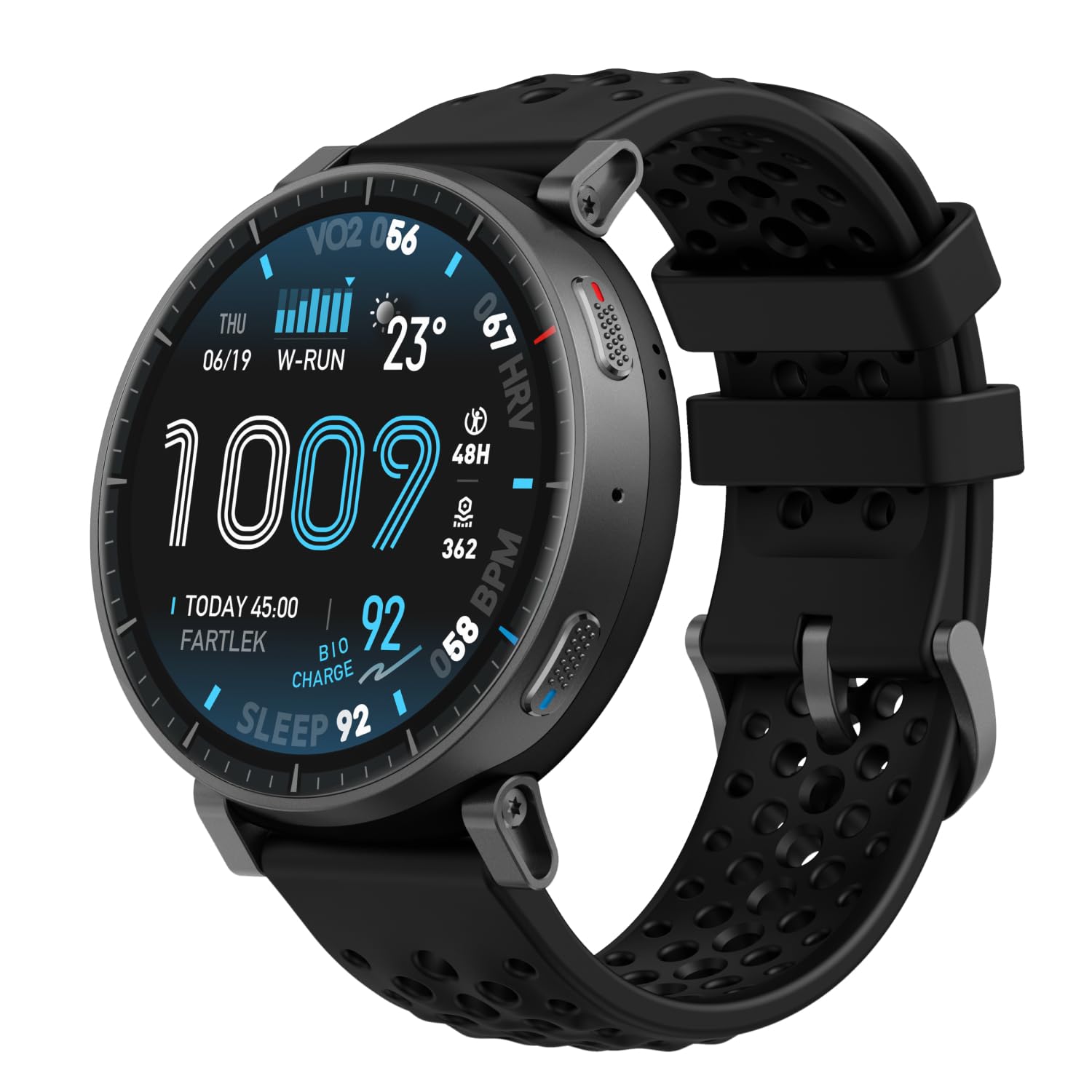
Image: Amazfit Active Max Smart Watch with its vibrant AMOLED display showing various data points.
2. Guía de configuración
2.1 ¿Qué hay en la caja?
- Amazfit Active Max Smart Watch
- Base de carga magnética (cable USB tipo C no incluido)
- Manual de usuario
2.2 Carga del dispositivo
Before first use, fully charge your Amazfit Active Max. Connect the magnetic charging base to a USB power source (e.g., a computer USB port or a USB wall adapter). Place the watch onto the charging base, ensuring the magnetic pins align correctly. The watch display will indicate charging status.

Image: The Amazfit Active Max Smart Watch connected to its magnetic charging base, indicating a full charge.
2.3 Emparejamiento con su teléfono inteligente
- Descargar el Aplicación Zepp desde la tienda de aplicaciones de tu teléfono inteligente (disponible para Android y iPhone).
- Abra la aplicación Zepp y cree una cuenta o inicie sesión.
- Follow the on-screen instructions in the app to pair your Amazfit Active Max. This typically involves scanning a QR code displayed on the watch or selecting the device from a list.
- Asegúrese de que Bluetooth esté habilitado en su teléfono inteligente durante el proceso de emparejamiento.

Image: A smartphone screen showing the Zepp App interface, which is used to manage the Amazfit Active Max.
3. Funcionamiento del reloj
3.1 Pantalla y navegación
The Amazfit Active Max features a 1.5-inch ultra-bright AMOLED display with up to 3,000 nits peak brightness for clear visibility in various lighting conditions. Navigate the watch interface using touch gestures (swipe, tap) and the physical buttons on the side.

Imagen: Un detalle view of the Amazfit Active Max's vivid AMOLED display, showcasing diversas métricas de salud y actividad.
3.2 Personalización de las esferas del reloj
You can change the watch face directly on the device or through the Zepp App. The app offers a wider selection of watch faces, including free and paid options, to personalize your watch's appearance.
4. Seguimiento de la salud y la actividad física
4.1 Modos de entrenamiento y GPS
The watch supports over 170 workout modes. It features built-in GPS with five satellite systems for accurate outdoor activity tracking. You can download terrain and ski maps directly to the watch for offline navigation, eliminating the need for a phone signal.

Image: A person engaged in outdoor running, demonstrating the watch's use during physical activity and highlighting its workout modes.
4.2 Monitoreo de Salud
The Amazfit Active Max provides 24/7 monitoring of key health metrics:
- Frecuencia cardíaca: Seguimiento continuo de la frecuencia cardíaca.
- Oxígeno en sangre (SpO2): On-demand and continuous blood oxygen level measurement.
- Seguimiento del sueño: Monitorea el sueñotages, duración y calidad.
- Niveles de estrés: Tracks stress and provides breathing exercises.
- BioCharge Energy Monitoring: Assesses your body's recovery and energy levels based on activity and stress.

Image: A person running while wearing the Amazfit Active Max, with the watch display showing a real-time heart rate graph.
4.3 Zepp Coach and Training Plans
Utilize Zepp Coach for personalized AI-driven workout plans that adapt to your performance and recovery. Choose from various training programs, including specific running plans for 3K, 5K, 10K, half, and full marathons.

Image: An individual running, symbolizing the use of Zepp Coach for guided training and performance improvement.
4.4 Onboard Storage for Music and Maps
The watch includes 4GB of onboard storage, allowing you to store music and downloaded maps directly on the device. This enables phone-free workouts with music playback and offline navigation.

Image: A person using the Amazfit Active Max to view maps and listen to music via connected earbuds, highlighting the onboard storage feature.
5. Funciones inteligentes
5.1 Bluetooth Calls and Message Replies
When connected to your smartphone, the Amazfit Active Max allows you to take Bluetooth calls directly from your wrist. For Android users, Zepp Flow enables hands-free message replies using a QWERTY keyboard or speech-to-text.

Image: The Amazfit Active Max displaying a message notification and options for replying, demonstrating its communication features.
5.2 Bluetooth Peripheral Connectivity
The watch can connect to various Bluetooth peripherals, including heart rate belts, cadence meters, power meters, and speedometers, to enhance your workout data collection.

Image: An individual cycling indoors, with the Amazfit Active Max on their wrist, illustrating its capability to connect with external Bluetooth sensors.
6. Mantenimiento
6.1 Resistencia al agua
The Amazfit Active Max is 5 ATM water-resistant, meaning it can withstand pressures equivalent to a depth of 50 meters. It is suitable for swimming and showering but not for high-speed water sports or diving.
6.2 Limpieza y cuidado
- Limpie periódicamente el reloj y la correa con un paño suave y seco.amp paño.
- Evite utilizar productos químicos agresivos o materiales abrasivos.
- Asegúrese de que los contactos de carga en la parte posterior del reloj estén limpios y secos antes de cargarlo.
6.3 Duración de la batería
El reloj ofrece una mayor duración de la batería:
- Uso típico: Hasta 25 días
- Uso pesado: Hasta 13 días
- Continuous GPS Usage: Hasta 64 horas
Actual battery life may vary based on usage patterns and settings.
7. Solución de problemas
7.1 Problemas comunes y soluciones
- El reloj no enciende: Asegúrese de que el reloj esté completamente cargado.
- No se puede emparejar con el teléfono: Check if Bluetooth is enabled on your phone and the watch is in pairing mode. Restart both devices and try again.
- Datos inexactos: Ensure the watch is worn snugly on your wrist. For GPS, ensure a clear view del cielo.
- Las notificaciones no aparecen: Check notification settings in the Zepp App and your phone's system settings.
Para obtener más ayuda, consulte la sección de ayuda de la aplicación Zepp o comuníquese con el servicio de atención al cliente de Amazfit.
8. Especificaciones
| Característica | Detalle |
|---|---|
| Número de modelo | A2557 |
| Mostrar | AMOLED de 1.5" |
| Almacenamiento | 4 GB |
| Resistencia al agua | 5 cajeros automáticos |
| Duración de la batería (típica) | Hasta 25 días |
| GPS | 5 Satellite Systems |
| Peso del artículo | 1.97 onzas |
| Fabricante | Amazfit |
9. Garantía y soporte
Para obtener información sobre la garantía y atención al cliente, consulte el sitio web oficial de Amazfit. website or contact your local Amazfit service center. Keep your purchase receipt for warranty claims.