Introducción
This manual provides detailed instructions for the safe and efficient use of your Monster S380 Portable Bluetooth Speaker. Please read this manual thoroughly before operating the device and retain it for future reference. The Monster S380 delivers 40W stereo sound, features Bluetooth 6.0, offers up to 20 hours of playtime, supports TWS pairing, and is IPX6 waterproof, making it suitable for various environments.
Producto terminadoview
The Monster S380 Portable Bluetooth Speaker is engineered for a powerful audio experience with versatile features. Below are some key highlights and visual representations of the speaker's capabilities.
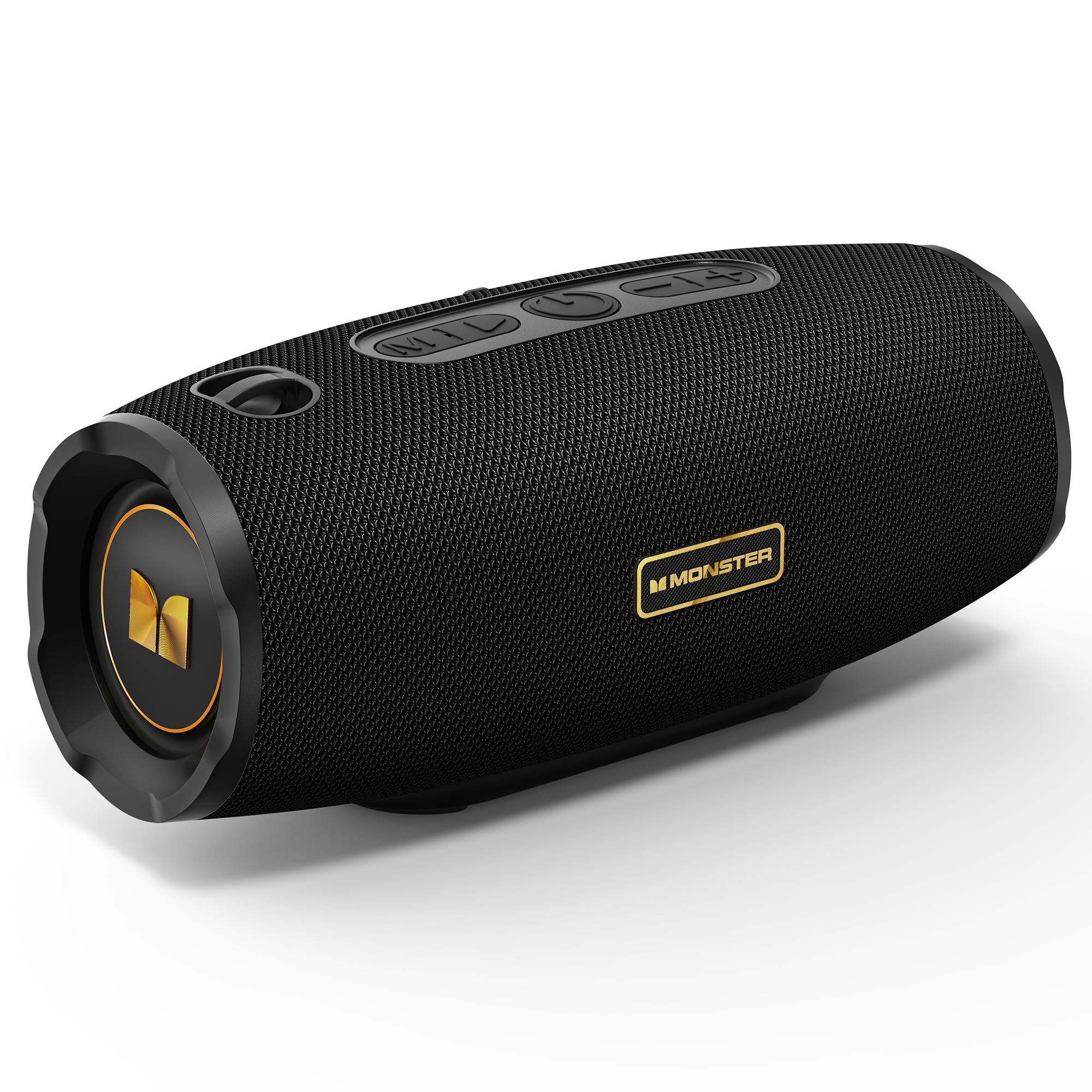
Figure 1: Monster S380 Portable Bluetooth Speaker. This image displays the overall design of the speaker, highlighting its compact and robust build.

Figure 2: Monster S380 Speaker with 40W Pure Monster Sound. This image illustrates the speaker's internal components, emphasizing its 40W audio output for clear and deep bass.

Figure 3: Monster S380 Speaker featuring Bluetooth 6.0 for stable connection. The image highlights the advanced Bluetooth 6.0 technology, ensuring a reliable and fast wireless connection.

Figure 4: Two Monster S380 Speakers demonstrating TWS Pairing. This image shows two speakers connected wirelessly for a synchronized stereo sound experience.

Figure 5: Monster S380 Speaker highlighting 20H Long Playtime. The image emphasizes the extended battery life, allowing for up to 20 hours of music playback.

Figure 6: Monster S380 Speaker showcasing IPX6 Waterproof rating. This image depicts the speaker in a water-resistant environment, demonstrating its IPX6 protection against splashes and rain.

Figure 7: Monster S380 Speaker with Portable Lanyard Design. The image shows the speaker with its integrated lanyard, emphasizing its portability for outdoor activities.
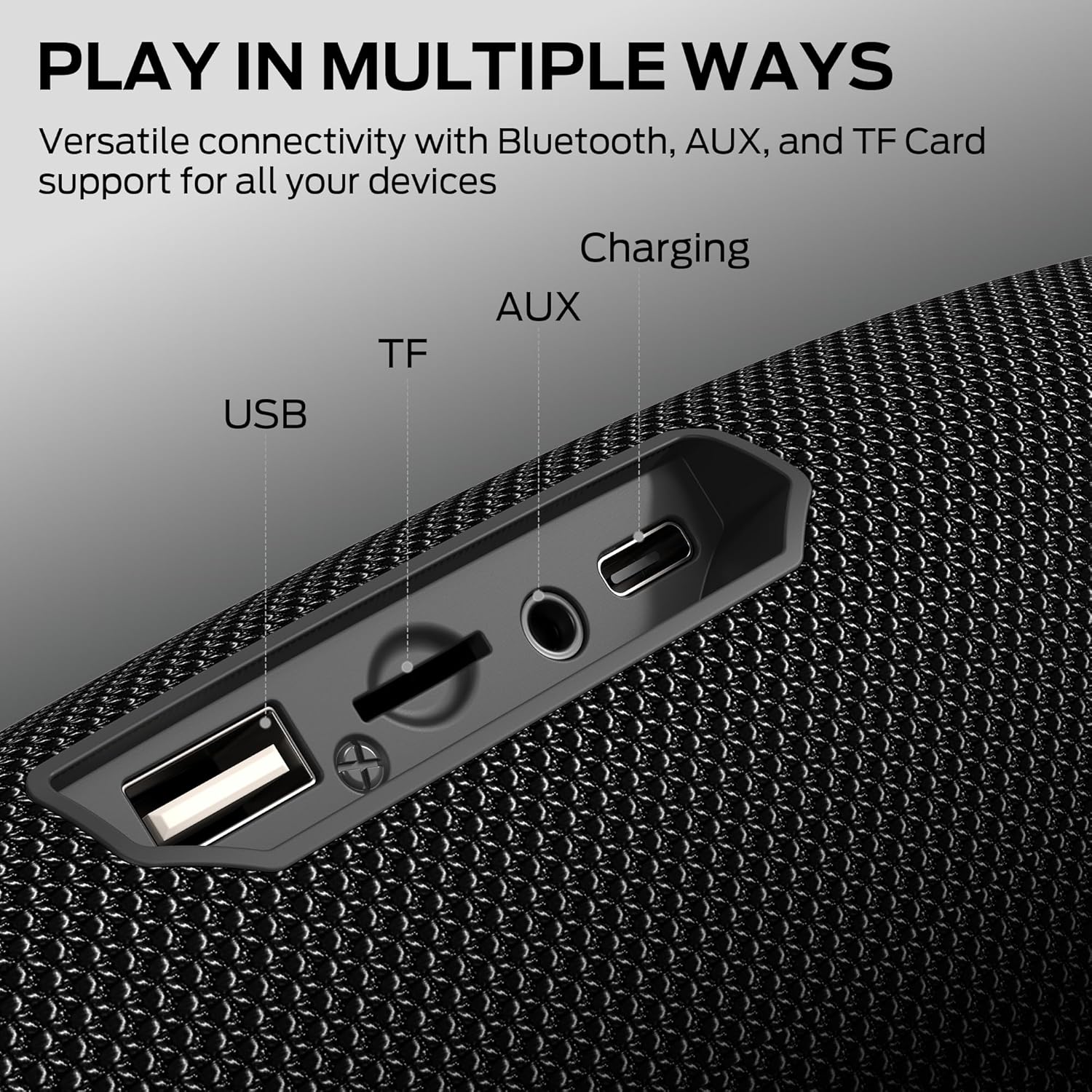
Figure 8: Monster S380 Speaker with multiple connectivity options (USB, TF, AUX, Charging). This image details the various input ports available on the speaker, including USB, TF card, AUX, and charging.
Vídeo 1: Terminadoview of Monster Portable Bluetooth Speakers. This video provides a general overview of Monster's portable Bluetooth speaker line, showcasing características y diseño.
Video 2: Demonstration of Bluetooth Wireless Speakers. This video demonstrates the wireless capabilities of Bluetooth speakers, including pairing and audio playback.
Contenido del paquete
Asegúrese de que todos los elementos estén presentes al desembalar:
- Monster S380 Speaker × 1
- Cable de carga USB-C × 1
- AUX-in Cable × 1
- Guía de inicio rápido × 1
- Portable Rope × 1

Figure 9: Contents of the Monster S380 Speaker box. This image shows all the items included in the product packaging.
Controles e indicadores
Familiarícese con el panel de control y los puertos del altavoz:

Figure 10: Monster S380 Speaker button layout and functions. This image clearly labels each button on the speaker's control panel and its corresponding function.
- Botón de encendido (⏻): Mantenga presionado para encender/apagar.
- Botón de reproducción/pausa (▶): Presione para reproducir o pausar el audio.
- Botón para bajar el volumen/pista anterior (-): Presiona para bajar el volumen. Mantén presionado para ir a la pista anterior.
- Botón para subir volumen/siguiente pista (+): Presiona para subir el volumen. Mantén presionado para pasar a la siguiente pista.
- Botón de modo (M): Presione para cambiar entre los modos de entrada (Bluetooth, AUX, tarjeta TF, USB).
- Lighting Control Button (⚙): Press to cycle through different lighting modes.
- Puerto de carga USB-C: Para cargar el altavoz.
- Puerto de entrada auxiliar: Para conexión de audio por cable.
- Ranura para tarjetas TF: Para reproducir música directamente desde una tarjeta TF.
- Puerto USB: Para reproducir música directamente desde una unidad USB.
Configuración
Carga del altavoz
- Open the protective rubber flap on the back of the speaker to reveal the charging port.
- Conecte el cable de carga USB-C provisto al puerto USB-C del altavoz.
- Conecte el otro extremo del cable USB-C a un adaptador de corriente USB compatible (no incluido).
- The charging indicator light will illuminate to show charging status. Once fully charged, the indicator light will change or turn off.
Encendido/apagado
- To power on, press and hold the Power Button (⏻) for approximately 2-3 seconds until you hear an audible prompt and the indicator lights activate.
- To power off, press and hold the Power Button (⏻) for approximately 2-3 seconds until you hear an audible prompt and the indicator lights turn off.
Emparejamiento Bluetooth
- Ensure the speaker is powered on and in Bluetooth mode. If not, press the Mode Button (M) to switch to Bluetooth mode. The Bluetooth indicator light will flash, indicating it's ready for pairing.
- En su dispositivo móvil (teléfono inteligente, tableta, computadora portátil), habilite Bluetooth y busque los dispositivos disponibles.
- Seleccione "Monster S380" de la lista de dispositivos.
- Once successfully paired, the Bluetooth indicator light on the speaker will stop flashing and remain solid. You will also hear a confirmation tone.
Verdadero emparejamiento estéreo inalámbrico (TWS)
TWS pairing allows you to connect two Monster S380 speakers for a synchronized, 60W stereo sound experience.
- Ensure both Monster S380 speakers are powered on and in Bluetooth mode, but not yet connected to any device.
- On one of the speakers (this will be your primary speaker), press and hold the Play/Pause Button (▶) for 2-3 seconds. The speaker will emit a tone, indicating it's searching for another TWS speaker.
- The second speaker will automatically connect to the primary speaker. Once connected, both speakers will emit a confirmation tone, and their indicator lights will synchronize.
- Now, connect your mobile device to the primary speaker via Bluetooth as described in the Bluetooth Pairing section. Audio will play in stereo across both speakers.
Instrucciones de funcionamiento
Controles de reproducción
- Reproducir/Pausa: Press the Play/Pause Button (▶).
- Ajuste de volumen: Presione los botones Subir volumen (+) o Bajar volumen (-).
- Pista siguiente: Mantenga presionado el botón Subir volumen (+).
- Pista anterior: Mantenga presionado el botón para bajar el volumen (-).
Opciones de conectividad
The Monster S380 supports multiple audio input methods:
- Bluetooth: Conéctese de forma inalámbrica a su dispositivo.
- Entrada auxiliar: Use the provided 3.5mm AUX cable to connect to devices without Bluetooth. Press the Mode Button (M) to select AUX mode.
- Tarjeta TF: Inserte una tarjeta TF (MicroSD) con audio fileInserte el cable en la ranura para tarjeta TF. El altavoz cambiará automáticamente al modo tarjeta TF y comenzará la reproducción.
- USB: Inserte una unidad flash USB con audio fileConecte el cable al puerto USB. El altavoz cambiará automáticamente al modo USB y comenzará la reproducción.
Llamadas manos libres
When connected to a smartphone via Bluetooth, the built-in microphone allows for hands-free calling:
- Responder llamada: Press the Play/Pause Button (▶).
- Finalizar llamada: Press the Play/Pause Button (▶) again.
- Rechazar llamada: Press and hold the Play/Pause Button (▶).
Modos de iluminación
The speaker features dynamic RGB lighting. Press the Lighting Control Button (⚙) to cycle through various light effects or turn them off.
Mantenimiento
Impermeabilidad (IPX6)
The Monster S380 is IPX6 water-resistant, meaning it can withstand strong jets of water. However, it is not designed for submersion. Ensure the rubber flap covering the ports is securely closed before exposing the speaker to water to maintain its water resistance.
Limpieza
Limpie el altavoz con un paño suave, damp Paño. No utilice limpiadores abrasivos ni disolventes, ya que pueden dañar la superficie.
Almacenamiento
Guarde el altavoz en un lugar fresco y seco, alejado de la luz solar directa y de temperaturas extremas. Si lo va a guardar durante un periodo prolongado, cargue la batería periódicamente para prolongar su vida útil.
Solución de problemas
- Sin energía: Asegúrese de que la batería esté cargada. Conecte el altavoz a una fuente de alimentación mediante el cable USB-C.
- No se puede emparejar a través de Bluetooth: Make sure the speaker is in Bluetooth pairing mode (flashing indicator light). Ensure your device's Bluetooth is enabled and within range. Try restarting both the speaker and your device.
- Sin sonido: Check the volume levels on both the speaker and your connected device. Ensure the correct input mode is selected (Bluetooth, AUX, TF Card, USB).
- Mala calidad de sonido: Acerque el altavoz a su dispositivo Bluetooth para reducir las interferencias. Asegúrese de que no haya obstáculos entre el altavoz y el dispositivo.
- Error de emparejamiento de TWS: Ensure both speakers are not connected to any other Bluetooth device before attempting TWS pairing. Try resetting both speakers and repeating the TWS pairing steps.
Presupuesto
| Característica | Descripción |
|---|---|
| Marca | Monstruo |
| Nombre del modelo | MS62153 |
| Tipo de altavoz | Altavoz portátil |
| Potencia máxima de salida del altavoz | 40 vatios |
| Tecnología de conectividad | Bluetooth |
| Versión de Bluetooth | 6.0 |
| Alcance de Bluetooth | 33 pies |
| Recreo | Up to 20 hours (Note: Feature bullets state 15H, title states 20H. Using 20H as per title.) |
| Nivel de resistencia al agua | Resistente al agua IPX6 |
| Características especiales | 30W Loud Stereo Sound (Note: Title states 40W, feature bullets state 30W. Using 40W as per title), Support AUX/TF Card/USB, True Wireless Stereo, Built-in Mic, Hands-Free Calling, Skin-Friendly Touch |
| Fuente de poder | Funciona con pilas (1 pila AA incluida) |
| Material | Plástico |
| Color | Negro |
| Peso del artículo | 1.92 libras |
| Dimensiones del producto | 1" de profundidad x 1" de ancho x 1" de alto |
Garantía y soporte
The Monster S380 Portable Bluetooth Speaker comes with a Garantía limitada. For detailed warranty information, product support, or service inquiries, please refer to the contact information provided in the Quick Start Guide or visit the official Monster websitio.


